Third-Party Cookies: The Slow Death of Web Tracking's Favorite Tool
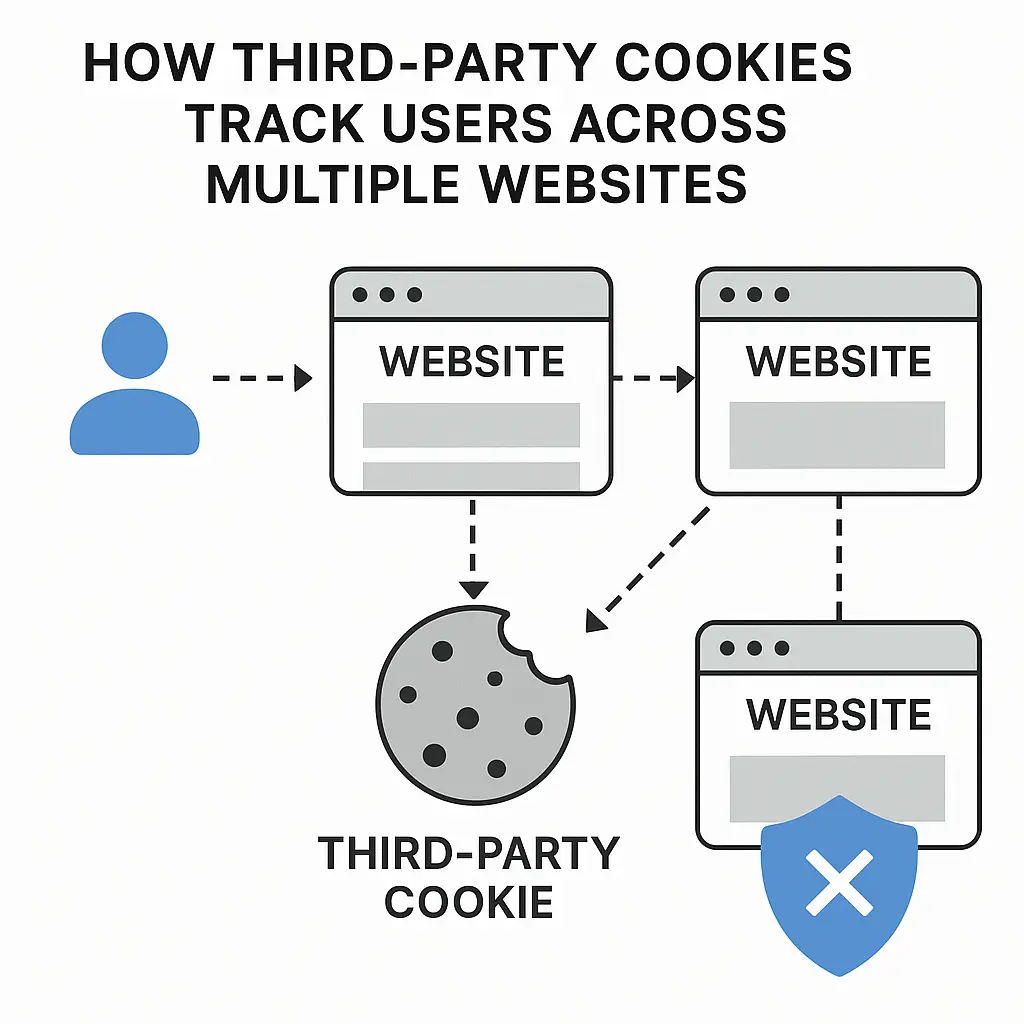
You visit a news site. An ad for running shoes appears. You close the tab and visit a recipe blog. The same running shoe ad follows you there. You never searched for running shoes. You never visited the shoe company's website. Yet somehow, the ad knows where you've been.
That's third-party cookies doing exactly what they were designed to do.
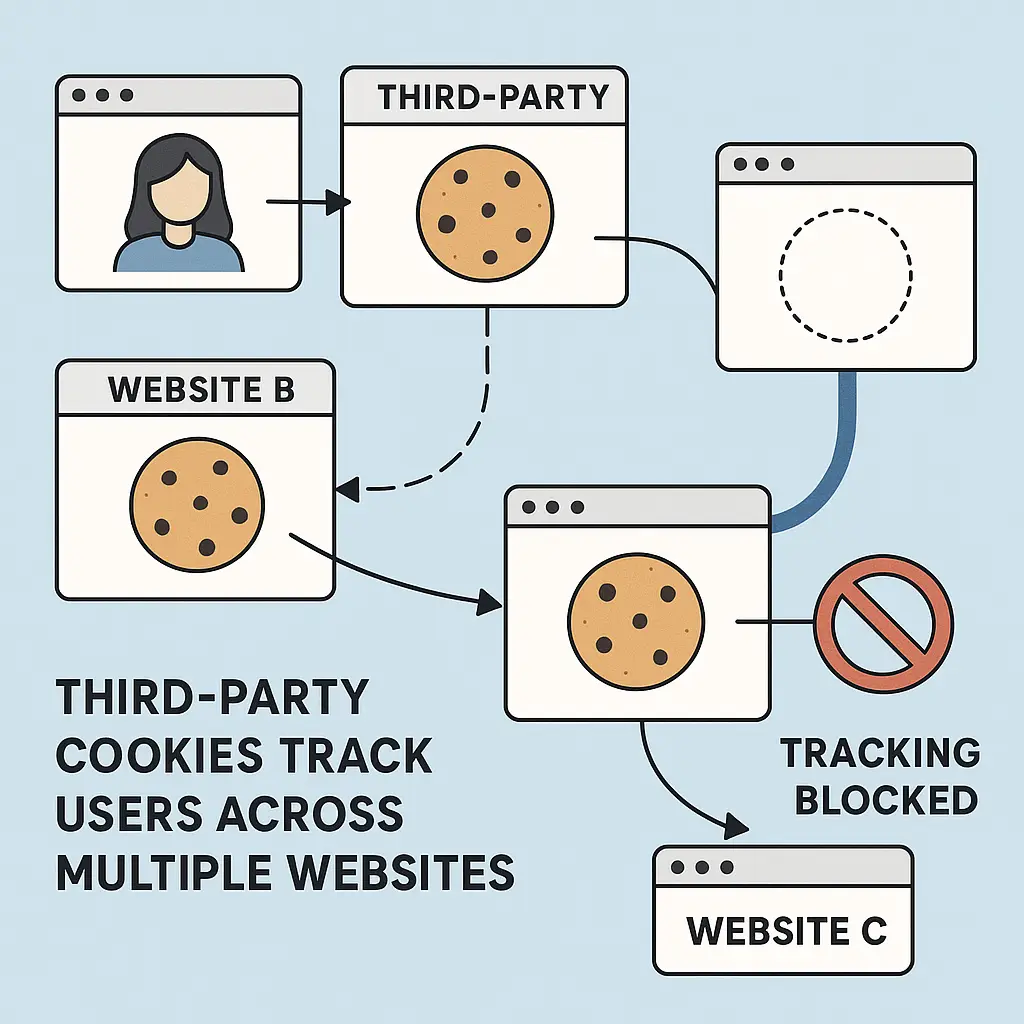
Third-party cookies are small text files stored in your browser by domains you didn't directly visit. When you load a webpage, embedded content from advertisers, analytics services, and social media platforms can place cookies on your device. Those cookies persist across sites, building a profile of your browsing behavior over time.
The mechanism is simple. The consequences are vast. And after more than two decades of dominance, third-party cookies are finally dying. Slowly. Messily. With plenty of resistance from the companies that profit from them.
Here's how third-party cookies work, why they're disappearing, what's replacing them, and what you can do right now.
How Third-Party Cookies Actually Work
When you visit a website, your browser requests files from that site's server. The server sends back HTML, CSS, JavaScript, images, and sometimes cookies. A first-party cookie comes from the domain in your address bar. A third-party cookie comes from somewhere else.
Most webpages load content from multiple domains. A news article might include ads served by an ad network, analytics scripts from Google, social media buttons from Facebook, and embedded videos from YouTube. Each of those services can set cookies in your browser, even though you never visited their sites directly.
The cookie contains an identifier unique to you. When you visit another site that also loads content from the same third party, that identifier gets read. The tracking company now knows you visited both sites. Over time, as you browse the web, the profile grows. Which news sites you read. Which products you looked at. Which topics you research. Which videos you watch.
The Electronic Frontier Foundation has documented online tracking mechanisms for years, including detailed explanations of how cookies enable cross-site surveillance.
The tracking happens silently. You see the webpage. You don't see the dozens of third-party requests firing in the background. You don't see the cookies being written to your browser. You don't see the data being sent back to tracking servers. The entire system operates below the surface of what you think of as "using the web."
The Ecosystem Built on Third-Party Cookies
Third-party cookies enabled an entire industry. Behavioral advertising depends on them. You look at camping gear on one site. Ads for tents follow you across the web. That's not coincidence. That's third-party cookies linking your behavior across domains.
Ad networks use cookies to build audience segments. "People who visited travel sites in the last 30 days." "People who looked at luxury watches." "People who read articles about parenting." Advertisers buy access to those segments. The ads follow you because the cookies identified you as part of a valuable group.
Analytics platforms use third-party cookies to track user journeys. A company wants to know which marketing channels drive sales. Third-party cookies let them follow you from a Facebook ad to their website to a purchase, attributing the sale to the original ad click. Without that cross-site tracking, attribution falls apart.
Retargeting campaigns depend entirely on third-party cookies. You add items to a shopping cart but don't check out. Ads for those exact items appear on other sites, reminding you to complete the purchase. The mechanism is a third-party cookie that links your browsing session on the retailer's site to your activity elsewhere on the web.
Social media platforms use third-party cookies to track you even when you're not logged in. Facebook's "Like" button appears on millions of sites. Even if you don't click it, the button loads content from Facebook's servers, which can set cookies. Facebook sees which sites you visit, building a shadow profile of your browsing habits.
Mozilla's privacy documentation explains how third-party tracking undermines user privacy and why browser makers are moving to block it by default.
The entire system is built on a technical feature that most people don't understand and never consented to in any meaningful way.
Why Third-Party Cookies Are Dying
Safari blocked third-party cookies by default in 2020. Firefox followed shortly after. Chrome announced plans to do the same, then delayed. Then delayed again. As of 2026, Chrome still allows third-party cookies by default, but the company has committed to phasing them out. The timeline keeps shifting.
The pressure comes from multiple directions. Privacy regulations like GDPR in Europe and CCPA in California impose requirements on tracking and data collection. Enforcement actions from regulators have targeted companies that use tracking cookies without proper consent. The FTC's privacy enforcement actions include cases where companies misled users about how their data was collected and used.
Public awareness has grown. People understand that they're being tracked. They don't like it. Browser makers see privacy as a competitive advantage. Safari and Firefox market themselves as privacy-focused. Chrome faces pressure to match their features or lose users.
Technical alternatives exist. Advertisers argued for years that third-party cookies were necessary for the web to function. Browser makers have proven that's not true. Safari's Intelligent Tracking Prevention and Firefox's Enhanced Tracking Protection block third-party cookies without breaking most websites. Users adapted. The web kept working.
But the transition is messy. Google's Privacy Sandbox is an attempt to replace third-party cookies with new APIs that preserve some tracking capabilities while adding privacy protections. The proposal has faced criticism from privacy advocates who argue it still enables surveillance, and from advertisers who say it doesn't provide enough data. Chrome's repeated delays suggest the company is struggling to balance competing interests.
The cultural reference that fits here is How I Met Your Mother. In one episode, Marshall tries to break up with his college girlfriend but keeps delaying the conversation, making excuses, postponing the inevitable. The relationship limps along in an awkward half-state where everyone knows it's ending but no one wants to pull the trigger. That's Chrome and third-party cookies. The breakup was announced years ago. The timeline keeps shifting. The relationship staggers forward. Everyone knows how this ends, but the actual ending keeps getting pushed back.
What's Replacing Third-Party Cookies
Tracking doesn't stop just because third-party cookies die. The incentives remain. The industry adapts.
Browser fingerprinting identifies you by analyzing your device's unique characteristics. Screen resolution, installed fonts, browser version, timezone, language settings, graphics card, and dozens of other data points combine to create a fingerprint that's often unique enough to track you across sites. No cookies required. The technique works even in private browsing mode.
Privacy guides from Mozilla explain how fingerprinting works and why it's harder to defend against than cookie-based tracking.
First-party cookies with server-side tracking keep the tracking in-house. Instead of loading third-party scripts directly in your browser, websites send data to their own servers, which then forward it to tracking companies. From your browser's perspective, everything looks like first-party activity. The tracking happens on the backend, invisible to cookie blockers.
CNAME cloaking disguises third-party trackers as first-party requests. A website sets up a subdomain that points to a third-party tracking service. Your browser thinks it's talking to the website you're visiting, but the data flows to a tracker. This technique bypasses browser protections that block third-party domains.
Google's Privacy Sandbox introduces new APIs designed to enable targeted advertising without cross-site tracking. Topics API categorizes your interests based on browsing history but keeps the data local to your browser. Protected Audience API handles retargeting without sharing your browsing history with advertisers. Attribution Reporting API measures ad effectiveness without tracking individual users across sites.
Privacy advocates remain skeptical. The APIs still enable behavioral advertising. They still involve surveillance, just with different technical mechanisms. The Electronic Frontier Foundation's Privacy Badger project continues to develop tools that block tracking regardless of the underlying technology.
Some publishers are moving to contextual advertising, which targets ads based on the content of the page you're viewing rather than your browsing history. You're reading an article about hiking. You see ads for hiking gear. No tracking required. The approach worked before behavioral advertising dominated the web. It still works now.
Paywalls and subscriptions offer another path. If users pay directly for content, publishers don't need to monetize through surveillance-based advertising. The model works for some publications. It doesn't scale to the entire web.
What You Can Do Right Now
You don't have to wait for Chrome to phase out third-party cookies. Every major browser lets you block them today.
In Chrome, open Settings, click Privacy and Security, select Third-party cookies, and choose "Block third-party cookies." The setting takes effect immediately. Some websites will break. Login flows that rely on third-party authentication might fail. Embedded content might not load. You'll need to decide whether the privacy gain is worth the occasional inconvenience.
Safari blocks third-party cookies by default. You don't need to change anything. The feature is called Intelligent Tracking Prevention, and it's been active since 2020.
Firefox blocks third-party cookies by default in Standard and Strict modes. Open Settings, click Privacy & Security, and confirm that Enhanced Tracking Protection is enabled. Strict mode blocks more trackers but may break more sites.
Edge, built on Chromium like Chrome, offers similar settings. Open Settings, click Privacy, search, and services, and select Strict under Tracking prevention. The browser will block third-party cookies and other trackers.
Browser extensions add another layer of protection. Privacy Badger from the EFF learns which domains track you and blocks them automatically. uBlock Origin blocks ads and trackers using filter lists maintained by the community. Both extensions work across Chrome, Firefox, and Edge.
Clearing cookies regularly limits how much data accumulates. In Chrome, Firefox, Safari, and Edge, you can configure the browser to delete cookies when you close the window. The setting is aggressive. You'll need to log in to sites more often. But it prevents long-term tracking from building detailed profiles.
Using private browsing mode for sensitive searches isolates that activity from your regular browsing. Private mode doesn't make you anonymous. Your ISP, employer, and the websites you visit can still see what you're doing. But it prevents cookies from one session from following you into the next.
Switching to a privacy-focused browser makes the defaults work in your favor. Brave blocks third-party cookies and fingerprinting by default. Firefox emphasizes privacy in its marketing and engineering decisions. Safari prioritizes user privacy over advertising industry needs.
The FTC's consumer guidance on online privacy recommends reviewing browser settings, using privacy-focused tools, and understanding how websites collect data.
None of these steps make you invisible. Tracking evolves. New techniques emerge. But blocking third-party cookies removes one of the most pervasive surveillance mechanisms on the web. It's a meaningful step, even if it's not a complete solution.
The Slow Death Continues
Third-party cookies are dying, but the death is slow. Chrome's delays give advertisers time to adapt. Privacy Sandbox APIs give Google a way to preserve some tracking capabilities while claiming to protect privacy. The industry is fighting to maintain as much surveillance as possible under the new constraints.
Safari and Firefox have already moved on. Their users browse the web without third-party cookies. The sky hasn't fallen. Websites still function. Advertisers still make money. The web adapts.
Chrome's eventual phase-out will be the inflection point. Chrome holds around 65 percent of the browser market. When Chrome blocks third-party cookies by default, the tracking ecosystem built on them will collapse. That moment has been coming for years. It keeps getting delayed. But the direction is clear.
What replaces third-party cookies matters. Fingerprinting is worse for privacy because it's harder to block. Server-side tracking is harder to detect. Privacy Sandbox APIs might preserve too much surveillance under a privacy-friendly label. The fight over what comes next is the fight that matters now.
You don't have to wait for that fight to resolve. You can block third-party cookies today. You can use privacy-focused browsers and extensions. You can clear cookies regularly. You can make tracking harder, even if you can't make it impossible.
Third-party cookies are dying because people demanded it, regulators enforced it, and browser makers responded. The web is changing because users refused to accept surveillance as the price of admission. That's worth remembering as the next generation of tracking mechanisms emerges. The tools change. The fight continues.