Brave vs Firefox vs Safari: real-world privacy differences
You want a browser that stops tracking. Brave, Firefox, and Safari all claim to do that. The question is how they differ when you actually use them, not what their marketing pages say.
This is a comparison on criteria that matter: what each browser blocks by default, how each handles fingerprinting, where your data syncs, who controls the code, and what trade-offs you accept by choosing one over the others. I will not tell you which browser to use. I will tell you what each one does and does not do, so you can decide based on your situation.
What tracking protection actually means in 2026
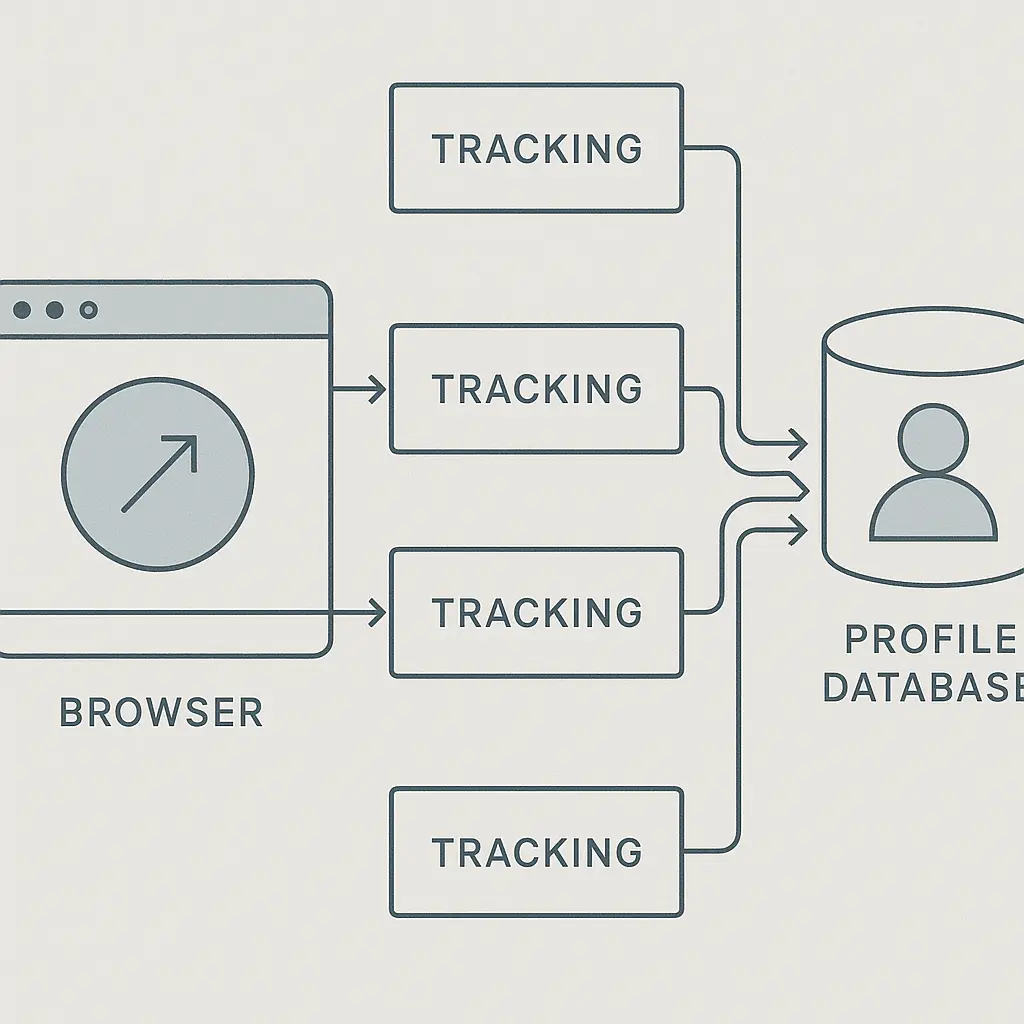
Tracking protection is not one thing. It is a collection of techniques that limit how much information websites, advertisers, and analytics companies collect about you as you move across the web.
The FTC describes tracking as the practice of monitoring your online activity to build a profile of your interests, habits, and identity. That profile gets used for targeted advertising, sold to data brokers, or fed into algorithmic systems that make decisions about what you see.
Browsers block tracking through several mechanisms. They can block third-party cookies, which advertisers use to follow you from site to site. They can block known tracking scripts that send your behavior data to analytics companies. They can resist fingerprinting, which identifies you by the unique characteristics of your browser and device. They can limit how much information websites can access about your system.
Different browsers implement these protections differently. Some block aggressively by default. Some require configuration. Some prioritize compatibility with websites over privacy. Understanding what each browser actually does requires looking at the mechanisms, not the claims.
Brave: maximum blocking out of the box
Brave is built on Chromium, the open-source project that underlies Chrome, but it strips out Google's tracking code and adds its own privacy features. The result is a browser that blocks more by default than any other mainstream option.
Brave blocks third-party cookies, cross-site trackers, and most advertising by default. You do not configure anything. You install Brave, and the blocking starts. It also blocks fingerprinting scripts, upgrades connections to HTTPS automatically, and blocks known malware and phishing sites.
The fingerprinting protection works by randomizing or limiting the information websites can collect about your browser. Websites cannot reliably identify you by your screen resolution, installed fonts, or system configuration because Brave either standardizes those values or adds noise to them. This is more aggressive than what Firefox or Safari do by default.
Brave also offers optional features like Tor integration for anonymous browsing and a built-in ad-replacement system that shows privacy-respecting ads in exchange for cryptocurrency rewards. You can ignore those features entirely if you want. The core privacy protections work without them.
The trade-off is that Brave sometimes breaks websites. Aggressive blocking means some sites do not load correctly, some videos do not play, and some login flows fail. Brave lets you disable shields on a per-site basis, but you have to notice the problem and fix it manually.
Brave syncs your bookmarks, passwords, and settings across devices using end-to-end encryption. Your data never sits on Brave's servers in plaintext. The sync works on Windows, macOS, Linux, iOS, and Android.
Brave is open source. Independent researchers can audit the code to verify what it does. That does not guarantee privacy, but it makes deception harder.
Firefox: configurable privacy with nonprofit backing
Firefox is developed by Mozilla, a nonprofit organization with no advertising business model. That structural difference matters. Mozilla's revenue comes from search engine partnerships and donations, not from tracking you.
Firefox blocks known trackers by default, but the level of blocking depends on which mode you choose. The default mode is Standard, which blocks known trackers in private windows and some trackers in normal windows. Strict mode blocks all known trackers, third-party cookies, and fingerprinting scripts. Custom mode lets you configure exactly what gets blocked.
Most people never change the default. That means most Firefox users get less protection than Brave users out of the box. If you enable Strict mode, Firefox blocks roughly as much as Brave, but you have to know to do that.
Firefox resists fingerprinting in Strict mode by blocking fingerprinting scripts and limiting the information websites can access. It does not randomize values like Brave does. Instead, it tries to make all Firefox users look similar by standardizing certain browser characteristics. This approach is less aggressive but breaks fewer sites.
Firefox syncs your data using a Firefox Account. The sync is end-to-end encrypted, but you have to trust Mozilla's implementation. Firefox works on Windows, macOS, Linux, iOS, and Android.
Firefox is fully open source. The code, the build process, and the governance structure are all public. Mozilla publishes detailed reports about its privacy practices and responds to security researchers. This transparency is stronger than what you get from Brave or Safari.
The trade-off with Firefox is that you have to configure it. Out of the box, it blocks less than Brave. If you enable Strict mode and install a few privacy-focused extensions like uBlock Origin, Firefox becomes one of the most private browsers available. But that requires knowledge and effort.
Safari: Apple's integrated approach
Safari is Apple's browser. It works on macOS and iOS only. If you use Windows, Android, or Linux, Safari is not an option.
Safari blocks known trackers by default using Intelligent Tracking Prevention, which limits how long cookies persist and prevents cross-site tracking. It also blocks fingerprinting scripts and hides your IP address from known trackers. These features work without configuration.
Safari's privacy protections are tightly integrated with the Apple ecosystem. On iOS, Safari benefits from App Tracking Transparency, which requires apps to ask permission before tracking you across other apps and websites. On macOS, Safari integrates with iCloud Keychain for password management and iCloud Private Relay for IP address masking.
The fingerprinting protection in Safari works by limiting the information websites can access and by making Safari users look similar. It does not randomize values like Brave, and it does not block as aggressively as Firefox in Strict mode. Safari prioritizes website compatibility over maximum blocking.
Safari syncs your bookmarks, passwords, and settings through iCloud. The sync is end-to-end encrypted for passwords and payment information, but other data like bookmarks and browsing history is encrypted in transit and at rest on Apple's servers, not end-to-end. Apple can technically access that data, though the company says it does not.
Safari is not open source. You cannot audit the code. You have to trust Apple's claims about what Safari does and does not do. Apple publishes a privacy policy, but you cannot independently verify the implementation.
The trade-off with Safari is platform lock-in. If you use Apple devices exclusively, Safari integrates seamlessly and provides good privacy protections by default. If you use multiple platforms, Safari forces you to use a different browser on non-Apple devices, which fragments your privacy protections and complicates your workflow.
Fingerprinting resistance: how the approaches differ
Fingerprinting is the practice of identifying you by the unique characteristics of your browser and device. Websites collect information like your screen resolution, installed fonts, timezone, language settings, graphics card, and browser plugins. When combined, these data points create a fingerprint that is often unique enough to track you even when cookies are blocked.
Brave resists fingerprinting by randomizing or limiting the values websites can collect. Your screen resolution might be reported as a common value instead of your actual resolution. Your timezone might be randomized. Your list of installed fonts might be truncated. This approach makes it harder for websites to generate a stable fingerprint, but it can break sites that rely on accurate system information.
Firefox resists fingerprinting in Strict mode by blocking fingerprinting scripts and standardizing certain browser characteristics. Instead of randomizing values, Firefox tries to make all users look the same by reporting common values for screen size, fonts, and other identifiers. This approach is less aggressive than Brave's but breaks fewer sites.
Safari resists fingerprinting by limiting what information websites can access and by making Safari users look similar. It does not randomize values, and it does not block as aggressively as Brave or Firefox. Safari prioritizes compatibility, which means it tolerates more fingerprinting risk than the other two.
No browser eliminates fingerprinting entirely. Researchers have found that even with protections enabled, browsers leak enough information to partially identify users under certain conditions. The question is how much risk you are willing to tolerate in exchange for usability.
Sync and data control: who can see what
When you sync your browser data across devices, you are uploading bookmarks, passwords, browsing history, and settings to a server. The question is who controls that server, whether the data is encrypted, and whether the company can read it.
Brave syncs using end-to-end encryption. Your data is encrypted on your device before it leaves, and only your devices can decrypt it. Brave cannot read your synced data. The sync chain is managed by a passphrase or QR code that you control. This is the strongest sync model of the three browsers.
Firefox syncs using end-to-end encryption through a Firefox Account. Your data is encrypted on your device, and Mozilla cannot read it. The encryption keys are derived from your account password, which means a strong password is critical. Mozilla stores the encrypted data on its servers, but the company cannot decrypt it without your password.
Safari syncs through iCloud. Passwords and payment information are end-to-end encrypted, which means Apple cannot read them. Other data like bookmarks, browsing history, and open tabs are encrypted in transit and at rest on Apple's servers, but Apple holds the encryption keys. That means Apple can technically access that data, though the company says it does not routinely do so.
The difference matters if you are concerned about government requests, data breaches, or company policies. End-to-end encryption means the company cannot hand over your data even if compelled by law, because the company cannot decrypt it. Server-side encryption means the company can access your data if required or if its systems are compromised.
Default settings: what you get without configuration
Most people never change browser settings. That means the default configuration determines what protection most users actually get.
Brave blocks third-party cookies, trackers, and ads by default. Fingerprinting protection is enabled. HTTPS upgrades are automatic. You get maximum protection without touching a setting.
Firefox blocks known trackers in private windows by default, but the protection in normal windows is limited unless you switch to Strict mode. Most users stay in Standard mode, which means they get less protection than Brave users. Fingerprinting protection requires Strict mode.
Safari blocks known trackers and fingerprinting scripts by default. The protection is good but not as aggressive as Brave. Safari does not block ads by default, and it allows some first-party advertising cookies.
If you are comparing browsers for someone who will not configure settings, Brave provides the most protection out of the box. If you are willing to enable Strict mode, Firefox provides comparable protection. Safari provides good default protection but less than Brave or Firefox in Strict mode.
Cross-platform support: where each browser works
Brave works on Windows, macOS, Linux, iOS, and Android. You can use the same browser with the same privacy protections on every platform. Sync works across all devices.
Firefox works on Windows, macOS, Linux, iOS, and Android. Sync works across all devices. The privacy protections are consistent across platforms, though iOS Firefox is limited by Apple's requirement that all iOS browsers use WebKit under the hood.
Safari works on macOS and iOS only. If you use Windows, Android, or Linux, you cannot use Safari. This limits Safari's usefulness if you work across multiple platforms or share devices with people who use non-Apple hardware.
Cross-platform support matters if you switch between devices or if you want consistent privacy protections everywhere. Brave and Firefox both work everywhere. Safari works only in the Apple ecosystem.
Open source vs proprietary: who can audit the code
Brave is open source. The code is public, and independent researchers can audit it to verify what it does. That does not guarantee privacy, but it makes deception harder. If Brave were secretly tracking users, someone would notice and publish the evidence.
Firefox is fully open source. The code, the build process, and the governance structure are all public. Mozilla publishes detailed privacy reports and responds to security researchers. This transparency is stronger than what Brave offers because Mozilla is a nonprofit with no profit motive to compromise privacy.
Safari is proprietary. You cannot audit the code. You have to trust Apple's claims about what Safari does. Apple publishes privacy policies and marketing materials, but you cannot independently verify the implementation. This is the weakest transparency model of the three.
Open source does not automatically mean more private. Proprietary software can be private if the company's incentives align with user privacy. But open source makes verification possible, which reduces the need for trust.
When each browser makes sense
Brave makes sense if you want maximum blocking by default, if you use multiple platforms, and if you do not want to configure settings. It breaks more sites than the other two, but it blocks more tracking.
Firefox makes sense if you want nonprofit backing, if you are willing to enable Strict mode, and if you value transparency. It requires more configuration than Brave but offers more control over what gets blocked.
Safari makes sense if you use Apple devices exclusively, if you want tight integration with the Apple ecosystem, and if you trust Apple's privacy claims. It does not work on non-Apple platforms, and you cannot audit the code.
None of these browsers is universally better. The right choice depends on your platform, your threat model, and how much configuration you are willing to do.
What tracking protection does not solve
Browser-based tracking protection stops advertisers and analytics companies from following you across websites, but it does not stop the websites you visit from collecting data about you. When you log into a site, that site knows who you are and what you do on that site. Tracking protection does not change that.
Browser-based tracking protection does not stop your internet service provider from seeing which sites you visit. It does not stop your employer from monitoring your activity on a work device. It does not stop apps on your phone from tracking you outside the browser.
Browser-based tracking protection does not protect you from phishing, malware, or social engineering. It does not encrypt your data in transit unless you also use HTTPS. It does not make you anonymous.
If you want anonymity, you need Tor. If you want to hide your activity from your ISP, you need a VPN. If you want to stop apps from tracking you, you need to review app permissions and use privacy-focused alternatives. Browser-based tracking protection is one piece of a larger privacy strategy, not a complete solution.
The cultural reference that fits
In Ted Lasso, the team's approach to winning changes when they stop trying to play like everyone else and start playing to their actual strengths. Roy Kent does not try to be Jamie Tartt. Jamie does not try to be Roy. The team wins when each player does what they are actually good at, not what the conventional playbook says they should do.
The same logic applies here. Brave is good at aggressive blocking. Firefox is good at transparency and configurability. Safari is good at ecosystem integration. Trying to make one browser do what another browser is designed for misses the point. The question is not which browser is objectively best. The question is which browser's strengths match your situation.
If you need cross-platform blocking with no configuration, Brave does that. If you need nonprofit backing and full transparency, Firefox does that. If you need Apple ecosystem integration and you never leave that ecosystem, Safari does that. Trying to force Safari to work on Android or Firefox to integrate with iCloud is the wrong approach. Pick the browser that does what you actually need without forcing it to be something it is not.
Testing the claims yourself
You can test what your browser blocks by visiting tracker-testing sites. Cover Your Tracks from the EFF shows you how trackable your browser is and what information it leaks. Run the test in Brave, Firefox, and Safari to see the differences.
You can also test fingerprinting resistance by visiting AmIUnique, which shows you how unique your browser fingerprint is compared to other users. A unique fingerprint means you are easier to track. A common fingerprint means you blend in with other users.
These tests are not perfect, but they give you a baseline. If a browser claims to block fingerprinting but you show up as highly unique on AmIUnique, the browser is not doing what it claims.
Making the decision
You are choosing between three browsers that all provide reasonable privacy protections. The differences are real, but they are not life-or-death for most people. The question is which trade-offs you accept.
If you use multiple platforms and you want maximum blocking without configuration, use Brave. If you value nonprofit backing and transparency and you are willing to enable Strict mode, use Firefox. If you use Apple devices exclusively and you want ecosystem integration, use Safari.
If you are not sure, start with Firefox in Strict mode. It works everywhere, it is fully transparent, and it provides strong privacy protections once configured. If Firefox breaks too many sites, try Brave. If you use only Apple devices and you want tighter integration, try Safari.
The important thing is to use a browser that blocks trackers by default. Brave, Firefox in Strict mode, and Safari all do that. The differences between them matter, but they matter less than the difference between any of them and Chrome.
Related reading: