WiFi Pineapple Attacks: The Rogue Access Point That Steals Your Data
You're at a conference. You open your laptop. Your device automatically connects to "Marriott_Guest", the same network you used at three other hotels this year. You check email, review a presentation, maybe log into your bank account to verify a payment cleared.
Everything feels normal. The connection works. The speeds are fine. You have no reason to suspect anything.
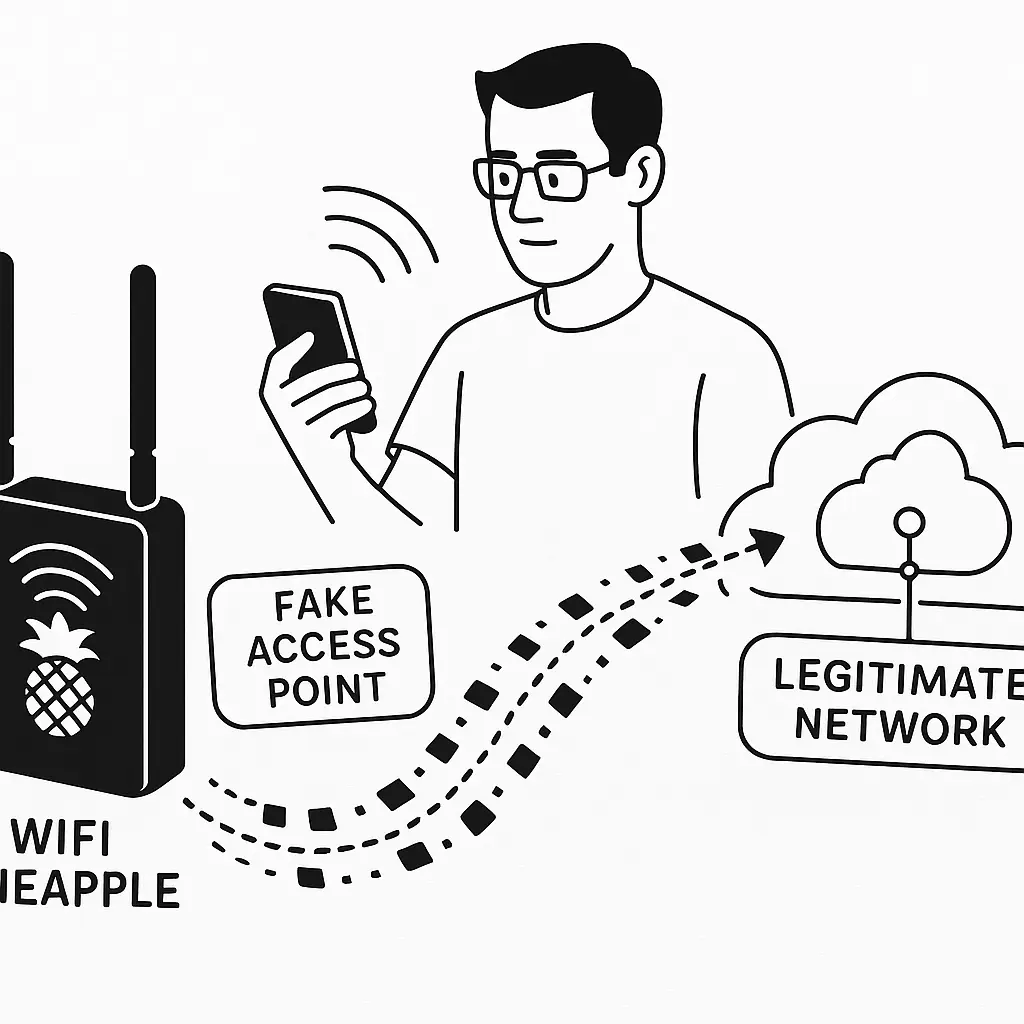
But you're not connected to the Marriott network. You're connected to a device the size of a deck of cards, sitting in someone's backpack two tables away. Every website you visit, every password you type, every unencrypted message you send, it all flows through that device first.
This is a WiFi Pineapple attack. Not a theoretical threat from a Black Hat presentation. Not a movie plot device. A real attack using real hardware that costs around $100 and requires no advanced technical knowledge to deploy.
The device is called a Pineapple because that's what Hak5, the company that manufactures it, decided to name their penetration testing tool. The name is cute. The mechanism is not.
Here's how it works, why it succeeds, and what you can actually do about it.
The Technical Mechanism Behind Rogue Access Points
A WiFi Pineapple is a small, portable wireless router designed for network penetration testing. Security professionals use it to audit wireless security. Attackers use it to steal data.
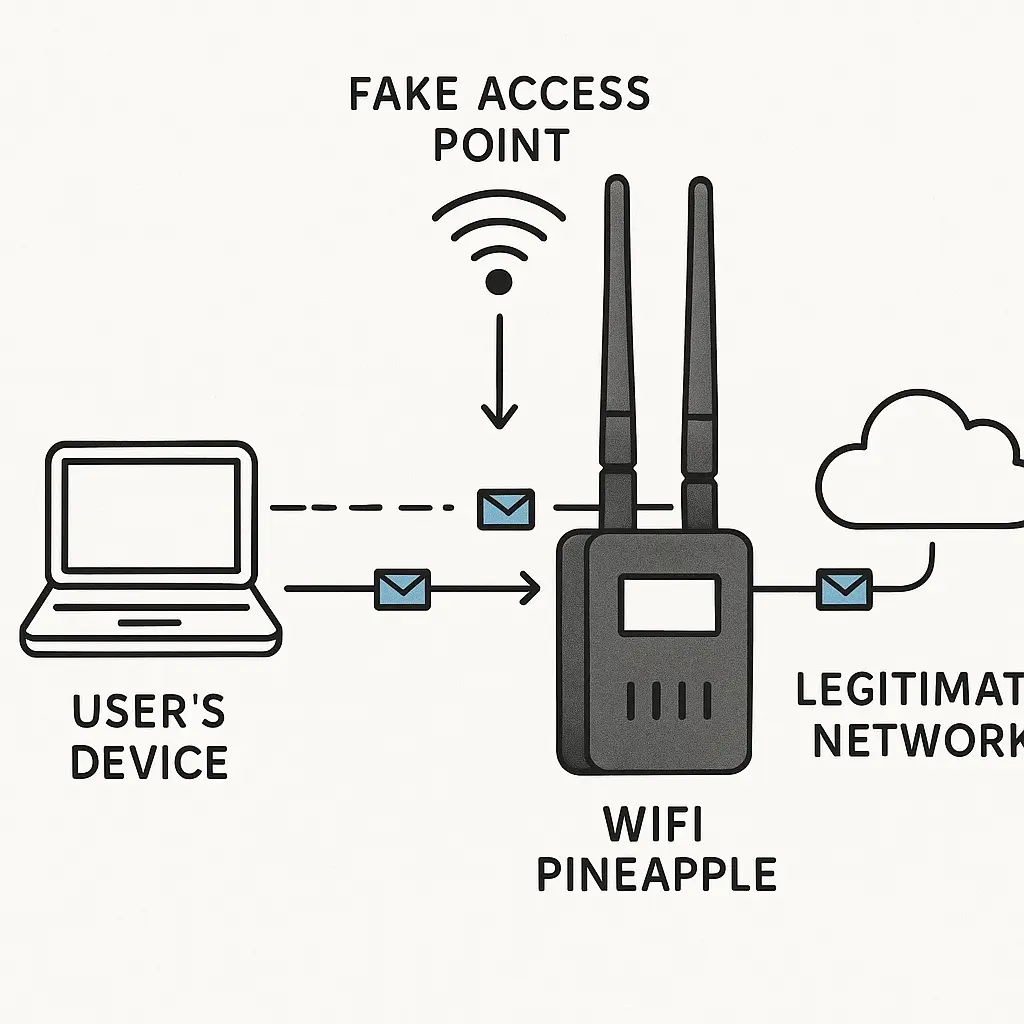
The device broadcasts wireless network names, SSIDs, that match common networks people have connected to before. "Starbucks WiFi." "attwifi." "xfinitywifi." "Marriott_Guest." Generic names that appear at airports, hotels, coffee shops, and conference centers across the country.
Your phone and laptop remember every network you've ever connected to. When you walk into a new location, your device scans for familiar network names and automatically connects to any match it finds. This is a convenience feature. It's also the vulnerability that makes Pineapple attacks work.
The Pineapple doesn't need to crack passwords or break encryption. It just needs to broadcast a network name your device recognizes. Your device sees "Starbucks WiFi," assumes it's the legitimate Starbucks network you connected to last month, and joins automatically. No password required for open networks. No verification that this access point is actually operated by Starbucks.
Once you're connected, the Pineapple becomes the intermediary between you and the internet. It's a man-in-the-middle position. Every request you make, every website you visit, every login form you submit, every email you send, passes through the attacker's device before reaching its destination.
The attacker can see your traffic. They can log your activity. They can inject malicious code into unencrypted web pages. They can redirect you to fake login pages that look identical to the real ones. They can strip encryption from connections that should be secure.
This is not a passive eavesdropping attack. The attacker has active control over your network traffic. They're not just reading your data. They're routing it.
What Makes WiFi Pineapple Attacks Succeed
The attack succeeds because your device trusts network names.
When you connect to "Starbucks WiFi" at your local coffee shop, your phone saves that network name. The next time you're near a network broadcasting "Starbucks WiFi," your device automatically connects. It doesn't verify the MAC address of the router. It doesn't check a certificate. It doesn't confirm you're actually at a Starbucks. It just sees a familiar name and connects.
This behavior is by design. Automatic reconnection makes WiFi convenient. You don't want to manually select and authenticate every time you walk into your favorite coffee shop. But convenience creates vulnerability.
The Pineapple exploits this by broadcasting multiple network names simultaneously. A single device can impersonate dozens of networks at once. "Starbucks WiFi." "attwifi." "Marriott_Guest." "Hilton Honors." "Delta WiFi." "Google Starbucks." The device cycles through common SSIDs, waiting for someone's device to recognize one and connect.
The attack works best in crowded public spaces. Airports. Conference centers. Hotel lobbies. Anywhere people expect to find public WiFi and have connected to similar networks before. The more devices in range, the higher the probability that someone's phone will auto-connect to one of the fake networks.
The hardware is small, portable, and battery-powered. An attacker can deploy it in a backpack, a briefcase, or a coat pocket. It doesn't need to be physically connected to anything. It just needs to be powered on and within WiFi range of potential targets.
The attack is also difficult to detect from the victim's perspective. The connection works. Websites load. Email sends. Everything feels normal because the Pineapple is routing your traffic to the real internet, it's just capturing and analyzing everything along the way.
The Encryption Gap That Makes This Dangerous
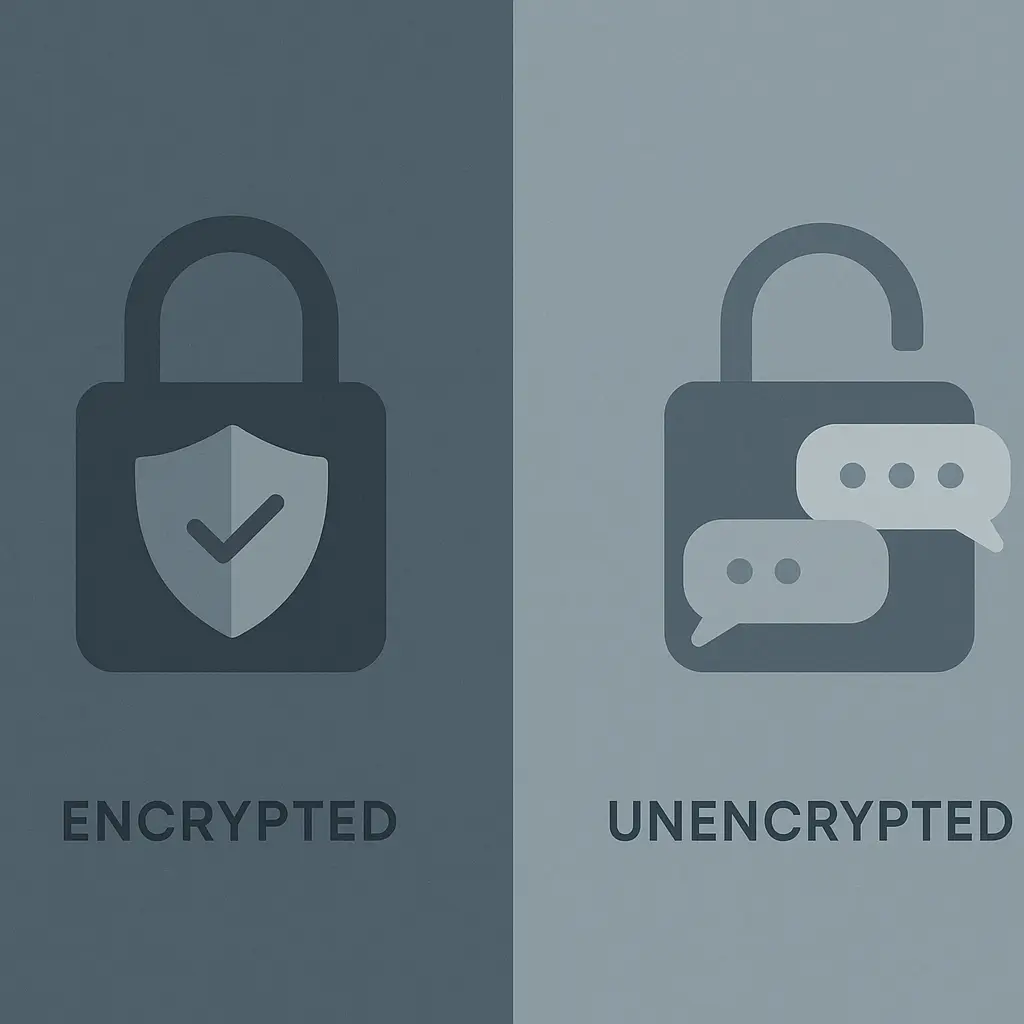
HTTPS encrypts most web traffic in 2026. When you visit a site using HTTPS, your browser creates an encrypted tunnel between your device and the web server. A Pineapple sitting in the middle can see that you're visiting a particular domain, but it can't read the contents of your encrypted traffic.
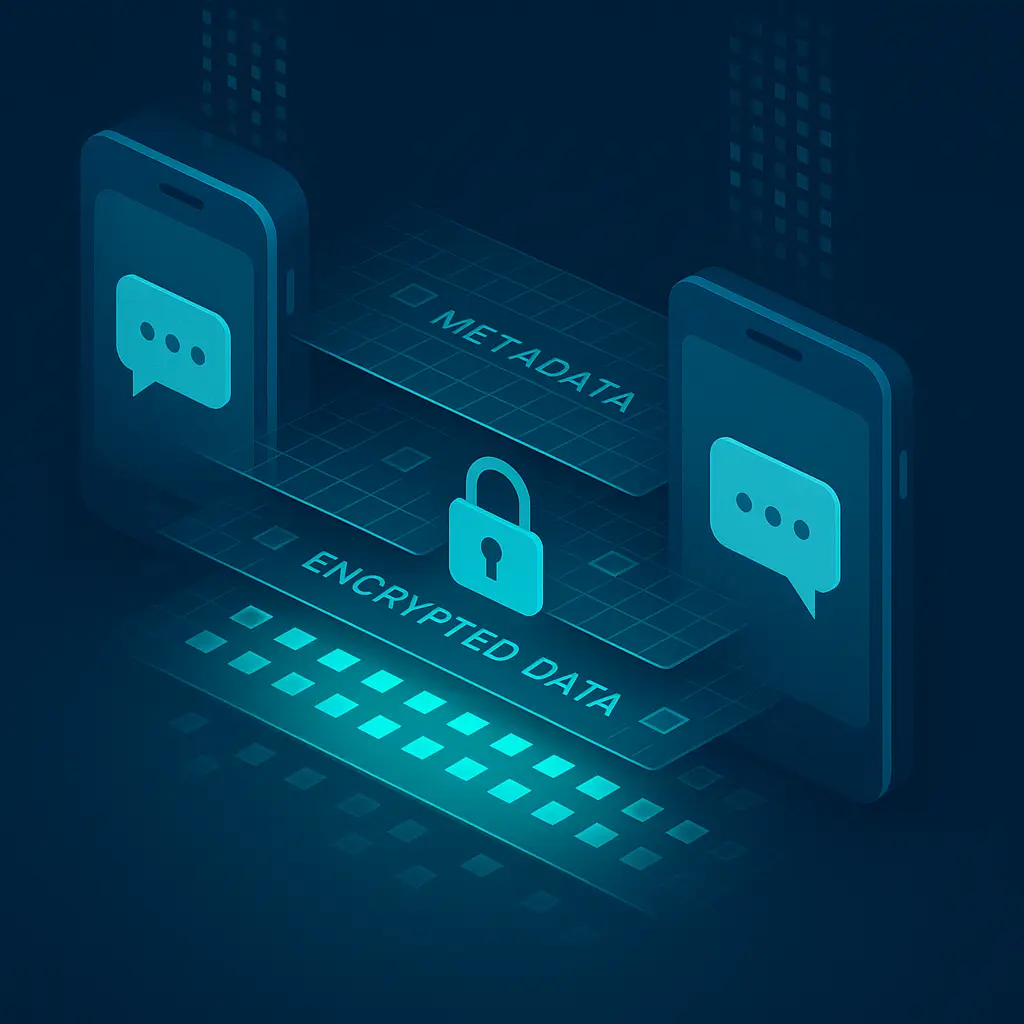
But HTTPS isn't universal. Some sites still use HTTP. Some apps don't encrypt traffic properly. Some services send sensitive data over unencrypted connections. And even with HTTPS, metadata leaks, the Pineapple can see which domains you're visiting, how much data you're transferring, and the timing of your requests.
More importantly, the Pineapple can attempt SSL stripping. This is an attack where the device intercepts your HTTPS request and downgrades it to HTTP. You think you're connecting securely, but the Pineapple has stripped the encryption layer. Your browser might show a warning, a missing padlock icon, a certificate error, but many people ignore these warnings or don't notice them.
The Electronic Frontier Foundation's HTTPS Everywhere project was designed to combat this exact attack by forcing browsers to use HTTPS whenever possible. But HTTPS Everywhere was retired in 2022 after browsers began implementing HTTPS-by-default. The protection now depends on browser defaults and website configuration, both of which can fail.
Even with proper HTTPS, DNS requests often leak. When you type a web address, your device sends a DNS query to translate that domain name into an IP address. That query is usually unencrypted. The Pineapple can see every domain you're looking up, building a detailed profile of your browsing behavior even when the actual page content is encrypted.
What Attackers Actually Capture
When you connect to a Pineapple, the attacker gains visibility into your network activity. Here's what they can see:
Every domain you visit. Even with HTTPS, DNS queries reveal which sites you're accessing. The attacker knows you visited your bank, your health insurance portal, your work email, and that news site you'd rather keep private.
Metadata about your traffic. How much data you're transferring, when you're active, how long you spend on different sites. This information builds a behavioral profile even when content is encrypted.
Unencrypted traffic. Any site or app still using HTTP sends data in cleartext. Login forms, search queries, email content, messages, all visible to the Pineapple operator.
Certificate errors and downgrades. If the Pineapple successfully strips SSL, the attacker sees everything: passwords, session tokens, personal information, financial data.
Your device information. The Pineapple logs your MAC address, device type, operating system, and installed apps. This data can be used for targeted attacks later.
Saved network names. When your device probes for known networks, it broadcasts the names of networks you've connected to before. This reveals your location history, where you live, where you work, which coffee shops you frequent, which airports you've traveled through.
The attacker isn't necessarily targeting you specifically. They're casting a wide net, capturing data from everyone who connects, then sorting through the logs later to find valuable information. Credit card numbers. Login credentials. Corporate VPN access. Email content. Anything that can be monetized or used for further attacks.
The Sherlock Holmes Problem
In "The Adventure of the Naval Treaty," Sherlock Holmes solves a case by recognizing that a dog didn't bark during a burglary, an absence that revealed the intruder was someone the dog knew. The clue wasn't what happened. It was what didn't happen.
WiFi Pineapple attacks work on the same principle. Your device doesn't raise an alarm because nothing looks wrong. The network name is familiar. The connection works. The sites load. There's no error message, no warning dialog, no obvious sign of compromise.
The absence of warning is the warning. But you can't see an absence. You can't notice that something didn't happen. Your device trusts the network name, so you trust the connection, and the attack succeeds because the mechanism is designed to be invisible.
Holmes solved crimes by noticing what others missed. You can protect yourself by assuming what others ignore: that familiar network names aren't always what they claim to be.
Real-World Deployment and Target Selection
WiFi Pineapple attacks aren't theoretical. Security researchers demonstrate them at conferences. Penetration testers use them in authorized security audits. And attackers deploy them in environments where the payoff justifies the risk.
High-value targets include:
Conference centers and trade shows. Thousands of people in one location, many connecting to public WiFi to check email or access work resources. Attendees at cybersecurity conferences are particularly ironic targets, they know the risks but still connect because they need internet access.
Airports and hotels. Business travelers accessing corporate VPNs, checking work email, reviewing confidential documents. The combination of time pressure and familiar network names creates ideal conditions for auto-connect attacks.
Coffee shops near corporate offices. Employees working remotely or taking meetings outside the office. The attacker sets up near a Starbucks frequented by employees from a specific company, captures VPN credentials, and gains access to the corporate network.
Executive travel routes. High-level executives traveling to board meetings, investor presentations, or acquisition negotiations. An attacker who knows the executive's schedule can deploy a Pineapple at the airport lounge or hotel lobby where the target is likely to connect.
The attack scales. One device can compromise dozens of victims in a single session. The hardware costs around $100. The potential payoff, corporate access, financial credentials, personal information, far exceeds the investment.
Why VPNs Actually Matter Here
This is one of the specific scenarios where a VPN provides real, meaningful protection.
A VPN encrypts all your traffic before it leaves your device. When you connect through a VPN, the Pineapple still intercepts your connection, you're still routing through the attacker's device, but everything the attacker sees is encrypted.
The Pineapple operator knows you're connected. They can see how much data you're transferring. They can see the VPN server you're connected to. But they can't see which websites you're visiting, what you're typing, or what data you're sending. The VPN creates an encrypted tunnel through the man-in-the-middle attack.
This is different from the dubious privacy claims VPN marketing makes about hiding from your ISP or accessing geo-restricted content. Those use cases involve questionable threat models and often misleading promises. But protection against rogue access points on public networks? That's a legitimate use case where VPNs deliver real value.
CISA's guidance on network security emphasizes encrypted connections when using untrusted networks. A VPN is the practical implementation of that recommendation.
Not all VPNs are equal. Free VPNs often log your traffic, inject ads, or sell your data, defeating the privacy purpose entirely. Reputable paid services like NordVPN use strong encryption, maintain independently audited no-log policies, and provide kill switches that block traffic if the VPN connection drops.
The kill switch matters. If your VPN disconnects while you're on a compromised network, your device might continue sending unencrypted traffic through the Pineapple. A kill switch prevents this by blocking all network traffic until the VPN reconnects.
Detection and Prevention
You can't reliably detect a Pineapple attack while it's happening. The connection looks legitimate. The network name matches one you've used before. There's no error message, no warning sign, no obvious indication that something's wrong.
Occasionally you'll see clues. Certificate errors when visiting HTTPS sites. Redirects to unexpected login pages. Unusually slow connection speeds. But these symptoms can also indicate legitimate network problems, and many people ignore them or assume they're temporary glitches.
Prevention is the only reliable defense:
Disable auto-connect for WiFi networks. Your device should ask before joining any network, even ones you've connected to before. This prevents the automatic connection that makes Pineapple attacks succeed. It's less convenient. It's also substantially more secure.
Forget networks you don't regularly use. Every saved network name is a potential attack vector. If you connected to "Marriott_Guest" once during a business trip two years ago, your device will auto-connect to any network broadcasting that name. Forget it. When you stay at another Marriott, manually connect again.
Use a VPN on all public networks. Not because you don't trust the coffee shop. Because you can't verify the coffee shop network is actually operated by the coffee shop. A VPN encrypts your traffic regardless of who's operating the access point.
Verify network names with staff. Ask the barista, hotel front desk, or conference organizer for the official network name. Don't assume "Starbucks WiFi" is legitimate just because you've connected to networks with that name before.
Pay attention to certificate warnings. If your browser shows an HTTPS error or certificate mismatch, don't click through. That warning might indicate an SSL stripping attack. Disconnect from the network immediately.
Use cellular data when possible. Your phone's LTE or 5G connection is substantially more secure than public WiFi. The encryption is built into the cellular protocol, and the attack surface for intercepting cellular traffic is much smaller than WiFi.
Enable two-factor authentication on sensitive accounts. Even if a Pineapple captures your password, 2FA prevents the attacker from logging in without the second factor. Use an authenticator app, not SMS, SMS codes can be intercepted through SIM swapping attacks.
The Broader Context: Network Trust Models
WiFi Pineapple attacks exploit a fundamental assumption in how devices handle wireless networks: that network names are trustworthy identifiers.
They're not.
A network name is just a string of text broadcast by a router. Anyone can create a network with any name. There's no central authority verifying that "Starbucks WiFi" is actually operated by Starbucks. There's no certificate system for wireless networks equivalent to HTTPS certificates for websites.
NIST's guidance on network security emphasizes zero-trust architecture, the principle that you should never assume a network is safe just because it looks familiar. Every connection should be verified. Every communication should be encrypted. Trust should be explicitly established, not implicitly assumed.
This is the opposite of how most people use WiFi. We see a familiar network name, we connect, and we assume everything's fine. That assumption is the vulnerability.
The solution isn't paranoia. It's appropriate caution. Public WiFi is useful. It's also untrustworthy. Those two facts can coexist. You can use public networks safely by encrypting your traffic, verifying connections, and not assuming that familiar names mean familiar networks.
What's Changed and What Hasn't
WiFi Pineapple attacks are older than smartphones. The first Pineapple device shipped in 2008. The underlying vulnerability, automatic connection to familiar network names, has existed since WiFi became common.
What's changed:
HTTPS adoption. Most major sites use HTTPS by default in 2026, limiting what attackers can capture even on compromised networks. But HTTPS isn't universal, and metadata still leaks.
VPN accessibility. VPNs are cheaper, faster, and easier to use than they were a decade ago. Services like NordVPN offer one-click connection and automatic protection on untrusted networks.
Operating system protections. Modern mobile operating systems warn about unencrypted networks and limit background scanning for known SSIDs. But these protections aren't foolproof, and many users disable them for convenience.
Cellular data availability. LTE and 5G coverage is widespread and fast enough to replace WiFi in many situations. Using cellular data eliminates the WiFi attack surface entirely.
What hasn't changed:
The core vulnerability. Devices still trust network names. Auto-connect still works the same way. The fundamental mechanism that makes Pineapple attacks succeed hasn't been fixed because fixing it would break the convenience features people expect from WiFi.
Hardware accessibility. Pineapple devices are still available for purchase. They're marketed as penetration testing tools, but there's no verification that buyers are legitimate security professionals. Anyone with $100 can buy one.
User behavior. Most people connect to public WiFi without thinking about security. They don't use VPNs. They don't verify network names. They auto-connect to familiar SSIDs and assume everything's fine.
Attacker motivation. The potential payoff from compromising business travelers, conference attendees, or executives justifies the minimal cost and risk of deploying a Pineapple.
When the Threat Actually Matters
Not every public WiFi connection is dangerous. Not every coffee shop has an attacker with a Pineapple sitting in the corner. The risk is real but not universal.
The threat matters most in specific contexts:
You're traveling for business. You're accessing corporate resources, checking work email, reviewing confidential documents. The value of your data justifies targeted attacks.
You're at a high-profile event. Conferences, trade shows, industry gatherings. Locations where many people connect to public WiFi and where attackers know they'll find valuable targets.
You're handling sensitive information. Financial transactions, health records, legal documents, anything that would cause significant harm if compromised.
You're in a foreign country. Local laws may permit government surveillance of public networks. Border security may inspect devices. The threat model expands beyond criminal attackers.
You're a high-value target. Executives, journalists, activists, anyone whose data or access is valuable to sophisticated attackers.
If none of these apply, the risk of a Pineapple attack is low but not zero. The hardware is cheap enough and the deployment is easy enough that opportunistic attacks can happen anywhere. But the probability is substantially lower at your neighborhood coffee shop than at a cybersecurity conference or international airport.
The Practical Security Posture
You don't need to avoid public WiFi entirely. You need to use it with appropriate caution.
The practical security posture for public networks:
Always use a VPN. This is the single most effective defense. It protects against Pineapple attacks, ISP monitoring, and other network-level threats. NordVPN offers reliable encryption and a kill switch that blocks traffic if the VPN drops.
Disable auto-connect. Manual network selection prevents your device from automatically joining rogue access points.
Verify network names. Ask staff for the official SSID before connecting.
Use HTTPS everywhere. Browser extensions and settings can force encrypted connections to sites that support HTTPS.
Enable two-factor authentication. Protects accounts even if passwords are compromised.
Forget old networks. Every saved SSID is a potential attack vector.
Use cellular data for sensitive tasks. Banking, healthcare, confidential work, use your phone's data connection, not public WiFi.
Pay attention to warnings. Certificate errors and security alerts often indicate real problems.
These steps aren't paranoia. They're proportionate responses to documented threats. WiFi Pineapple attacks happen. The hardware exists. The vulnerability persists. The defenses work.
You can use public WiFi safely. You just can't use it carelessly.