Logging Policies: The Most Overlooked VPN Feature
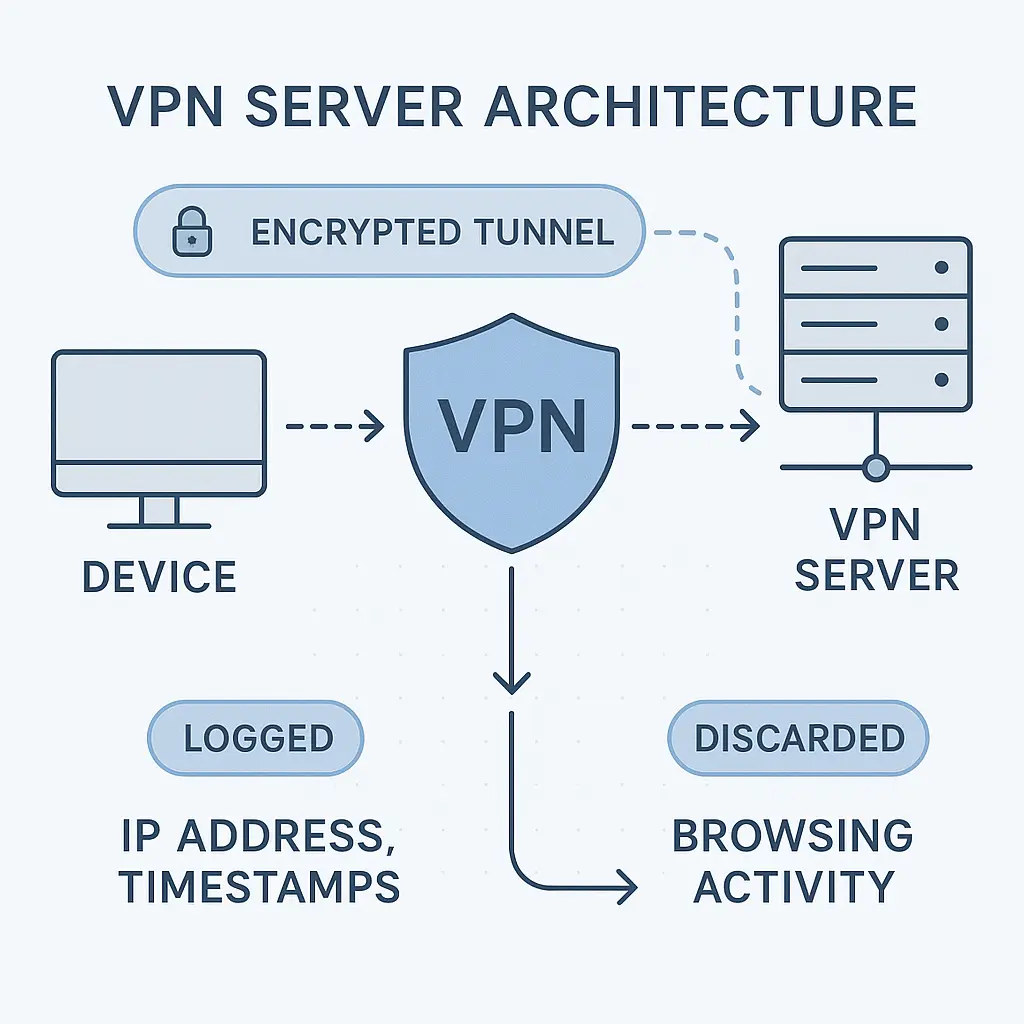
You're shopping for a VPN. Every provider's homepage screams "no-log policy" in bold letters. Some promise "zero logs." Others guarantee "strict no-log." A few claim "military-grade no-log protection."
They're all talking about the same feature using different words, and most people skip past the details to check the price. That's a mistake. The logging policy is the single most important privacy feature a VPN offers, and the marketing language hides more than it reveals.
Here's what VPN providers actually record, what "no-log" really means, and how to verify the claims before you subscribe.
What VPN Logs Actually Are
When you connect to a VPN, your traffic routes through the provider's servers. Those servers run software. Software generates logs. The question isn't whether logs exist, it's what data those logs contain and how long the provider keeps them.
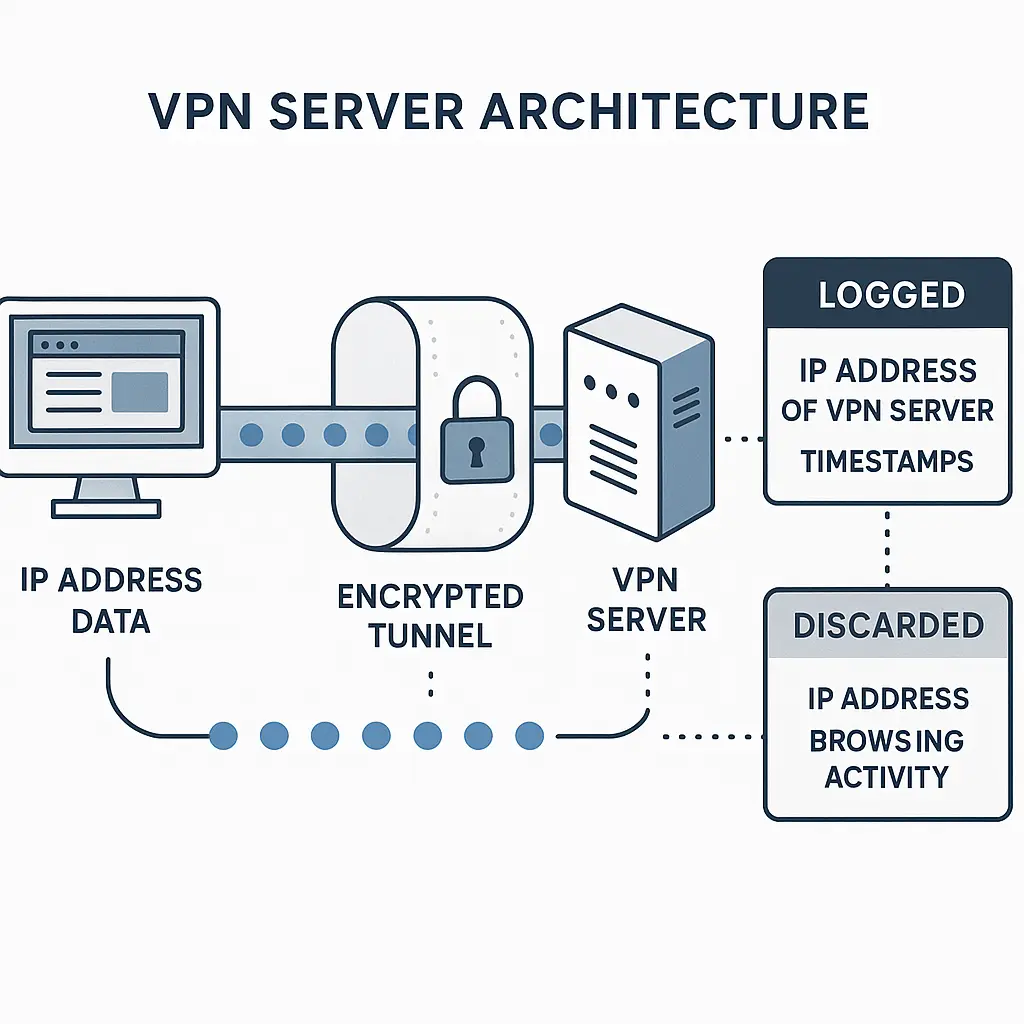
VPN logs fall into two categories: connection logs and activity logs.
Activity logs record what you do online. Sites you visit. Files you download. Search queries. Streaming services. The full record of your browsing behavior. If a VPN keeps activity logs, it defeats the entire purpose of using a VPN for privacy. You've just shifted surveillance from your ISP to your VPN provider.
Connection logs record metadata about your VPN sessions. When you connected. When you disconnected. Your originating IP address. The VPN server you used. Bandwidth consumed. Some providers call these "usage logs" or "session logs." The terminology varies, but the data is the same: information about your connection, not your activity.
Most VPNs that advertise "no-log" policies mean they don't keep activity logs. They're silent about connection logs. That silence matters, because connection metadata can still identify you in specific circumstances.
The Legal Gray Zone
"No-log" has no legal definition. There's no regulatory body that certifies VPN logging policies. The term means whatever the provider says it means in their privacy policy, and privacy policies change.
Some providers define "no-log" as zero activity logs but acknowledge connection logs. Others claim they store connection data temporarily, then delete it. A few genuinely keep nothing beyond what's required to process payments.
The distinction matters when law enforcement comes knocking. If a court orders a VPN provider to hand over data about a specific user, the provider can only comply if that data exists. No logs means nothing to hand over. Minimal logs means minimal disclosure. Extensive logs means the VPN becomes a surveillance tool with a subscription fee.
In Lavabit v. United States (2013), the encrypted email provider chose to shut down rather than comply with a surveillance order. VPN providers face similar pressure, but most don't publicize the requests they receive. A few publish transparency reports. Most stay silent.
CISA's guidance on network security emphasizes knowing what data your infrastructure collects. That principle applies to VPNs. If you don't know what your VPN logs, you don't know what's at risk.
What Providers Actually Log (Despite the Marketing)
Let's look at what major VPN providers admit to logging in their privacy policies, not their marketing pages.
Connection timestamps. Nearly every provider logs when you connect and disconnect. That's metadata, not activity, but it's enough to correlate your VPN usage with specific events. If law enforcement knows a crime occurred at 3:47 PM and your VPN logs show a connection from your IP at 3:45 PM, that's a data point.
Originating IP addresses. Some providers log your real IP address when you connect. Others claim they don't, but court cases have revealed otherwise. In 2017, PureVPN provided connection logs to the FBI despite marketing themselves as a no-log service. The logs included the user's originating IP, which led to an arrest.
Server selection. Which VPN server you connected to can narrow down your location and activity. If you're consistently connecting to servers in a specific country, that's behavioral data.
Bandwidth totals. Many providers log total data transferred per session or per billing cycle. That's not activity data, but it's still a record of your usage patterns.
Payment information. Unless you pay with cryptocurrency or cash, your payment method links your identity to your VPN account. Even "anonymous" VPNs that accept Bitcoin often require an email address for account recovery.
Device identifiers. Some VPN apps log device types, operating systems, or app versions. That's ostensibly for troubleshooting, but it's still data that persists on the provider's servers.
The gap between "we don't log your activity" and "we don't log anything" is wide. Most providers fall somewhere in the middle, logging connection metadata while avoiding activity data. A few genuinely keep nothing. Many more claim to keep nothing but store more than they admit.
The Audit Problem
How do you verify a VPN's logging policy? You can't inspect their servers. You can't review their code. You're trusting the provider's word, and trust is a weak foundation for privacy.
Third-party audits offer some verification. A reputable security firm reviews the provider's infrastructure, examines server configurations, and confirms whether the logging policy matches reality. Mozilla's VPN service published audit results showing their no-log claims held up under scrutiny. That's evidence, not marketing.
But audits have limits. They're snapshots in time. A provider can pass an audit in 2024 and change their logging practices in 2025. Audits also vary in rigor. Some firms conduct deep technical reviews. Others perform surface-level checks and rubber-stamp the results.
Look for audits from firms with reputations to protect: Deloitte, PwC, Cure53, VerSprite. Avoid audits from unknown firms or audits that don't publish detailed findings. If a VPN claims to be audited but won't name the auditor or share the report, that's not verification, it's marketing.
Jurisdiction Matters More Than You Think
Where a VPN provider is based determines which laws govern their data retention and disclosure obligations. This is the part most people ignore and most providers downplay.
Five Eyes, Nine Eyes, Fourteen Eyes. These are intelligence-sharing agreements between countries. If your VPN is based in a Five Eyes country (US, UK, Canada, Australia, New Zealand), the provider can be compelled to log data and share it with partner governments. Nine Eyes adds Denmark, France, Netherlands, and Norway. Fourteen Eyes adds Germany, Belgium, Italy, Spain, and Sweden.
Some providers argue that jurisdiction doesn't matter if they don't log data, there's nothing to compel. That's true until the government orders them to start logging. In 2013, Lavabit received a secret court order to install surveillance software. The company shut down rather than comply, but most VPN providers lack the resources or will to make that choice.
Data retention laws. Some countries require ISPs and telecom providers to retain connection logs for months or years. Whether those laws apply to VPNs varies by jurisdiction. In the EU, the Data Retention Directive was struck down in 2014, but individual member states still enforce their own retention rules.
Warrant canaries. Some providers publish a statement that they've never received a government data request. If the statement disappears, it's a signal that a request arrived and the provider is legally barred from disclosing it. Warrant canaries are clever, but they're not foolproof. Governments can prohibit them, and some providers forget to update them.
NIST's cybersecurity framework emphasizes understanding third-party risk. Your VPN is a third party with access to your traffic. Jurisdiction determines what legal pressure that third party faces.
The Transparency Report Test
A transparency report is a public document that discloses how many government data requests a provider received, how many they complied with, and what data they handed over. It's the closest thing to proof that a no-log policy works.
If a VPN receives 50 data requests and complies with zero because they have no data to provide, that's strong evidence. If they receive 50 requests and comply with 48, that's a logging policy in action, regardless of the marketing.
Not all transparency reports are equal. Some providers publish detailed breakdowns by country, request type, and outcome. Others offer vague summaries. A few publish nothing and claim they've never received a request, which is either true or a lie you can't verify.
Look for:
- Annual publication (not one-time reports)
- Specific numbers (not ranges or estimates)
- Disclosure of what data was provided (not just "we complied")
- Third-party verification (some providers have their reports audited)
ProtonVPN publishes transparency reports with detailed breakdowns. NordVPN does the same. ExpressVPN publishes reports but with less granular detail. If a provider doesn't publish a transparency report, that's not proof they're logging, but it's a red flag.
What "RAM-Only Servers" Actually Mean
Some VPN providers advertise "RAM-only servers" or "diskless infrastructure" as proof of their no-log commitment. The pitch: since the servers use volatile memory instead of hard drives, all data disappears when the server reboots. No persistent storage means no persistent logs.
This is technically true but operationally misleading. RAM-only servers can still log data while they're running. They can still send logs to external storage. They can still retain connection metadata in memory for hours or days before a reboot. The architecture makes it harder to store logs long-term, but it doesn't make logging impossible.
What RAM-only servers do prevent is forensic recovery. If law enforcement seizes a server, there's nothing on disk to analyze. That's a real privacy benefit, but it's not the same as a no-log policy. It's a no-persistent-log policy.
A few providers combine RAM-only infrastructure with third-party audits confirming they don't log to external storage. That's stronger evidence. But RAM-only servers alone don't prove much.
The Court Case Litmus Test
The strongest evidence of a no-log policy is a court case where the provider couldn't comply with a data request because the data didn't exist.
In 2017, Turkish authorities seized ExpressVPN servers and found no user data. The servers were running in RAM, and the provider's no-log policy held up under real-world pressure. That's proof.
In 2021, NordVPN's no-log policy was tested when a data center in Finland was seized. No user data was recovered. Again, proof.
Contrast that with PureVPN, which provided logs to the FBI in 2017 despite marketing themselves as no-log. Or HideMyAss, which handed over connection logs to UK authorities in 2011, leading to an arrest.
Court cases are rare, and most providers never face them. But when they do, the outcome reveals whether the logging policy is real or theater.
The Cultural Reference
In Ocean's Eleven, Danny Ocean's crew pulls off a casino heist by exploiting the one thing the casino doesn't monitor: the garbage chute. The casino tracks every dollar on the floor, every card at every table, every face in every camera feed. But the trash? Nobody's watching the trash.
VPN logging policies work the same way. Providers monitor everything they think matters, bandwidth, server load, payment processing, but the question is whether they're watching the data that actually identifies you. Connection logs are the garbage chute. They seem incidental until someone looks closely and realizes they're the path that links your identity to your activity.
The casinos in Ocean's Eleven assumed their surveillance was comprehensive. It wasn't. VPN providers make the same assumption about their logging policies. Some are right. Some are catastrophically wrong. The only way to know is to check what's actually being monitored, not what the marketing says is being monitored.
How to Evaluate a VPN's Logging Policy
Here's the step-by-step process to verify whether a VPN's no-log claims hold up:
Step 1: Read the privacy policy, not the marketing page. The marketing page will say "no logs." The privacy policy will specify what data they collect. If the privacy policy is vague or contradicts the marketing, that's a red flag.
Step 2: Check for third-party audits. Look for recent audits (within the last two years) from reputable firms. Verify that the audit report is public and includes technical findings, not just a summary.
Step 3: Review transparency reports. If the provider publishes them, check whether they're annual, detailed, and verifiable. If they don't publish them, ask why.
Step 4: Research jurisdiction. Find out where the provider is incorporated and where their servers are located. Cross-reference that with data retention laws and intelligence-sharing agreements.
Step 5: Look for court cases. Search for news articles about the provider being compelled to hand over data. If they complied, what did they provide? If they couldn't comply, why not?
Step 6: Test the provider's claims. Some VPNs let you request your data under GDPR or CCPA. Submit a request and see what they send you. If they claim they don't log connection data but send you a file with timestamps and IP addresses, that's proof the policy is false.
Step 7: Check for RAM-only infrastructure. If the provider advertises diskless servers, verify whether that's independently confirmed or just marketing. Look for technical whitepapers or third-party validation.
This process takes time, but it's the only way to know whether a VPN's logging policy is real. Trusting the marketing is how you end up with a VPN that logs everything and hands it over the moment a government asks.
What Happens When a VPN Lies
In 2020, seven VPN providers were exposed for logging user data despite advertising no-log policies. The logs included IP addresses, connection timestamps, and in some cases, browsing history. The exposure came from a misconfigured database left open on the internet, over a billion records, accessible to anyone who knew where to look.
The providers involved were small, lesser-known brands, but the incident proved that no-log marketing doesn't guarantee no-log reality. Some of the exposed providers went out of business. Others rebranded. A few kept operating as if nothing happened.
The lesson: logging policies are only as trustworthy as the provider's operational security. Even if a VPN genuinely doesn't intend to log data, poor infrastructure can create logs anyway. Even if they claim to delete logs, misconfigured servers can retain them. Even if they publish audits, those audits only verify what the auditor checked, not what they didn't.
The Payment Anonymity Problem
You can use the most privacy-focused, audited, zero-log VPN on the market, and it won't matter if your payment method links your real identity to your account.
Credit cards, PayPal, and bank transfers all create a direct connection between your name, address, and VPN subscription. If a government requests subscriber information, the VPN can hand over your payment details even if they don't have activity logs.
Some providers accept cryptocurrency, which offers better anonymity, but only if you acquire the cryptocurrency anonymously, which most people don't. Buying Bitcoin with a credit card and then paying for a VPN with that Bitcoin doesn't break the identity link. It just adds a step.
A few providers accept cash by mail or prepaid gift cards. That's genuinely anonymous, but it's inconvenient enough that most people skip it. And even then, you need an email address to create an account. If that email is tied to your real identity, the anonymity breaks.
The payment problem has no perfect solution. The closest you can get is: cryptocurrency acquired anonymously + email address created for the sole purpose of the VPN account + VPN provider with a verified no-log policy and strong jurisdiction. That's a lot of steps, and each one is a potential failure point.
What You Can Actually Control
You can't force a VPN to stop logging. You can't audit their servers yourself. You can't verify their claims beyond what they choose to disclose. But you can make an informed choice about which provider to trust, and you can limit what data you expose even to a trusted provider.
Use a VPN that publishes third-party audits, transparency reports, and detailed privacy policies. Avoid providers in Five Eyes jurisdictions unless they've proven their no-log policy in court. Pay with cryptocurrency if anonymity matters. Use a dedicated email address that isn't linked to your real identity.
Understand that "no-log" is a spectrum, not a binary. Some providers log nothing. Some log connection metadata. Some log everything and lie about it. The only way to know where a provider falls is to check their evidence, not their marketing.
And remember: a VPN shifts your trust from your ISP to your VPN provider. If you don't trust the provider, the VPN makes your privacy worse, not better. Choose carefully.