Local LLMs Explained: What Runs on Your Device and Why It Matters
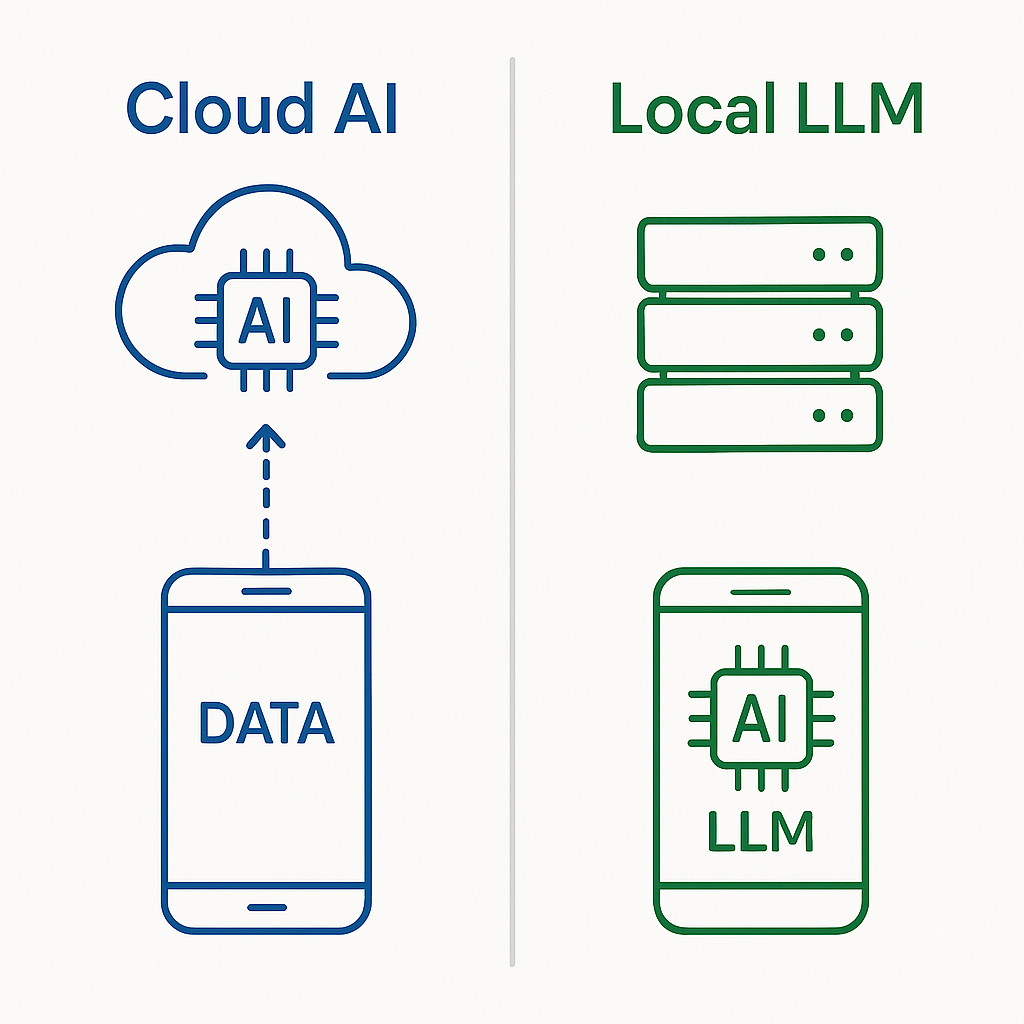
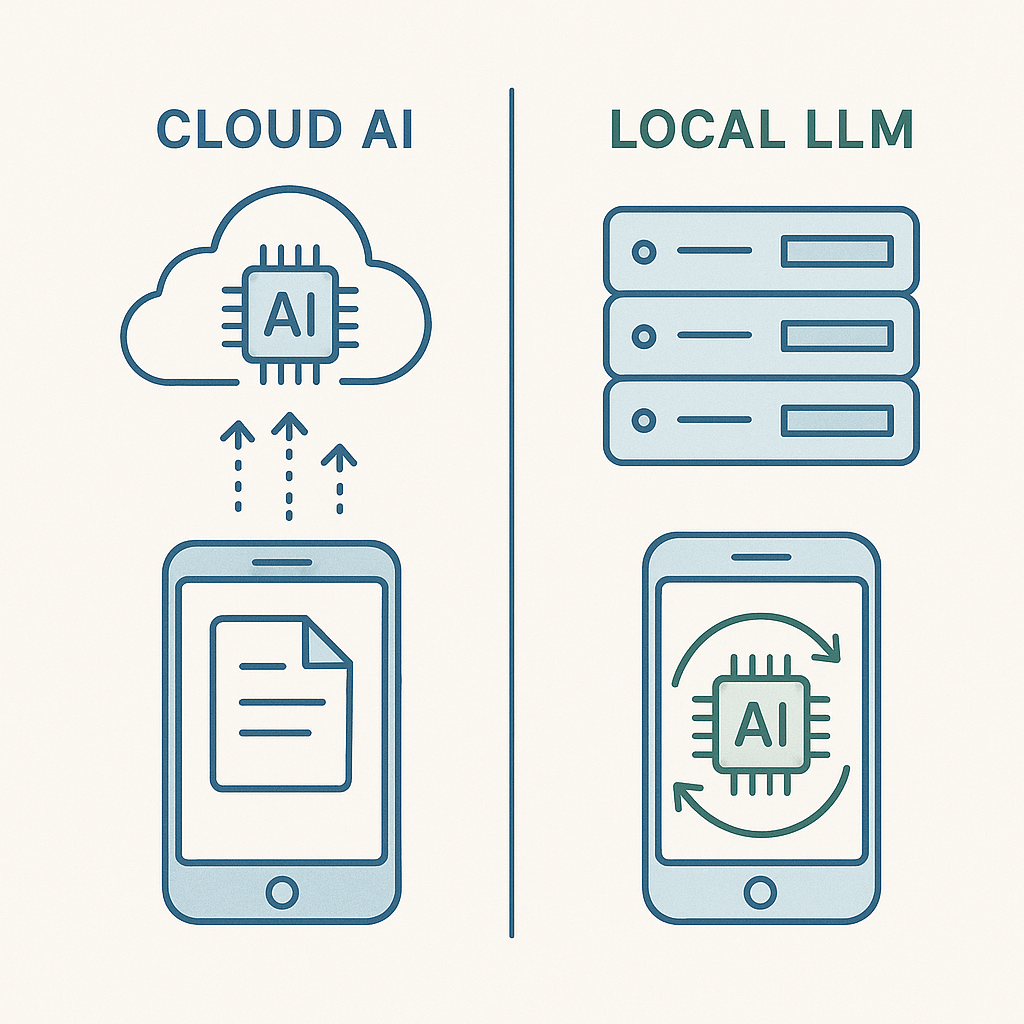
A local LLM is a large language model that runs entirely on your device. Your prompts stay on your computer. The model's responses generate locally. No data travels to external servers. No company stores your conversation history. No training happens on your inputs.
This architecture differs fundamentally from cloud-based AI services like ChatGPT, Claude, or Gemini, where your prompts leave your device, get processed on remote servers, and potentially contribute to model training. The tradeoff is straightforward: local processing sacrifices some capability and convenience for complete control over your data.
The Technical Difference Between Local and Cloud LLMs
A language model is a neural network trained on massive text datasets to predict what words come next. The model consists of billions of parameters, numerical weights that determine how the network processes input and generates output. When you send a prompt to ChatGPT, that prompt travels encrypted over the internet to OpenAI's servers, where the model processes it using their infrastructure, then sends the response back to your device.
A local LLM reverses this flow. You download the model file, typically several gigabytes, to your computer. When you enter a prompt, your device's processor (CPU) or graphics card (GPU) performs all the calculations needed to generate a response. Nothing leaves your machine unless you explicitly configure external connections.
The model file itself is static. It doesn't change based on your prompts. Training a model requires enormous computational resources and specialized datasets, which happens once before distribution. When you run inference (generating responses), you're using the frozen weights from that training process. Your local device doesn't retrain the model, it just applies the existing parameters to your input.
This distinction matters for privacy. Cloud services can log your prompts, analyze patterns across users, and incorporate your data into future training runs. CISA's cybersecurity guidance emphasizes that data sent to third-party services becomes subject to that service's retention and usage policies, regardless of encryption in transit. Local processing eliminates this exposure entirely, there's no third party to trust or audit.
What "Local" Actually Means in Practice
Running a model locally means the software executes on your hardware using your computational resources. The model loads into your device's RAM, and your processor performs the matrix multiplications and transformations that generate text. This happens whether you're connected to the internet or not. Airplane mode doesn't disable a local LLM.
The model file typically comes from a public repository like Hugging Face, downloaded once and stored permanently on your drive. Popular options include Llama models from Meta, Mistral models from Mistral AI, and various community-created variants. File sizes range from around 4GB for smaller 7-billion-parameter models to 50GB or more for larger 70-billion-parameter versions.
You interact with the model through software that provides a user interface and handles the technical details of loading the model, processing your input, and displaying output. Options include Ollama (command-line and API), LM Studio (graphical interface), and text-generation-webui (web-based interface). These tools manage model loading, memory allocation, and inference parameters, but the core processing still happens locally.
Configuration determines what data leaves your device. Some local LLM tools offer optional features like cloud synchronization of conversation history, telemetry reporting, or integration with external services. These features are opt-in, but you need to verify your setup. Check network activity during use. A properly configured local LLM should show zero outbound connections to AI service providers during inference.
Hardware Requirements and Performance Tradeoffs
Local LLMs demand significant computational resources. The minimum viable setup for a 7-billion-parameter model is roughly 16GB of RAM and a modern multi-core processor. Performance improves dramatically with a dedicated GPU that has at least 8GB of VRAM. Apple Silicon Macs (M1 and newer) handle local inference well due to unified memory architecture that lets the GPU access system RAM efficiently.
Model size directly affects both capability and hardware requirements. A 7B parameter model fits in 16GB of RAM and generates responses at around 10-20 tokens per second on a recent laptop. A 13B model needs 24GB and runs slower. A 70B model requires 80GB+ of RAM or a high-end GPU setup and generates tokens at maybe 2-5 per second on consumer hardware. Larger models generally produce better responses, but the performance penalty makes them impractical for many users.
Quantization reduces these requirements by compressing model weights from 16-bit or 32-bit precision down to 4-bit or 8-bit representations. A 7B model that originally required 14GB of RAM might run in 4GB when quantized to 4-bit precision. The tradeoff is subtle quality degradation, responses become slightly less coherent or accurate. For many use cases, the performance gain justifies this loss.
Response speed matters more than you'd expect. A cloud service like ChatGPT returns responses in seconds. A local 70B model on marginal hardware might take 30 seconds to generate a paragraph. This latency changes how you interact with the tool. Iterative conversations become tedious. Quick lookups feel inefficient. You adapt by batching requests or accepting slower workflows.
Privacy Guarantees and Limitations
The core privacy guarantee is simple: if the model runs locally and sends no network traffic, your data never leaves your device. No company sees your prompts. No logs accumulate on remote servers. No training data incorporates your inputs. This architecture eliminates entire categories of privacy risk that exist with cloud services.
But "local" doesn't mean "automatically private." You still need to verify configuration. Some local LLM tools include analytics that phone home. Others offer cloud backup of conversation history. Browser-based interfaces might load external resources. The software itself could contain vulnerabilities that leak data. Running a local model is necessary but not sufficient for privacy, you also need to audit the software stack.
Conversation history typically stores in plaintext files on your device. Anyone with access to your computer can read these logs. Full disk encryption protects against physical theft, but an unlocked session exposes everything. If you're running a local LLM specifically for privacy, you need to secure the host system too. Disk encryption, screen locks, and user account separation all matter.
The model file itself poses minimal privacy risk. It's a static artifact containing billions of numbers that represent learned patterns from the training data. You can't extract specific training examples from a model, the compression is lossy and irreversible. But the model does encode biases and patterns from its training corpus. If that corpus included private data (which is unlikely for publicly released models but theoretically possible), those patterns persist in the weights.
Local processing also means local storage. Your conversation history accumulates on your drive. Unlike cloud services where you can delete your account and request data removal, local data persists until you manually delete it. This is both a feature (you control retention) and a risk (you're responsible for cleanup). If you're using a local LLM to process sensitive information, you need a plan for securely erasing that data later.
Model Capability Compared to Cloud Services
Local models lag behind frontier cloud models in raw capability. GPT-4, Claude 3.5, and Gemini 1.5 represent the current state of the art, trained on massive datasets using computational resources that cost millions of dollars. The largest local models you can run on consumer hardware are typically 6-12 months behind this frontier and trained on smaller datasets with less compute.
This gap manifests in specific ways. Complex reasoning tasks, multi-step logic, nuanced analysis, creative problem-solving, favor larger models with more parameters and better training. A local 13B model handles straightforward questions, summarization, and basic coding assistance reasonably well. It struggles with ambiguous prompts, domain-specific expertise, and tasks requiring extensive context.
Researchers measure model performance using benchmarks like MMLU (Massive Multitask Language Understanding), which tests knowledge across 57 subjects, and HumanEval, which measures coding ability. A typical local 7B model scores around 50-60% on MMLU. GPT-4 scores above 85%. For coding, local models might solve 30-40% of HumanEval problems versus 67% for GPT-4. These numbers are rough but illustrate the capability gap.
But capability isn't everything. Local models excel at tasks where privacy matters more than perfection. Drafting sensitive emails, brainstorming confidential strategy, analyzing proprietary data, these use cases benefit from the privacy guarantee even if the output quality trails cloud alternatives. You're trading some capability for complete control.
The capability gap narrows over time. Open-source models improve as researchers share techniques and training methods. A 13B model from 2026 outperforms a 70B model from 2023 on many benchmarks. Hardware advances make larger models practical on consumer devices. The tradeoff between local and cloud processing shifts gradually toward local as both models and hardware improve.
Common Use Cases for Local LLMs
Local LLMs fit specific scenarios where privacy justifies the capability tradeoff. Writing assistance for sensitive documents, legal memos, medical notes, confidential business communication, benefits from local processing. You get grammar suggestions, tone adjustments, and structural feedback without exposing the content to a third party.
Code assistance represents another strong use case, particularly for proprietary codebases. A local model can suggest completions, explain functions, and help debug without sending your code to an external service. The suggestions might be less sophisticated than GitHub Copilot, but the privacy guarantee matters when you're working on unreleased features or internal tools.
Research and analysis of confidential data works well locally. You can feed a local model internal documents, customer data, or strategic plans for summarization and analysis without that data leaving your environment. The model's understanding might be shallower than a frontier cloud model, but the privacy boundary stays intact.
Personal knowledge management benefits from local processing. Using an LLM to organize notes, extract insights from journals, or maintain a personal wiki makes sense locally if that content is private. You're building a system that learns from your data without exposing it to external training.
Some users run local LLMs simply to avoid surveillance. If you're uncomfortable with the idea of a company logging every question you ask an AI, local processing eliminates that concern. You sacrifice convenience and capability, but you gain peace of mind and control.
Setting Up a Local LLM: The Basic Process
The setup process varies by tool, but the general pattern is consistent. First, you choose and download model files. Hugging Face hosts thousands of options, ranging from small 3B parameter models to large 70B variants. Model cards describe capabilities, training data, and licensing. You download the model file (or files, some models split across multiple archives) to your local storage.
Next, you install software to run the model. Ollama provides a simple command-line interface and API that works across platforms. LM Studio offers a graphical interface with drag-and-drop model loading and conversation management. Text-generation-webui runs in a browser and supports advanced features like model merging and fine-tuning. Each tool has different complexity and capabilities, but all perform the same core function: loading models and generating text.
After installation, you load your chosen model into the software. This step can take several minutes for large models as the software reads gigabytes of data from disk into RAM. Once loaded, you can start prompting. The interface typically resembles a chat window, you type a message, the model generates a response, and the conversation continues.
Configuration options control behavior. Temperature adjusts randomness (lower values produce more predictable output, higher values increase creativity). Context window determines how much conversation history the model considers (larger windows require more RAM). Top-k and top-p sampling parameters affect token selection during generation. Default settings work for most users, but tweaking these values changes output characteristics.
Performance optimization matters if you're running on marginal hardware. Quantization reduces memory requirements and speeds up inference. Running on GPU instead of CPU typically improves speed by 5-10x. Adjusting batch size affects memory usage versus throughput. These optimizations require some technical comfort but can make the difference between a usable and unusable setup.
The Security Implications of Local Processing
Local LLMs shift the security boundary from the cloud provider to your device. You're no longer trusting OpenAI, Anthropic, or Google to protect your data, you're trusting your own system security. This changes the threat model significantly.
Physical access to your device becomes a complete compromise. If someone can boot your computer from external media, they can read your conversation history, extract the model, and access any data you've processed. Full disk encryption mitigates this risk, but only when the device is powered off. An unlocked session with a local LLM running exposes everything.
Software vulnerabilities in the LLM tool itself create risk. These applications are complex, often developed by small teams, and may not undergo the same security review as commercial software. A vulnerability could allow an attacker to execute code, exfiltrate data, or compromise the system. Keeping the software updated and monitoring project security advisories matters more with local tools than with established cloud services.
The model file is an executable artifact. You're downloading multi-gigabyte files from the internet and running them on your system. While the model itself is data (numbers representing neural network weights), the software that loads and runs the model executes code. A malicious model file could theoretically contain embedded exploits, though this is more theoretical than practical given how models are distributed and verified.
Network isolation provides a strong security boundary. Running your local LLM on a device with no internet connection (or with strict firewall rules blocking all outbound traffic from the LLM process) eliminates entire categories of data exfiltration risk. This setup is impractical for most users but represents the gold standard for privacy-focused local AI use.
Cost Analysis: Local vs Cloud AI Services
Cloud AI services charge per token (GPT-4), per message (Claude Pro), or via monthly subscription (ChatGPT Plus). These costs are predictable but accumulate over time. Heavy users might spend $20-50 per month on subscriptions or hundreds in API costs for high-volume applications.
Local LLMs have upfront hardware costs but no ongoing service fees. If you already own suitable hardware, the cost is zero beyond electricity. If you need to upgrade, a GPU capable of running 13B models costs around $400-800. A high-end setup for 70B models might run $1500-3000. These are one-time investments that pay off if you use the system regularly over months or years.
Electricity costs are real but modest. A gaming-grade GPU running inference draws around 200-300 watts. At $0.12 per kWh, that's roughly $0.02-0.03 per hour of active use. Even heavy users (several hours daily) spend under $30 per year on electricity for the GPU alone. This is negligible compared to subscription costs.
The calculation shifts based on usage patterns. Occasional users who prompt an AI a few times per week probably benefit from cloud services, the convenience and capability justify the cost. Daily users processing sensitive data locally might recoup hardware investment in 6-12 months while gaining privacy benefits. The tipping point depends on individual circumstances, but local processing becomes economically viable around 10-20 hours of use per month.
Opportunity cost matters too. Time spent setting up, troubleshooting, and maintaining a local LLM has value. Cloud services abstract away this complexity. For users comfortable with technical setup, local processing is straightforward. For others, the learning curve and ongoing maintenance might outweigh the financial and privacy benefits.
The Future of Local AI Processing
Local AI processing is improving faster than cloud services in relative terms, even as cloud models advance in absolute capability. Open-source researchers share techniques that make smaller models more efficient. Hardware manufacturers optimize chips for AI workloads. The gap between local and cloud narrows gradually but consistently.
Quantization techniques improve. Early 4-bit quantization caused noticeable quality degradation. Modern methods like GPTQ and GGUF preserve more capability while achieving similar compression. This means a 13B model quantized to 4-bit today performs closer to an 8-bit version from a year ago, running in half the memory.
Hardware advances specifically target local AI. Apple's M-series chips integrate neural engines that accelerate inference. NVIDIA's consumer GPUs include tensor cores optimized for the matrix operations that dominate LLM processing. AMD and Intel are following suit. In three years, a typical laptop might handle workloads that currently require a desktop GPU.
Model architectures evolve to favor local deployment. Mixture of Experts (MoE) models activate only a subset of parameters for each prompt, reducing memory requirements without sacrificing capability. Sparse models achieve similar effects through different mechanisms. These techniques make larger effective model sizes practical on consumer hardware.
The regulatory landscape might accelerate local adoption. Privacy regulations like GDPR create liability for companies that process personal data. Using a local LLM eliminates this exposure, you're not sending data to a processor, so data protection obligations simplify. Organizations in regulated industries might mandate local processing for this reason alone.
But cloud services aren't standing still. They're adding privacy features like confidential computing, where data processes in encrypted enclaves that even the service provider can't access. They're improving transparency around training data usage and offering opt-outs for data retention. The competitive pressure from local alternatives pushes cloud providers toward better privacy practices.
Comparing Local LLM Tools and Platforms
Ollama focuses on simplicity and API access. You install it via command line, pull models with a single command, and interact through a chat interface or programmatic API. It's lightweight, cross-platform, and designed for developers who want to integrate local LLMs into applications. The tradeoff is minimal GUI, you're working in a terminal or writing code.
LM Studio provides a polished graphical interface aimed at non-technical users. You browse available models, download them with a click, and chat through a familiar interface. It handles model management, conversation history, and settings through menus and buttons. The tradeoff is less flexibility, you're constrained by what the GUI exposes.
Text-generation-webui offers the most features but the steepest learning curve. It runs as a web application, supports advanced options like model merging, fine-tuning, and extensions, and provides granular control over inference parameters. The tradeoff is complexity, setup involves Python environments, dependencies, and configuration files.
Each tool handles the same underlying task (loading models and generating text) but targets different user profiles. Ollama suits developers building applications. LM Studio fits casual users who want simplicity. Text-generation-webui appeals to enthusiasts who want maximum control. Your choice depends on technical comfort and use case.
Performance varies slightly across tools due to implementation details. Ollama uses llama.cpp under the hood, which is highly optimized for CPU inference. LM Studio also uses llama.cpp but adds a GUI layer that introduces minimal overhead. Text-generation-webui supports multiple backends (llama.cpp, ExLlama, Transformers) with different performance characteristics. In practice, these differences matter less than your hardware and chosen model.
Privacy Theater vs Real Privacy Protection
Running a local LLM creates the appearance of privacy, but real protection requires verification. The model might run locally, but the software could still phone home with telemetry. The conversation might stay on your device, but backups could sync to cloud storage. The data might not train future models, but your prompts could still leak through other channels.
Audit your setup. Use network monitoring tools to verify zero outbound connections during inference. Check the software's configuration files for analytics settings. Review the project's privacy policy and source code if available. Local processing is a necessary condition for privacy, not a sufficient one.
Consider the full data lifecycle. Where do conversation logs store? Are they encrypted at rest? What happens when you delete them? Does the software implement secure deletion, or do files persist in recoverable form? These questions matter as much as whether processing happens locally.
The model's training data creates indirect privacy concerns. If the model trained on scraped web data, it might reproduce private information from public sources. A model trained on GitHub code might suggest snippets from proprietary repositories that leaked. A model trained on social media might echo personal details from public profiles. You can't fully control this, it's baked into the model weights, but awareness matters.
Local processing also doesn't protect against side-channel attacks. Timing analysis, power consumption monitoring, and electromagnetic emanations can theoretically leak information about what a local model is processing. These attacks are sophisticated and impractical for most threat models, but they exist. If you're defending against nation-state adversaries, local processing alone is insufficient.
When Cloud AI Makes More Sense
Local LLMs aren't always the right choice. Cloud services offer real advantages that matter for many users and use cases. Recognizing when to use cloud AI is as important as knowing how to run models locally.
Capability requirements drive many users to cloud services. If you need state-of-the-art reasoning, extensive knowledge, or specialized capabilities (like advanced code generation or multimodal understanding), frontier cloud models significantly outperform local alternatives. The privacy tradeoff might be acceptable if the task demands maximum capability.
Convenience matters. Cloud services require zero setup, work across devices, and include features like conversation history sync, mobile apps, and web access. If you're prompting an AI from multiple devices throughout the day, the friction of local-only processing might outweigh privacy benefits.
Collaboration and sharing favor cloud platforms. If you're working with a team, sharing conversations or building on others' prompts, cloud services provide infrastructure for this. Local processing is inherently single-user unless you build your own sharing layer.
Some users simply don't have suitable hardware. A 4GB RAM laptop can't run even small local models effectively. Cloud services democratize access to AI capabilities regardless of device constraints. The privacy tradeoff is forced by hardware limitations, not choice.
Regulatory and compliance requirements sometimes mandate cloud services. Auditing, logging, and accountability are easier to implement with a third-party provider that maintains detailed records. Local processing makes these controls harder to demonstrate to auditors or regulators.
The Real Tradeoff
Local LLMs give you complete control over your data by eliminating the third party that processes your prompts. This architectural change removes entire categories of privacy risk, no company logs your conversations, no training data incorporates your inputs, no terms of service govern data usage.
The tradeoff is capability, convenience, and cost. Local models lag frontier cloud models by 6-12 months in raw performance. Setup requires technical comfort and suitable hardware. Performance depends on your device's specifications. You're responsible for maintenance, updates, and troubleshooting.
For users processing sensitive data, the tradeoff often makes sense. Legal professionals drafting confidential memos, researchers analyzing proprietary datasets, individuals uncomfortable with AI surveillance, these users benefit from local processing despite the limitations. The privacy guarantee justifies the capability gap.
For casual users who occasionally prompt an AI for general knowledge or creative tasks, cloud services usually make more sense. The convenience, capability, and zero-setup experience outweigh privacy concerns for non-sensitive use cases.
The landscape is shifting. Local models improve. Hardware gets faster. Tools become more user-friendly. The gap narrows. In a few years, the tradeoff might look very different. For now, local LLMs represent a viable option for privacy-conscious users willing to accept some limitations in exchange for complete data control.