DNS Spoofing on Public Networks: How Attackers Redirect Your Traffic
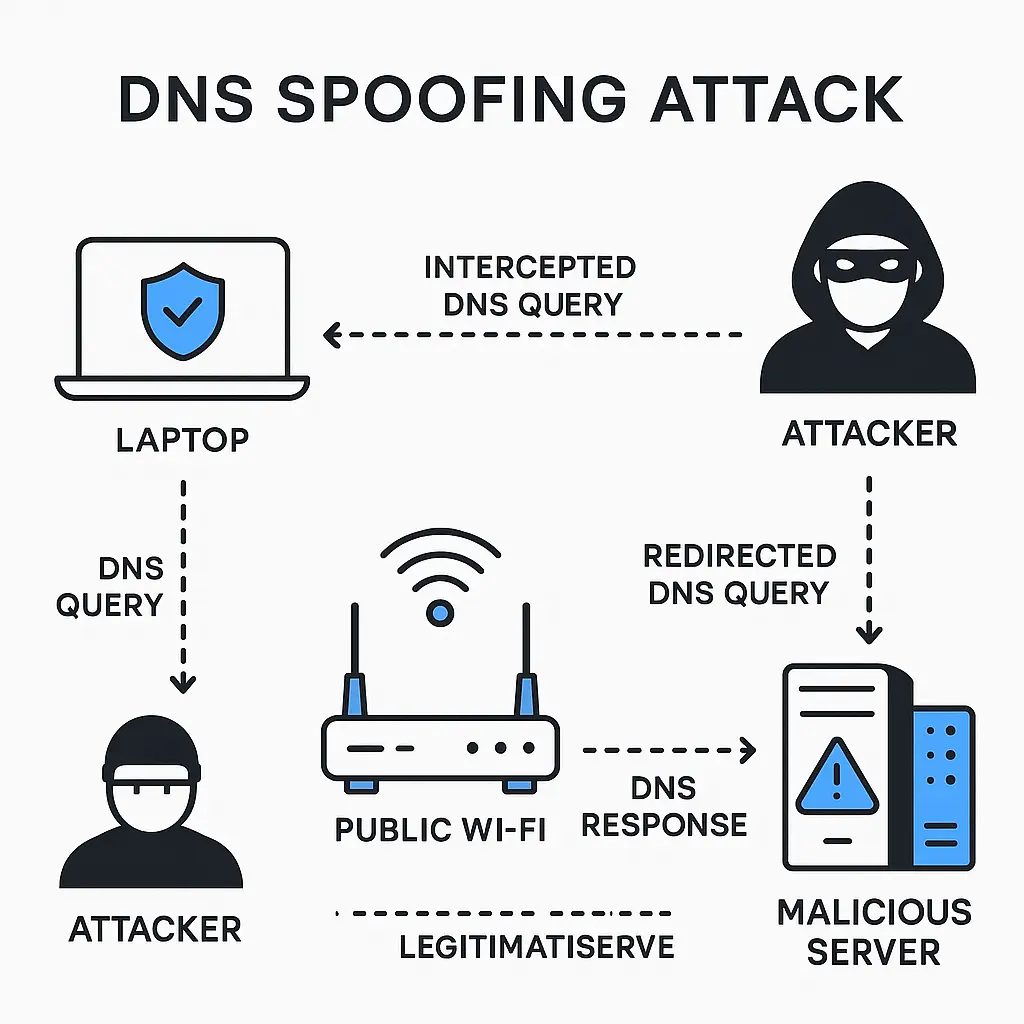
You type bankofamerica.com into your browser at a coffee shop. The site loads. You log in. Everything looks normal.
Except the site you're looking at isn't Bank of America. It's a pixel-perfect replica hosted by someone sitting three tables away. Your username and password just went to an attacker who intercepted the request before it ever reached the real bank.
That's DNS spoofing. It works because of how the internet translates human-readable addresses into machine-readable locations, and it works especially well on public networks where anyone can position themselves between you and the destination.
Here's the underlying mechanism, what makes public networks vulnerable, and what you can actually do about it.
How DNS translation works normally
When you type a web address, your device doesn't know where that site lives. It knows the name (bankofamerica.com), but it needs an IP address (something like 159.53.224.10) to actually connect.
That translation happens through the Domain Name System. Your device sends a query to a DNS server asking for the IP address associated with the domain name. The DNS server responds with the correct IP. Your device then connects to that IP address and loads the site.
The whole process takes milliseconds. You type the address, hit enter, and the page loads. The DNS lookup happens invisibly in the background.
In a trusted environment, this works fine. Your home router sends DNS queries to your internet service provider's DNS servers, or to public DNS services like Google's 8.8.8.8 or Cloudflare's 1.1.1.1. Those servers are managed by organizations with reputations to protect and infrastructure to secure.
On a public network, the trust assumptions break down.
The interception mechanism
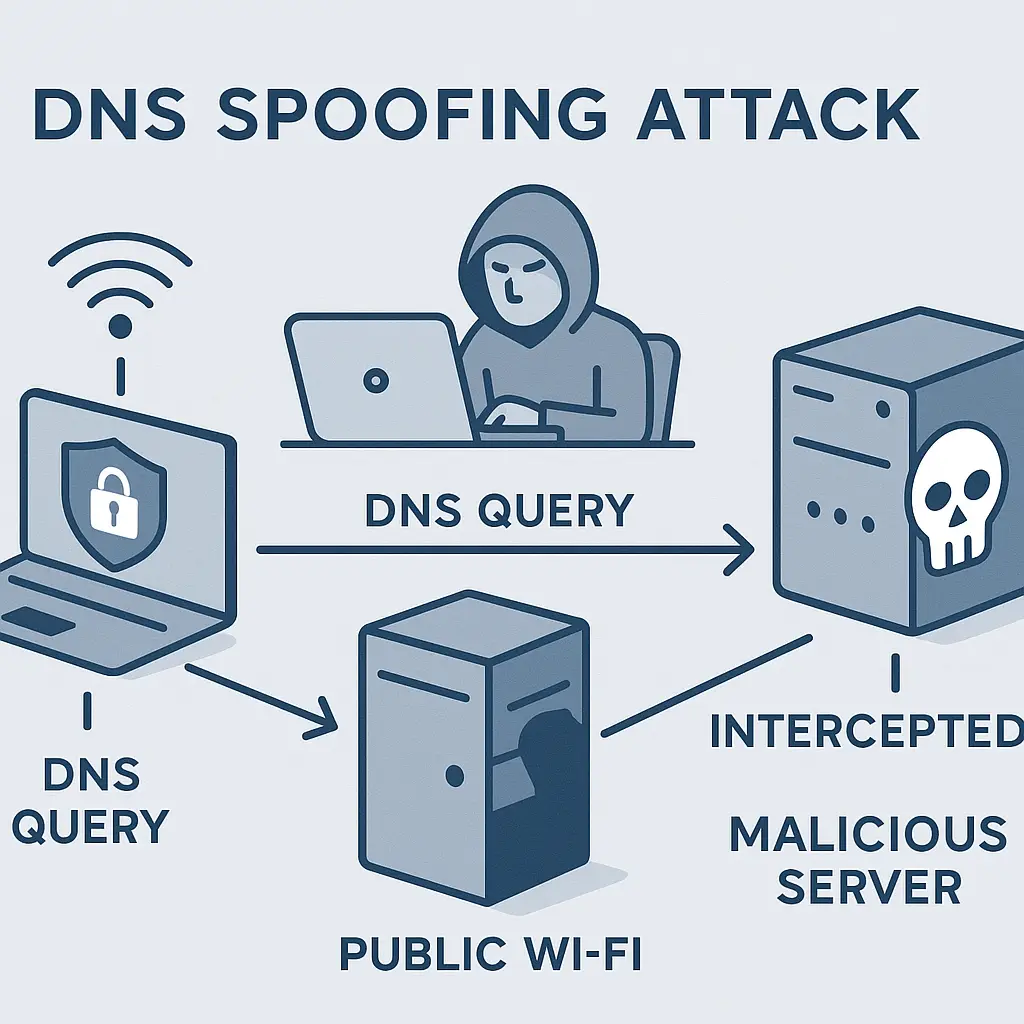
DNS spoofing exploits the gap between your request and the response. When you send a DNS query on a public network, that query travels through the local WiFi router before it reaches the DNS server.
An attacker on the same network can intercept that query. They see you asking for the IP address of bankofamerica.com. Instead of letting your query reach the legitimate DNS server, they respond first with a fake IP address that points to a server they control.
Your device accepts the first response it receives. It doesn't verify that the response came from the legitimate DNS server. It doesn't check whether multiple responses arrived and compare them. It takes the first answer and moves on.
This is the core vulnerability. DNS was designed in an era when networks were smaller, users were fewer, and trust was assumed. The protocol includes no built-in authentication mechanism. Any device that can see your DNS query can answer it.
The attacker's fake response arrives before the real one because they're physically closer to you on the network. By the time the legitimate DNS server sends back the correct IP address, your device has already moved on. The fake response wins by proximity.
What the fake site does
The attacker now controls where your browser goes when you type a legitimate address. They've set up a server that mimics the site you intended to visit. The fake site looks identical to the real one because the attacker copied the HTML, CSS, images, and layout from the legitimate site.
When you enter your username and password, the fake site captures them. It might immediately forward you to the real site afterward, so you never notice the interception. You think you mistyped your password the first time, try again on the real site, and get in. The whole attack happens in seconds.
Or the fake site might display an error message ("Our servers are experiencing high traffic. Please try again later.") and redirect you to the real site. You assume the bank's systems are slow. You don't suspect that someone just harvested your credentials.
The attacker can also use DNS spoofing to inject malware. Instead of mimicking a login page, the fake site serves a download that looks like a legitimate software update or PDF. You click, the malware installs, and the attacker gains persistent access to your device.
Why public networks enable this
Public WiFi networks in coffee shops, airports, hotels, and libraries share a common characteristic that makes DNS spoofing practical: anyone can connect.
When you join a public network, you're sharing that network with everyone else in range. Your device and the attacker's device both connect to the same router. Traffic from both devices flows through the same infrastructure.
This proximity is what makes interception possible. On your home network, you control who connects. On a corporate network, access is restricted and monitored. On a public network, the attacker is a legitimate user just like you.
The attacker doesn't need to compromise the router itself, though that's also possible and does happen. They just need to be present on the network and run software that listens for DNS queries and responds to them faster than the legitimate DNS server can.
Tools to perform DNS spoofing are not theoretical. They're available, documented, and widely used in penetration testing and security research. An attacker with moderate technical skill can deploy them in minutes.
The HTTPS complication
You might be thinking: doesn't HTTPS prevent this? Doesn't the padlock icon mean the connection is secure?
HTTPS encrypts the content of your communication with a website. It prevents eavesdropping on what you send and receive. But HTTPS doesn't prevent DNS spoofing from redirecting you to the wrong IP address in the first place.
Here's where the protection comes in: HTTPS requires the server to present a valid certificate that matches the domain name you requested. When you type bankofamerica.com, the server must prove it actually is Bank of America by presenting a certificate signed by a trusted authority.
The attacker's fake server can't produce a valid certificate for bankofamerica.com because they don't control that domain. Certificate authorities won't issue them one. When your browser connects to the fake server and requests the certificate, the certificate either won't match the domain or won't be signed by a trusted authority.
Your browser will show a warning: "Your connection is not private" or "This site's security certificate is not trusted." The warning tells you something is wrong with the connection.
This is where human behavior determines whether the attack succeeds. If you click through the warning and proceed anyway, the attacker wins. If you stop and close the tab, the attack fails.
Security researchers have found that a meaningful percentage of users click through certificate warnings. The warnings are technical, the language is confusing, and people are trained to dismiss dialog boxes that interrupt their workflow. Attackers know this and count on it.
Recognition signals you can use
DNS spoofing leaves traces you can spot if you know what to look for.
Certificate warnings are the most obvious signal. If you type a familiar address and see a certificate error, stop. Don't click through. Close the tab and try again on a different network or through a VPN.
Watch the URL bar. If you typed bankofamerica.com but the URL bar shows bankofamerica-secure.com or bankofamerica.net or any variation, you've been redirected. Attackers register domains that look similar to legitimate ones and hope you won't notice the difference.
Look for subtle design differences. A fake site might have the right logo and layout but slightly wrong fonts, colors, or spacing. These differences happen because the attacker copied the site manually or with automated tools that don't capture every detail perfectly.
Check for HTTPS. If you always access a site over HTTPS but suddenly see HTTP in the URL bar, something changed. DNS spoofing might have redirected you to an unencrypted version of the site or to a fake site that doesn't bother with HTTPS.
Pay attention to login behavior. If you enter your credentials and get an error, then try again on what looks like a different page and succeed, consider that the first page might have been fake. Attackers sometimes show an error to make you think you mistyped, then redirect you to the real site for the second attempt.
The VPN solution
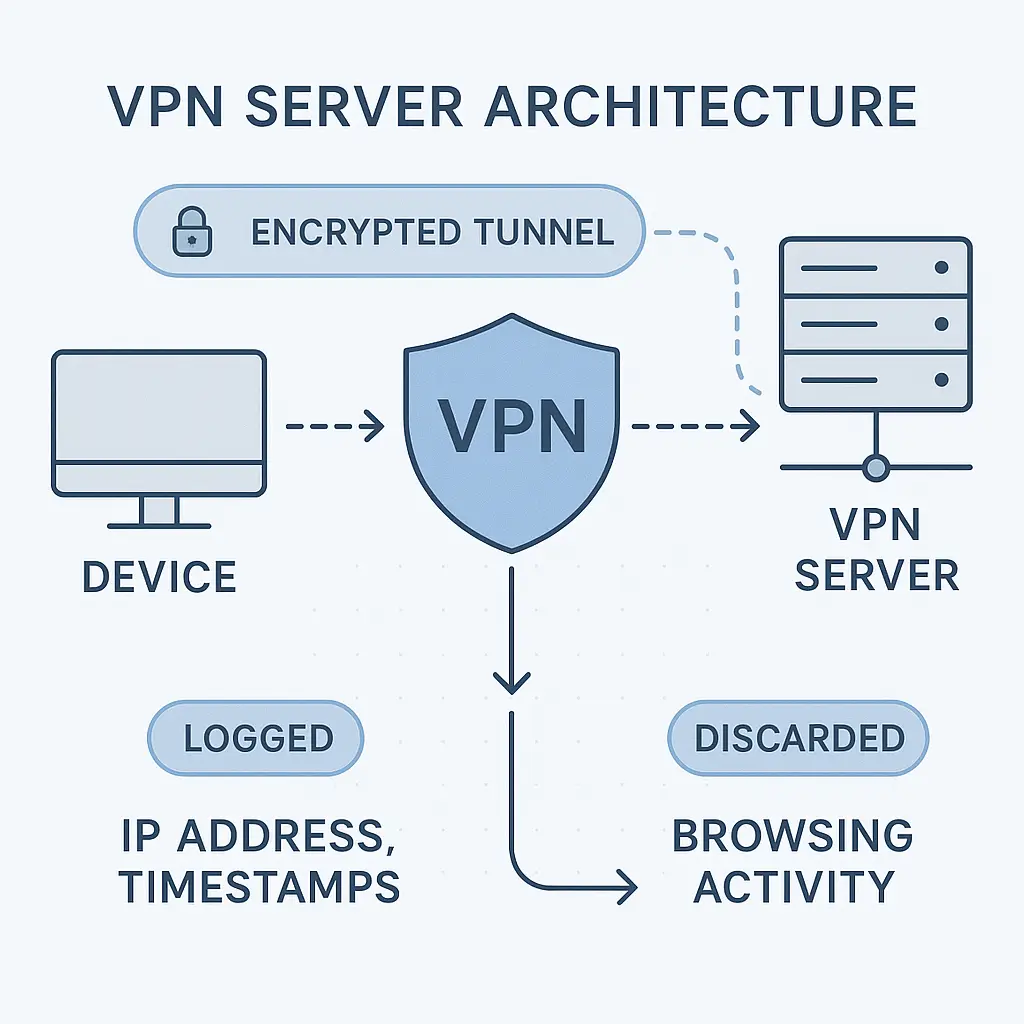
A VPN prevents DNS spoofing by encrypting all your traffic, including DNS queries, and routing it through the VPN provider's servers before it reaches the internet.
When you connect to a VPN on a public network, your device establishes an encrypted tunnel to the VPN server. All traffic goes through that tunnel. The local network can see that you're connected to a VPN, but it can't see what you're doing inside the tunnel.
Your DNS queries travel through the encrypted tunnel to the VPN provider's DNS servers. The attacker on the public network can't intercept them because they can't see inside the tunnel. They can't respond with fake IP addresses because they never see the queries in the first place.
This is why VPN services are one of the practical defenses against network-based attacks on untrusted networks. The VPN doesn't just protect your browsing traffic; it protects the DNS lookups that determine where that traffic goes.
Not all VPNs handle DNS the same way. Some VPNs leak DNS queries outside the encrypted tunnel, which defeats the purpose. Look for VPNs that explicitly prevent DNS leaks and route all DNS traffic through their own servers.
You can test for DNS leaks using online tools. Connect to your VPN, visit a DNS leak test site, and check whether the DNS servers shown match your VPN provider or your ISP. If you see your ISP's DNS servers, your VPN is leaking queries.
I use NordVPN when I work from coffee shops. It routes DNS through its own servers and has a kill switch that blocks all traffic if the VPN connection drops. That's the level of protection that actually matters on public networks.
Alternative DNS protection methods
VPNs aren't the only option. You can reduce DNS spoofing risk through other methods, though each has limitations.
DNSSEC (DNS Security Extensions) adds cryptographic signatures to DNS responses. When DNSSEC is enabled, your device can verify that the DNS response came from the legitimate DNS server and wasn't tampered with. The problem is that DNSSEC adoption is incomplete. Many domains don't support it, many DNS servers don't validate it, and many devices don't check it.
DNS over HTTPS (DoH) and DNS over TLS (DoT) encrypt DNS queries between your device and the DNS server. This prevents local network attackers from seeing what domains you're looking up or intercepting the responses. The encryption protects the query in transit, similar to how a VPN does but only for DNS traffic.
Major browsers now support DoH by default. Firefox, Chrome, Edge, and Safari can all send DNS queries over HTTPS to providers like Cloudflare or Google. This provides meaningful protection on public networks without requiring a VPN.
The limitation is that DoH only protects DNS. Your other traffic remains visible to anyone on the network. An attacker can still see which IP addresses you connect to after the DNS lookup completes. They can't spoof the DNS response, but they can still monitor your browsing behavior and potentially intercept unencrypted traffic.
Using a trusted DNS service helps but doesn't eliminate risk. Cloudflare's 1.1.1.1 and Google's 8.8.8.8 are managed by organizations with strong security practices, but the queries still travel across the public network unless you're using DoH or DoT. An attacker can intercept them before they reach those services.
The router compromise variation
DNS spoofing doesn't always require the attacker to intercept individual queries. If the attacker compromises the public WiFi router itself, they can configure it to return fake DNS responses to everyone on the network automatically.
Router compromise happens more often than most people realize. Public WiFi routers in small businesses often run with default credentials, outdated firmware, and minimal security configuration. An attacker who gains administrative access to the router can change its DNS settings to point to malicious DNS servers or configure it to perform DNS spoofing directly.
When the router itself is compromised, every device on the network receives fake DNS responses without any additional effort from the attacker. The router becomes the attack infrastructure. You connect, request a DNS lookup, and the router lies to you.
This variation is harder to detect because the fake responses come from the router you're supposed to trust. Your device sees a response from the local DNS server (the router) and accepts it. There's no obvious interception happening because the router is doing what routers normally do: handling DNS queries for connected devices.
The defenses remain the same. A VPN encrypts your DNS queries and routes them around the compromised router. DoH or DoT encrypts the queries so the router can't read or modify them. HTTPS still shows certificate warnings if the fake DNS response sends you to a malicious server.
What this means for your threat model
DNS spoofing is a real attack that happens on public networks. It's not theoretical. Security researchers demonstrate it regularly. Attackers use it to harvest credentials and distribute malware.
But it's not the most common attack you'll face on public WiFi. Passive eavesdropping on unencrypted traffic is easier and more reliable. Phishing emails are more scalable. Credential stuffing attacks against breached passwords succeed more often.
DNS spoofing requires the attacker to be on the same network at the same time you are. It requires you to request a DNS lookup while they're listening. It requires you to either ignore certificate warnings or visit a site that doesn't use HTTPS. Those conditions align less frequently than simpler attacks.
That doesn't mean you should ignore it. The attack is practical, the tools are available, and the consequences are serious. If you regularly work from public networks, you should assume that DNS spoofing is possible and take steps to prevent it.
If you occasionally check email at an airport, the risk is lower but not zero. If you never use public WiFi, DNS spoofing on public networks isn't part of your threat model at all.
The broader DNS security landscape
DNS spoofing on local networks is one attack in a larger category of DNS-based threats. Attackers also compromise DNS servers directly, poison DNS caches, and hijack DNS traffic at the ISP level.
Cache poisoning works by injecting fake DNS records into a DNS server's cache. When other users query that server, they receive the poisoned records and get redirected to malicious sites. This attack scales better than local network spoofing because one poisoned cache can affect thousands of users.
ISP-level hijacking happens when an attacker compromises the infrastructure that routes DNS queries across the internet. This is harder to pull off but affects more users. State-level actors and sophisticated criminal groups have demonstrated this capability.
These attacks operate at different layers of the infrastructure and require different defenses. Local network spoofing is the version you can most directly control through your own actions. You can't fix a poisoned DNS cache at your ISP, but you can use a VPN to route around it. You can't prevent nation-state DNS hijacking, but you can rely on HTTPS to detect when you've been redirected to a fake site.
The DNS security landscape is evolving. DNSSEC adoption is growing slowly. DoH and DoT are becoming default in major browsers. Certificate authorities are improving validation processes. But the fundamental DNS protocol remains unauthenticated, and that creates opportunities for attackers at every layer.
Practical steps you can take
If you use public networks regularly, configure your devices to use DNS over HTTPS. Most modern browsers support this in settings. Enable it and choose a reputable DNS provider like Cloudflare or Google.
Use a VPN on any network you don't control. This includes coffee shops, airports, hotels, and any WiFi network that isn't your home or office. The VPN encrypts your DNS queries and prevents local attackers from seeing or manipulating them.
Pay attention to certificate warnings. If your browser shows a security warning about an untrusted certificate, do not click through. Close the tab, disconnect from the network, and try again on a trusted connection.
Verify URLs before entering credentials. Look at the address bar and make sure the domain matches what you intended to visit. Check for HTTPS. If something looks wrong, stop and verify through a different method.
Avoid entering sensitive information on public networks when possible. If you can wait until you're on a trusted network to log into your bank or enter payment details, do that. The risk isn't high enough to justify paranoia, but it's high enough to justify basic caution.
Keep your devices updated. Operating system updates often include improvements to DNS handling, certificate validation, and network security. Install them.
The coffee shop paradox
In The Fellowship of the Ring, Gandalf speaks the password "mellon" to open the Doors of Durin, trusting that the ancient magic will recognize the Elvish word for "friend" and grant passage. The door opens because the system was designed to trust that specific word, spoken by anyone who knew it.
DNS works the same way. It trusts the first response that arrives, assuming that response came from a legitimate source. The system was designed in an era when that trust made sense. On a public network in 2026, it doesn't.
The attacker at the next table isn't speaking the password. They're intercepting your request and answering it before the real door can respond. The magic still works, but it's working for the wrong person.
The solution isn't to stop using public networks entirely. It's to add a layer of verification that the original system didn't include. HTTPS provides that verification through certificates. VPNs provide it by encrypting the entire conversation. DoH provides it by ensuring your DNS queries reach the server you intended.
DNS spoofing succeeds when you trust the network to be honest. Public networks aren't honest by default. They're open by design, which means anyone can connect, listen, and respond. Treat them accordingly.