Privacy Sandbox: What Google Is Actually Doing Instead of Third-Party Cookies
Google announced in 2020 that third-party cookies would die. Four years, multiple delays, and regulatory scrutiny later, Chrome still supports them. The replacement, called Privacy Sandbox, exists in parallel. Both systems run simultaneously in Chrome today.
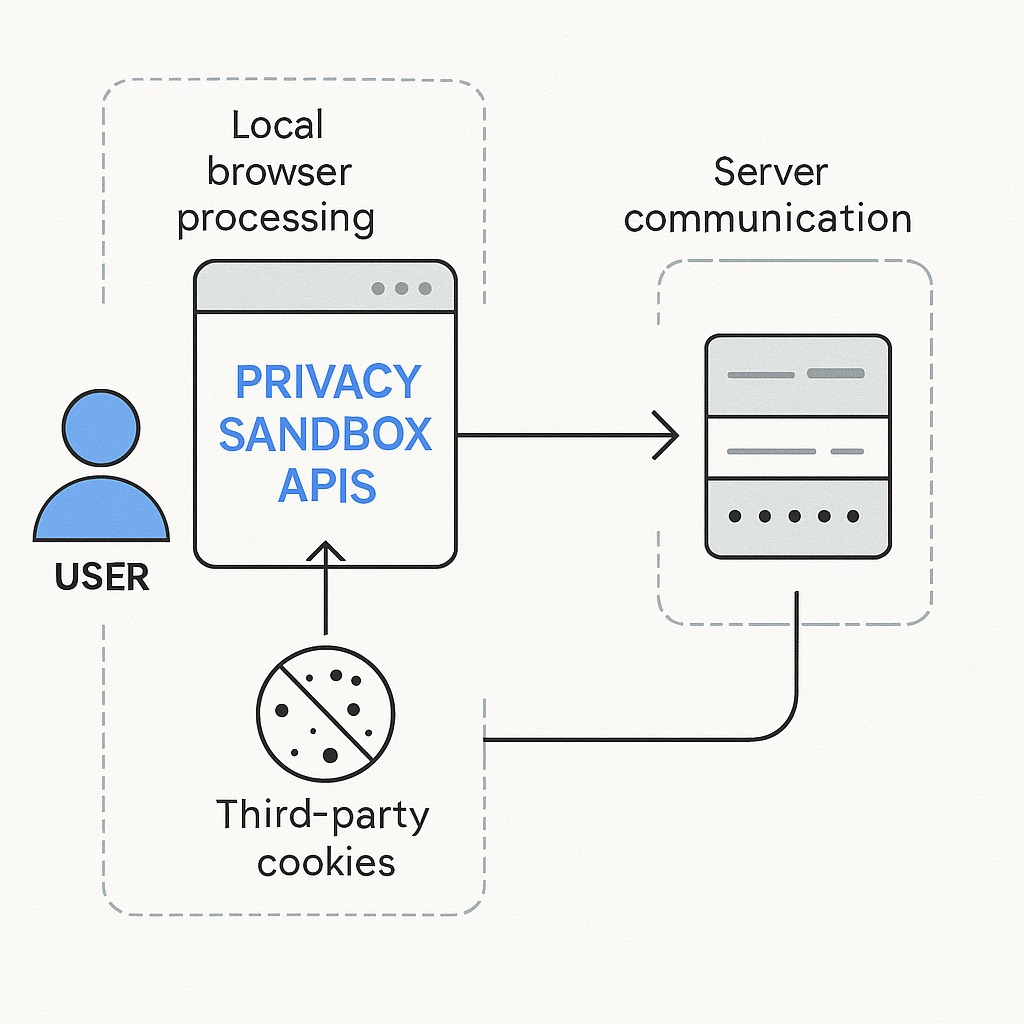
Privacy Sandbox is not one technology. It's a collection of browser APIs that handle different advertising functions: interest-based targeting, conversion measurement, fraud prevention, and cross-site identity. Each API replaces a specific use of third-party cookies. The underlying architecture shifts tracking from external servers reading cookies to your browser processing data locally and sharing summaries.
This article explains what Privacy Sandbox actually does, how the mechanism differs from cookies, and what changes for you as someone using the web.
What Third-Party Cookies Actually Did
A third-party cookie is a small text file stored by your browser when you visit a website, but set by a domain you didn't navigate to directly. When you load a news article, the page might include an ad from adnetwork.example. That ad domain sets a cookie. When you visit a shopping site that also uses adnetwork.example, the same cookie is present. The ad network reads the cookie on both sites and links your activity.
This mechanism creates persistent identifiers that follow you across unrelated websites. The ad network builds a profile: sites visited, articles read, products viewed, searches performed. That profile drives targeted advertising.
Cookies work because browsers historically sent all cookies for a domain with every request to that domain, regardless of which site initiated the request. If fifty websites embed adnetwork.example trackers, that network sees your activity on all fifty.
Mozilla's privacy documentation describes this as a fundamental architectural problem. Cookies were designed for single-site state management, not cross-site tracking. Advertisers repurposed the mechanism.
Third-party cookies enabled remarketing (showing ads for products you viewed), conversion tracking (measuring whether ads led to purchases), and frequency capping (limiting how often you see the same ad). These functions require linking activity across sites.
How Privacy Sandbox Changes the Architecture
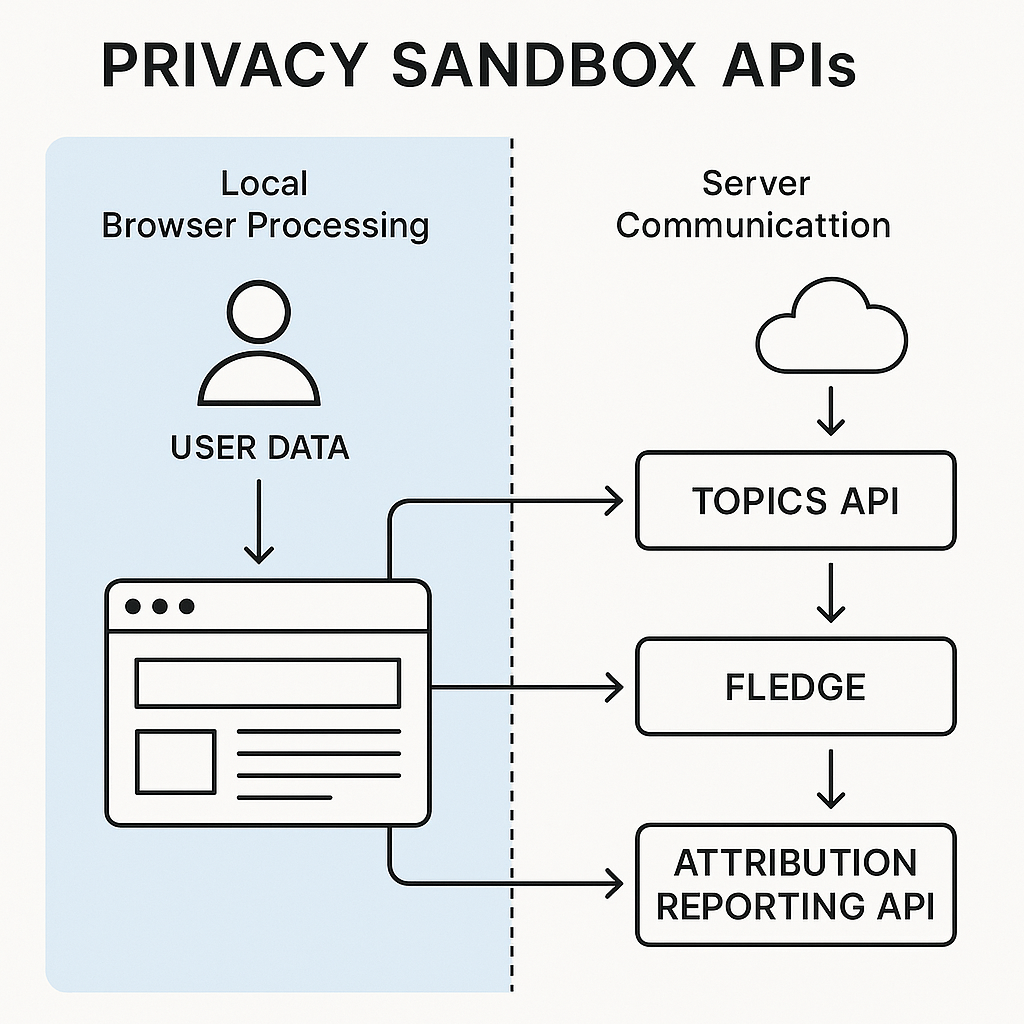
Privacy Sandbox moves tracking logic from external servers into Chrome itself. Instead of ad networks reading cookies across sites, Chrome processes your browsing data locally and provides aggregate or anonymized information through APIs.
The core architectural shift: your browser becomes the intermediary between websites and advertisers. Websites and ad networks call Privacy Sandbox APIs to request information, but they don't receive raw browsing history. Chrome processes the data and returns summary information or group assignments.
This changes who controls the data flow. With third-party cookies, ad networks saw everything directly. With Privacy Sandbox, Chrome decides what information leaves your device.
The system includes several distinct APIs:
Topics API assigns you to interest categories based on your recent browsing. Chrome analyzes the sites you visit, maps them to around 350 predefined topics (like "Fitness" or "Travel"), and shares your top three topics with websites that request them. Topics rotate weekly. Websites receive categories, not specific URLs.
Protected Audience API (formerly FLEDGE) handles remarketing. When you visit a shopping site, that site can add you to an interest group stored locally in Chrome. Later, when you visit a news site, advertisers can bid to show you ads based on those interest groups, but the auction happens inside your browser. The news site never learns which interest groups you're in.
Attribution Reporting API measures ad conversions without revealing individual user activity. When you click an ad and later make a purchase, Chrome records both events and reports the connection in aggregate form. Advertisers learn how many conversions resulted from an ad campaign, not which specific users converted.
Private Aggregation API allows websites to collect aggregate statistics about user behavior without identifying individuals. Chrome adds noise to the data before reporting it, making it mathematically difficult to extract individual records.
Each API addresses a specific advertising use case that previously relied on third-party cookies. The collection of APIs recreates advertising functionality with different privacy characteristics.
What Privacy Sandbox Actually Protects
Privacy Sandbox reduces cross-site tracking granularity. Ad networks no longer receive a persistent identifier that follows you across every website. They receive interest categories, group memberships, and aggregate conversion data instead.
This matters because individual tracking creates detailed profiles. An ad network that sees every article you read, every product you view, and every search you perform builds a comprehensive behavioral record. Privacy Sandbox limits that visibility.
The Topics API shares only three broad categories per week. An advertiser learns you're interested in "Fitness," not that you visited twelve specific workout sites, read articles about marathon training, and searched for running shoes in size 10.
The Protected Audience API keeps interest group membership local. A retailer can add you to a "viewed winter coats" group, but when another site requests ads, Chrome runs the auction internally. The second site never learns you're in that group.
Attribution Reporting adds noise and delays to conversion data. Advertisers can't trace individual user journeys from ad click to purchase. They receive statistical summaries: "approximately 150 conversions resulted from this campaign."
These mechanisms reduce tracking precision. You're still profiled and targeted, but with less granular data.
What Privacy Sandbox Does Not Protect
Privacy Sandbox does not eliminate tracking. It shifts tracking to a different mechanism with different tradeoffs.
Chrome still processes your browsing history to assign Topics. The browser analyzes which sites you visit and categorizes them. This happens locally, but the analysis occurs. Google's browser knows your interests.
The Protected Audience API still enables remarketing. You visit a shopping site, view products, leave, and see ads for those products elsewhere. The mechanism changes (browser-based auction instead of cookie-based tracking), but the outcome remains.
Attribution Reporting still connects your ad clicks to your purchases. The connection is aggregated and noised, but advertisers still measure which ads drive conversions. They lose individual-level data but retain campaign effectiveness metrics.
Privacy Sandbox also doesn't address first-party tracking. Websites still set their own cookies, track your behavior on their domain, and build profiles. Google Analytics still works. Facebook still tracks activity on Facebook. Privacy Sandbox only replaces third-party cross-site tracking.
The system doesn't prevent fingerprinting, where websites identify you by analyzing your browser configuration, installed fonts, screen resolution, and other characteristics. Privacy Sandbox APIs add new data points that could contribute to fingerprinting: your Topics, your interest groups, and your API interactions.
EPIC's consumer privacy work highlights that Privacy Sandbox maintains the advertising business model while changing the technical implementation. You're still the product. The packaging is different.
How This Compares to What Other Browsers Do
Chrome's approach differs fundamentally from Firefox and Safari. Those browsers block third-party cookies by default and don't replace them with alternative tracking APIs.
Firefox uses Enhanced Tracking Protection, which blocks known trackers and third-party cookies. Sites that depend on cross-site tracking break. Firefox's position: that breakage is acceptable because the tracking shouldn't happen.
Safari blocks third-party cookies and uses Intelligent Tracking Prevention (ITP) to limit first-party cookie lifetimes when tracking is detected. Safari also doesn't provide replacement APIs. Apple's model: advertising can adapt or websites can ask users to log in.
Chrome's Privacy Sandbox provides alternative tracking mechanisms specifically to preserve advertising functionality. Google's revenue depends on ads. Chrome's approach maintains ad targeting capability while claiming improved privacy.
This creates a three-way split in how browsers handle tracking. Chrome offers Privacy Sandbox APIs. Firefox and Safari block trackers without replacement. The web fragments.
Websites that depend on cross-site tracking face a choice: adapt to Privacy Sandbox APIs (which only work in Chrome), use first-party tracking and logins, or accept reduced functionality in Firefox and Safari.
The Regulatory and Industry Response
Privacy Sandbox has faced regulatory scrutiny, particularly from the UK's Competition and Markets Authority (CMA). The concern: Google controls both the browser (Chrome) and the largest ad network (Google Ads). Privacy Sandbox changes benefit Google's integrated advertising business while potentially disadvantaging competitors.
The CMA required Google to commit to several conditions before proceeding with Privacy Sandbox. Google must not give its own advertising products preferential access to Privacy Sandbox APIs. Changes to the APIs require CMA review. Google must maintain third-party cookie support until the CMA approves their removal.
These commitments explain why third-party cookies still work in Chrome in 2026. Google cannot unilaterally deprecate them. The CMA must agree that Privacy Sandbox provides sufficient functionality and doesn't unfairly advantage Google.
The FTC's privacy enforcement work has also examined how large tech platforms handle user data. Privacy Sandbox sits at the intersection of privacy claims and market dominance.
Publishers and advertisers have mixed reactions. Some support Privacy Sandbox as preferable to losing third-party cookies entirely. Others argue the APIs don't provide sufficient targeting capability and will reduce ad revenue. Still others view the entire system as Google consolidating control over web advertising infrastructure.
The advertising industry has developed alternative tracking systems in parallel: first-party data collection, authenticated user tracking, contextual advertising (targeting based on page content rather than user behavior), and various identity graph solutions that attempt to link users across sites without cookies.
Privacy Sandbox competes with these alternatives. Adoption remains incomplete because the regulatory situation is unresolved and because advertisers have invested in other approaches.
What You Can Actually Control
Chrome provides settings to disable Privacy Sandbox features. Navigate to Settings > Privacy and security > Ad privacy. You'll find controls for Topics, Protected Audience, and Ad measurement.
Disabling these features means Chrome stops processing your browsing history for ad targeting through Privacy Sandbox APIs. But it doesn't stop tracking entirely. Websites still use first-party cookies. Other tracking methods (fingerprinting, authenticated tracking) continue.
The tradeoff: disabling Privacy Sandbox while third-party cookies still work means you revert to the less private cookie-based tracking. You're choosing between two tracking systems, not between tracking and no tracking.
You can also use a different browser. Firefox and Safari block third-party cookies by default and don't implement Privacy Sandbox. Switching browsers eliminates Privacy Sandbox entirely.
Browser extensions like Privacy Badger block trackers regardless of the underlying mechanism. Privacy Badger analyzes third-party requests and blocks domains that appear to track you across sites. It works in Chrome, Firefox, and other browsers.
Using a privacy-focused browser like Brave blocks third-party cookies, blocks many trackers by default, and doesn't implement Privacy Sandbox. Brave's business model doesn't depend on advertising integration.
Consumer guidance from the FTC emphasizes that browser choice matters. The browser controls what tracking mechanisms are available. Chrome with Privacy Sandbox enabled provides one privacy model. Firefox with Enhanced Tracking Protection provides another. Neither eliminates tracking completely, but the tradeoffs differ.
The Bigger Picture: Who Controls Web Privacy
Privacy Sandbox represents a specific approach to web privacy: browser vendors implementing technical controls that balance user privacy against industry requirements. This approach assumes tracking will continue but can be made less invasive.
An alternative approach: legal frameworks that restrict tracking regardless of technical implementation. The GDPR in Europe requires consent before tracking. California's CCPA gives users the right to opt out. These laws apply regardless of whether tracking uses cookies, APIs, or other mechanisms.
The European Data Protection Board's guidance on tracking technologies addresses this tension. Legal requirements exist independent of technical methods. Privacy Sandbox must comply with GDPR consent requirements just as cookie-based tracking does.
The technical and legal approaches interact. Browsers can make tracking harder through technical means. Laws can make tracking illegal without proper consent. Users can choose browsers that align with their preferences. The combination determines actual privacy outcomes.
Privacy Sandbox shifts power toward browser vendors. Chrome decides which tracking mechanisms exist and how they work. This centralization creates new dependencies. Websites and advertisers must adapt to Chrome's APIs. Users must trust Google's implementation.
The alternative, where browsers simply block tracking without replacement, shifts power toward users but breaks existing web functionality. Publishers lose ad revenue. Websites that depend on cross-site features stop working. This creates pressure to log in everywhere, which centralizes identity with large platforms.
There's no neutral technical solution. Every approach to web tracking involves tradeoffs between privacy, functionality, business models, and power distribution.
The Seinfeld Problem
In Seinfeld, George Costanza spends an entire episode trying to get his money back for a defective suit. The store won't give him cash. They'll only offer store credit. George doesn't want store credit. He wants his money back. But the store's policy is clear: exchanges only, no refunds.
Privacy Sandbox is Google's store credit policy for tracking. Third-party cookies are going away (eventually), but Google won't give you the refund you actually want: no tracking at all. Instead, you get store credit in the form of Privacy Sandbox APIs. You can spend that credit on slightly better privacy within Google's system, but you can't opt out of the transaction entirely.
The store credit analogy captures the core tension. Privacy Sandbox improves privacy compared to third-party cookies. The improvements are real. But the framing assumes you'll accept some form of tracking. The option to leave the store entirely (use a browser that blocks tracking without replacement) exists, but Google controls the largest browser and the largest ad network. Most people stay in the store.
How Privacy Sandbox Affects Your Daily Browsing
In practice, Privacy Sandbox is mostly invisible. Chrome processes your browsing history in the background. Websites request Topics or run Protected Audience auctions. You see ads. The mechanism changed, but the surface experience didn't.
The ads you see might be slightly less targeted. Topics provides broader categories than cookie-based tracking. But advertisers adapt. They target wider audiences or shift to contextual advertising (showing running shoe ads on fitness sites rather than following individual users).
Some websites break. Features that depended on third-party cookies stop working when cookies are blocked. Privacy Sandbox doesn't always provide equivalent functionality. You might encounter more login prompts as sites shift to authenticated tracking.
Performance changes are subtle. Privacy Sandbox APIs add processing to your browser. Chrome must analyze sites, assign Topics, run ad auctions locally, and report aggregate data. This consumes CPU and memory, but modern devices handle it.
The bigger impact is architectural. Privacy Sandbox establishes Chrome as the mandatory intermediary for advertising. Websites and ad networks must use Chrome's APIs to access tracking data. This increases Google's control over web advertising infrastructure.
For users who care about privacy, the question becomes: is Privacy Sandbox better than third-party cookies? The answer is yes, with caveats. You're tracked less precisely, but still tracked. Chrome processes your data locally, but still processes it. Advertisers receive less information, but still enough to target you.
For users who want to minimize tracking entirely, Privacy Sandbox doesn't solve the problem. It's a harm reduction approach, not an elimination approach.
What Happens Next
Third-party cookie deprecation in Chrome has been delayed multiple times. Google originally planned to remove them in 2022, then 2023, then 2024. As of mid-2026, cookies still work. The CMA's regulatory process continues.
When cookies finally disappear from Chrome, Privacy Sandbox becomes the primary cross-site tracking mechanism for Chrome users. Websites and advertisers that haven't adopted Privacy Sandbox APIs will lose targeting capability in Chrome.
Firefox and Safari already block third-party cookies. Their user bases experience the post-cookie web now. Websites adapt by using first-party data, requiring logins, or accepting reduced ad revenue.
The web fragments further. Chrome with Privacy Sandbox, Firefox with Enhanced Tracking Protection, Safari with ITP, and various privacy-focused browsers each implement different tracking policies. Websites must handle all of them or choose which browsers to support fully.
Privacy Sandbox will evolve. Google continues developing new APIs and modifying existing ones based on feedback and regulatory requirements. The system is not static. What Privacy Sandbox does in 2026 differs from what it did in 2024 and will differ from what it does in 2028.
Alternative tracking methods will also evolve. Advertisers invest in first-party data collection, authenticated tracking, and probabilistic identity matching. Privacy Sandbox competes with these approaches.
Legal frameworks will continue shaping what's permissible. GDPR enforcement, state privacy laws in the US, and regulatory scrutiny of large tech platforms all affect how tracking works regardless of the technical mechanism.
Making Decisions About Privacy Sandbox
If you use Chrome and care about privacy, you face a decision: keep Privacy Sandbox enabled, disable it, or switch browsers.
Keeping Privacy Sandbox enabled gives you better privacy than third-party cookies (once cookies are removed) but maintains tracking through Chrome's APIs. This is the path of least resistance. Chrome works normally. Websites function. Ads are somewhat targeted.
Disabling Privacy Sandbox through Chrome's settings reduces tracking through those specific APIs but doesn't eliminate tracking. First-party cookies, fingerprinting, and authenticated tracking continue. You might see less targeted ads, but you'll still see ads.
Switching to Firefox or Safari eliminates Privacy Sandbox entirely and blocks third-party cookies by default. You gain stronger tracking protection but lose Chrome-specific features and might encounter more broken websites.
Using a privacy-focused browser like Brave or a browser extension like Privacy Badger adds another layer of protection regardless of which browser you choose.
The decision depends on your priorities. If you want maximum compatibility and don't mind some tracking, Chrome with Privacy Sandbox is fine. If you want stronger privacy and can tolerate occasional website breakage, Firefox or Safari is better. If you want to minimize tracking as much as possible, combine a privacy-focused browser with extensions and accept that some sites won't work.
There's no perfect choice. Every option involves tradeoffs between privacy, functionality, and convenience.
The Fundamental Question Privacy Sandbox Doesn't Answer
Privacy Sandbox addresses how tracking happens, not whether tracking should happen. The entire system assumes that targeted advertising is necessary and that the web's business model depends on it.
That assumption is debatable. The web existed before targeted advertising. Publishers funded content through subscriptions, contextual ads, and other models. Targeted advertising became dominant because it was more profitable, not because it was the only option.
Privacy Sandbox perpetuates the targeted advertising model while making it somewhat less invasive. This is a conservative approach: preserve the status quo with incremental privacy improvements.
An alternative approach would question whether cross-site tracking should exist at all. If users broadly reject tracking when given a clear choice, perhaps the business model should change rather than the tracking mechanism.
Privacy Sandbox doesn't explore that question. It assumes tracking continues and focuses on implementation details.
Whether that assumption is correct depends on your view of how the web should work. Privacy Sandbox is Google's answer. It's not the only possible answer.