ChatGPT and your data: what's actually stored, what's used, and what you control
When you type a prompt into ChatGPT, you're sending text to a server. That server processes your input, generates a response, and sends it back. Simple enough. But what happens to that text after the conversation ends? Where does it go? How long does it stay? Who can see it?
The answers matter because ChatGPT isn't a local application running on your device. It's a cloud service operated by OpenAI, and every interaction you have with it passes through OpenAI's infrastructure. Your prompts, ChatGPT's responses, and the context of your conversations all live on someone else's computers. Understanding what that means in practice requires looking at the mechanism behind the interface.
This article explains what ChatGPT does with your data. Not the marketing version. The technical version. What gets stored, what gets used for training, what gets deleted, and what you can actually control.
What happens when you send a prompt
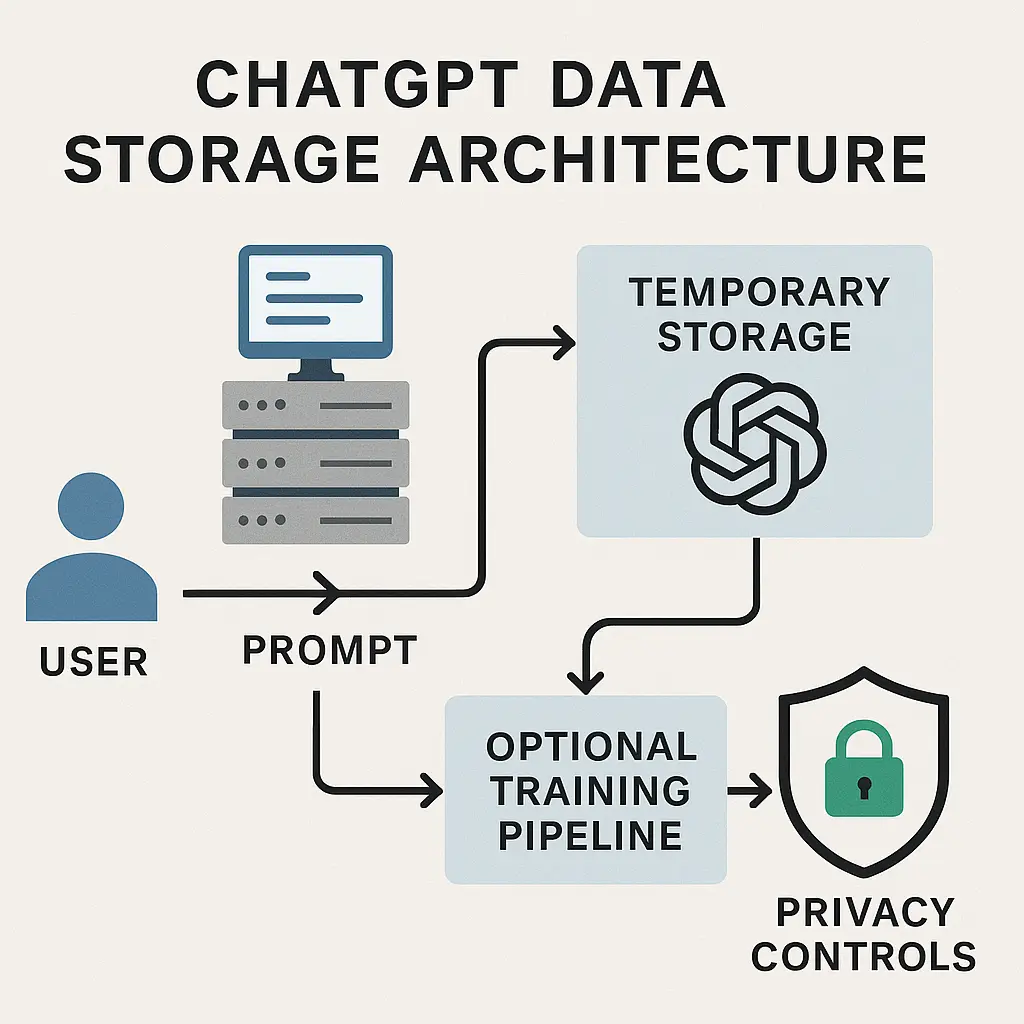
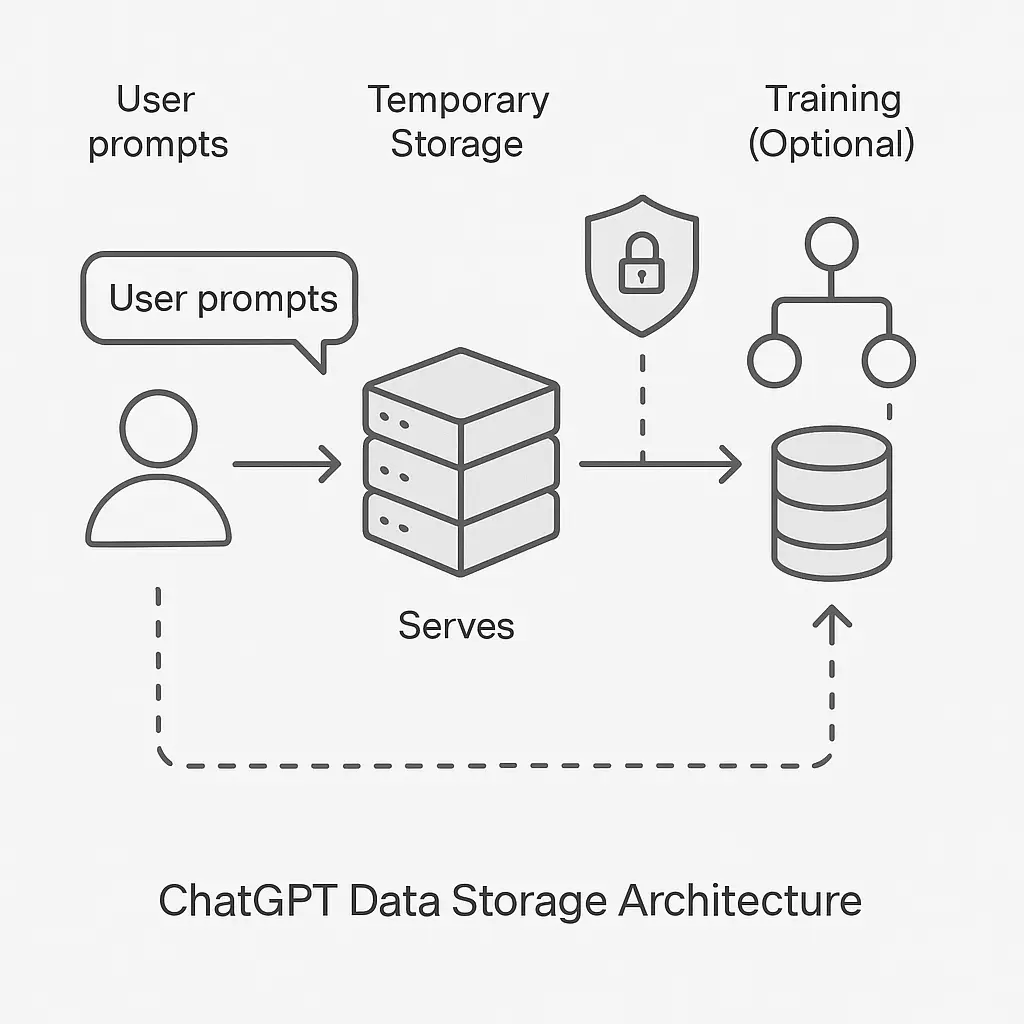
You type a message into ChatGPT. The text leaves your device, travels over the internet, and arrives at OpenAI's servers. Those servers run the model that generates the response. The model doesn't store anything itself. It's a mathematical function that takes your prompt as input and produces text as output. But the servers around that model do store things.
First, your prompt gets logged. OpenAI keeps a record of what you sent. This happens automatically, regardless of your settings, because the system needs to process your input. The prompt sits in memory while the model generates a response. After the response is complete, the prompt and response together form a conversation turn. That turn gets written to storage.
If you have chat history enabled (the default for logged-in users), the entire conversation, your prompts and ChatGPT's responses, gets saved to your account. You can see it in your history. You can return to it later. You can delete it. But while it exists, OpenAI has it.
If you've disabled chat history, the conversation still gets stored temporarily. OpenAI retains it for around 30 days to monitor for abuse and policy violations. After that period, it's typically deleted. This temporary retention happens even when you've opted out of long-term storage.
So the baseline is this: every prompt you send gets stored at least temporarily. The question isn't whether storage happens. The question is how long it lasts and what OpenAI does with it.
What OpenAI uses your data for
OpenAI uses conversation data for three purposes: delivering the service, improving the models, and monitoring for misuse.
Delivering the service means generating responses. The model needs your prompt to produce output. It also needs recent conversation context to maintain coherence across multiple turns. If you ask a follow-up question, ChatGPT references earlier parts of the conversation to understand what you mean. That context lives in temporary storage during your session.
Improving the models means training. OpenAI uses conversations to make future versions of ChatGPT better. This happens through a process called fine-tuning, where the model learns from examples of human input and desired output. Your prompts and ChatGPT's responses can become part of that training data.
This is the part that surprises people. When you chat with ChatGPT, you're not just using a tool. You're potentially contributing to the dataset that trains the next version of that tool. By default, OpenAI includes your conversations in this process unless you opt out.
Monitoring for misuse means human review. OpenAI employs people and contractors to review flagged conversations. If the automated systems detect potential violations (attempts to generate harmful content, abuse of the service, or policy breaches), a human may read your prompts and ChatGPT's responses. This review happens even if you've disabled chat history.
These three purposes overlap. A conversation stored for service delivery can later be used for training. A conversation flagged for review gets read by a human. The boundaries between these uses aren't always clear, and the defaults favor OpenAI's interests over your privacy.
What gets stored and for how long
The duration of storage depends on your account settings and the type of data involved.
With chat history enabled, your conversations stay in your account indefinitely. OpenAI doesn't automatically delete them. They persist until you manually delete them or close your account. Even after you delete a conversation from your visible history, OpenAI may retain it for up to 30 days for abuse monitoring before permanent deletion.
With chat history disabled, conversations still get stored temporarily. OpenAI keeps them for around 30 days, then deletes them. During that 30-day window, the data exists on OpenAI's servers and can be reviewed by humans if flagged.
If you use the API instead of the web interface, the retention rules differ. API requests aren't saved to your account history by default, but OpenAI still retains them for 30 days for abuse monitoring. After that, they're deleted. API users can also opt out of having their data used for model training by submitting a form to OpenAI.
For ChatGPT Plus and Team subscribers, there's an option to disable training on your data. This doesn't eliminate storage, but it prevents OpenAI from using your conversations to improve models. Free-tier users don't have this option. Their conversations can be used for training unless they disable chat history entirely.
The storage infrastructure itself is hosted on cloud providers. OpenAI uses Microsoft Azure for much of its infrastructure, which means your data lives on Azure's servers. This introduces another layer of trust. You're trusting not just OpenAI, but also Microsoft and the physical security of their data centers.
What OpenAI can see
OpenAI employees and contractors can see your conversations under certain conditions. Automated systems flag content that potentially violates OpenAI's usage policies. When that happens, a human reviewer reads the flagged conversation. This review process applies to all users, including those who've disabled chat history or opted out of training.
The reviewers see your prompts and ChatGPT's responses. They don't see your account details or personally identifying information unless you've included it in your prompts. But if you've typed your name, address, email, or other personal data into a conversation, the reviewer sees that too.
OpenAI's privacy policy describes this review process as necessary for safety and compliance. The company positions it as a tradeoff: allowing human review of flagged content in exchange for maintaining service quality and preventing misuse. Whether you find that tradeoff acceptable depends on what you're using ChatGPT for.
Beyond flagged content, OpenAI's security and engineering teams have access to stored data for debugging, infrastructure maintenance, and security purposes. This access is logged and subject to internal controls, but it exists. The people who run the service can see what's in it.
What happens to deleted conversations
When you delete a conversation from your ChatGPT history, it disappears from your account interface. But deletion on the user side doesn't mean immediate deletion on the server side.
OpenAI retains deleted conversations for up to 30 days for abuse monitoring. During that window, the data still exists in OpenAI's systems. If the conversation was flagged before deletion, it remains available for review. After 30 days, the data is typically purged.
There's a caveat. If your conversation was already used for model training before you deleted it, that usage can't be reversed. The training process doesn't store individual conversations. It extracts patterns and incorporates them into the model's parameters. Once that happens, deleting the source conversation doesn't remove its influence from the model.
This creates a one-way door. You can delete your visible history. You can prevent future use of your data for training. But you can't undo past training. If your conversations were used to improve ChatGPT before you opted out, that contribution is permanent.
For API users, deleted data follows the same 30-day retention window. After that, it's removed from OpenAI's systems. But the same caveat applies: if the data was used for training before deletion, the training persists.
Training opt-out and what it actually does
OpenAI offers a setting to prevent your conversations from being used to train models. This option is available to ChatGPT Plus and Team subscribers through the privacy settings. Free-tier users can achieve the same result by disabling chat history entirely.
When you opt out of training, OpenAI stops using your future conversations to improve ChatGPT. Your prompts and responses still get stored (either in your account or temporarily for abuse monitoring), but they don't feed into the training pipeline.
This opt-out is prospective, not retroactive. It applies to conversations you have after enabling the setting. It doesn't remove the influence of past conversations that were already used for training. If you've been using ChatGPT for months with the default settings, your data has likely already contributed to model improvements.
API users can opt out by submitting a form to OpenAI. Once approved, their API requests won't be used for training. This process is separate from the web interface settings and requires manual submission.
The training opt-out doesn't eliminate human review. Flagged conversations can still be read by OpenAI employees and contractors, even if you've disabled training. The opt-out narrows how OpenAI uses your data, but it doesn't eliminate all use.
Encryption and who it protects against
OpenAI encrypts your data in transit and at rest. When you send a prompt to ChatGPT, the connection uses HTTPS, which encrypts the data as it travels over the internet. When the data reaches OpenAI's servers, it's stored in encrypted form.
Encryption protects against external attackers. If someone intercepts your network traffic, they see ciphertext, not your prompts. If someone breaches OpenAI's storage systems, they encounter encrypted data that's difficult to read without the decryption keys.
But encryption doesn't protect against OpenAI itself. The company holds the decryption keys. Employees and contractors with appropriate access can decrypt and read your conversations. Encryption secures the data from outsiders, not from the people who run the service.
This is standard for cloud services. When you use Gmail, Google encrypts your email. But Google can still read it. When you use iCloud, Apple encrypts your data. But Apple can still access it (unless you enable Advanced Data Protection, which uses end-to-end encryption). ChatGPT follows the same model. The encryption protects the data in storage and transit, but the service provider retains access.
If you need stronger privacy guarantees, you'd need end-to-end encryption, where only you hold the decryption keys. ChatGPT doesn't offer this. The service requires server-side processing, which means OpenAI needs access to your prompts in plaintext to generate responses.
What you can control
You have three levers to control how ChatGPT handles your data: chat history, training opt-out, and account deletion.
Disabling chat history prevents long-term storage in your account. Your conversations still get retained for 30 days for abuse monitoring, but after that, they're deleted. This is the closest you can get to ephemeral usage without leaving the platform entirely.
Opting out of training (for Plus and Team subscribers) prevents OpenAI from using your conversations to improve models. This doesn't affect storage duration, but it limits how the stored data gets used.
Deleting your account removes your conversation history and prevents future data collection. But it doesn't retroactively remove your contributions to model training. If your data was used before account deletion, that usage persists.
These controls are better than nothing, but they're not comprehensive. You can't prevent temporary storage. You can't prevent human review of flagged content. You can't reverse past training. The platform's architecture requires data collection to function, and the controls you have are adjustments within that framework, not alternatives to it.
Comparing ChatGPT to other AI services
Other AI chatbots handle data similarly. Google's Gemini, Anthropic's Claude, and Microsoft's Copilot all store your prompts and responses. All use conversation data for training by default. All offer opt-outs with varying conditions.
Google's Gemini retains your conversations in your Google account unless you delete them. Google uses this data to improve its models unless you disable the "Gemini Apps Activity" setting. Deleted conversations are removed after a retention period, similar to ChatGPT.
Anthropic's Claude offers a setting to disable training on your conversations. When enabled, your prompts and responses aren't used for model improvement. But they're still stored temporarily for trust and safety purposes.
Microsoft's Copilot integrates with your Microsoft account and retains conversation history there. Microsoft uses this data for training unless you adjust your privacy settings. The integration with other Microsoft services (Outlook, Teams, Office) creates additional data flows that complicate the privacy picture.
The common thread across all these services is that data storage and training use are defaults, not exceptions. Opting out requires navigating settings menus and understanding what each toggle actually controls. The platforms are designed to collect data first and offer privacy controls second.
What to do if you've shared sensitive information
If you've typed sensitive information into ChatGPT, passwords, API keys, personal details, confidential work material, deleting the conversation doesn't fully resolve the risk.
First, assume OpenAI has a copy. Even after deletion, the data may persist in backups or logs for some period. Treat it as compromised.
Second, rotate the sensitive information. If you shared a password, change it. If you shared an API key, revoke it and generate a new one. If you shared confidential work material, notify your organization's security team.
Third, delete the conversation immediately. This limits the window during which the data is easily accessible, even if it doesn't eliminate retention entirely.
Fourth, disable chat history and opt out of training to prevent future incidents. These settings won't fix past mistakes, but they reduce the risk of repeating them.
The larger lesson is that ChatGPT isn't a private notepad. It's a cloud service with data retention, human review, and training pipelines. Treat it accordingly. Don't type anything into ChatGPT that you wouldn't type into a shared document on someone else's server.
The Blade Runner problem
In Blade Runner, the replicants are artificial beings created by the Tyrell Corporation. They're designed to serve, but they're also monitored, controlled, and retired when they become inconvenient. Their entire existence is recorded in corporate databases. They have no privacy from their creator.
The analogy isn't perfect, but it's close enough. When you use ChatGPT, you're interacting with a system that records everything you say. The system's creator can review those records, use them to improve future versions, and retain them for purposes you don't fully control. You're not a replicant, but your data is subject to a similar dynamic. It exists at the pleasure of the corporation that built the service.
The difference is that you can walk away. You can delete your account. You can stop using the service. The replicants couldn't. But walking away doesn't erase what you've already contributed. The training data persists. The patterns extracted from your conversations remain in the model. You can exit, but your influence stays.
This is the tradeoff. You get access to a tool that can generate text, answer questions, and assist with tasks. In exchange, you contribute to the dataset that makes the tool better. The terms of that exchange are set by OpenAI, not by you. The controls you have are limited to adjusting the degree of your participation, not opting out entirely.
The reality of cloud AI services
ChatGPT isn't unique in how it handles data. Cloud AI services, by their nature, require data collection. The models run on remote servers. The training happens on aggregated datasets. The infrastructure demands scale, and scale demands data.
You can use these services with some privacy protections in place, disabling history, opting out of training, being careful about what you type. But you can't use them with complete privacy. The architecture doesn't allow it.
If you need true privacy for sensitive work, you need local models. Tools like GPT4All, LLaMA, and other open-source models can run on your own hardware. They don't send your prompts to external servers. They don't contribute to training datasets. They don't involve human review. But they also don't match the performance of ChatGPT or other cloud services.
The choice is between convenience and control. Cloud services offer better performance and easier access. Local models offer privacy and autonomy. Most people choose convenience. That's fine, as long as the tradeoff is understood.
ChatGPT stores your data. It uses your data for training unless you opt out. It allows human review of flagged content. It retains deleted conversations for weeks. These aren't bugs. They're features of the service model. Knowing that, you can decide what to share and what to keep offline.