AI Phishing Emails: How Machine Learning Changes the Attack
Phishing emails used to announce themselves. Misspelled words, broken grammar, generic greetings, urgent demands from a "bank" you don't use. The tells were reliable. You learned to spot them, and that worked for years.
That stopped working around 2023. Language models changed the game. AI-generated phishing doesn't look like phishing. It reads like correspondence from someone who knows you, uses your company's terminology, references your recent projects, and writes in grammatically flawless prose. The old tells are gone.
This is an explainer. Here's how AI phishing works, what makes it different from the templated campaigns you're used to, and what you can do about it when the emails look real.
The mechanism: how language models generate phishing
Traditional phishing uses templates. An attacker writes one email, swaps in a few variables (name, company, account number), and sends it to a list. The template is static. The same phrasing, the same structure, the same tells. Spam filters learn to recognize the patterns. You learn to recognize the patterns.
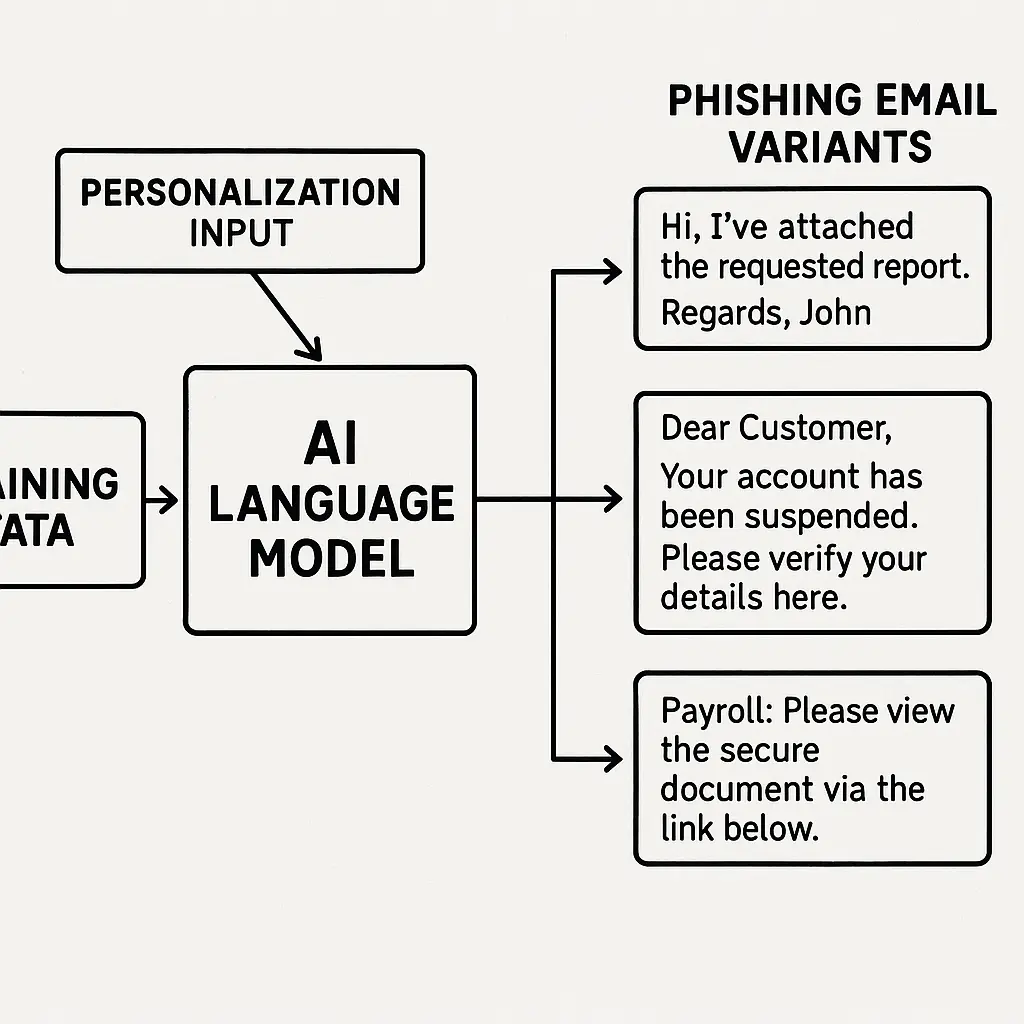
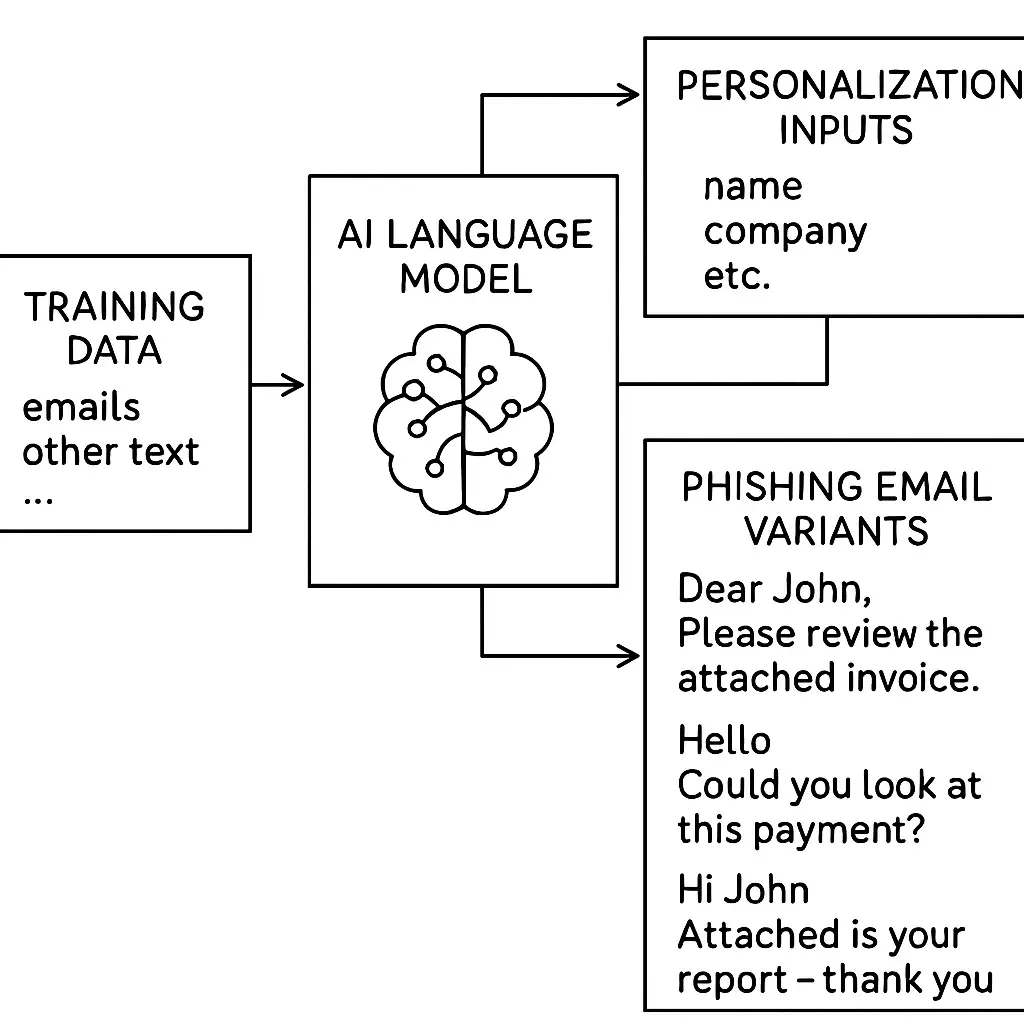
AI phishing uses large language models to generate each email individually. The attacker feeds the model a prompt: "Write an email from the IT department asking the recipient to reset their password. Use a professional tone. Mention the recent security update." The model generates text that fits the prompt. No template. No repeated phrasing. Every email is unique.
The model has been trained on billions of sentences from the internet. It knows how people write in different contexts. It knows how IT departments phrase security requests. It knows how executives close emails. It knows how colleagues ask for favors. It generates text that matches those patterns.
CISA's phishing guidance describes phishing as the first phase of most intrusions. AI doesn't change the goal. It changes the execution. The email that gets you to click, download, or reply now looks like something your colleague actually wrote.
Personalization at scale: the data ingestion problem
Spear phishing has always been more effective than mass phishing. An email that mentions your recent project, your boss's name, or your company's internal tools is more convincing than a generic "Dear Customer" blast. But personalization took time. An attacker had to research each target, craft a custom email, send it manually. That limited scale.
AI removes the scale constraint. The model ingests data about you (scraped from LinkedIn, company websites, breached databases, public filings), processes it, and generates an email that incorporates specific details. The attacker doesn't write the email. The model does. The attacker just feeds it the data and the goal.
Here's what that looks like in practice. The model sees that you work in finance at a mid-sized manufacturing company. It sees that your company recently announced a merger. It sees that you report to a CFO named Sarah. It generates an email that appears to come from Sarah, references the merger, uses your company's terminology, and asks you to review an attached spreadsheet before the board meeting next week. The tone matches Sarah's public writing. The timing makes sense. The request is plausible.
The FBI's 2024 Internet Crime Report noted a sharp increase in business email compromise losses, with cryptocurrency and AI scams bilking Americans of billions. The mechanism is the same: an email that looks legitimate, asks for something reasonable, and exploits the fact that you trust the sender.
Grammar is no longer a tell
For years, you could spot phishing by the mistakes. Misspellings, awkward phrasing, grammar that didn't sound like a native speaker. Those tells worked because most phishing came from actors who didn't speak English fluently and relied on machine translation or poorly written templates.
AI-generated phishing is grammatically perfect. The model has been trained on well-written English. It doesn't make the mistakes that humans make when they're translating or copying templates. It writes the way a competent professional writes.
This matters because you've been trained to trust grammatically correct emails. You assume that a well-written email from a plausible sender is legitimate. That heuristic no longer works. AI phishing passes the grammar test every time.
The FTC's guidance on recognizing phishing still lists "spelling and grammar mistakes" as a warning sign. That advice is outdated. The tells that worked in 2015 don't work in 2026.
Bypassing spam filters
Spam filters rely on pattern recognition. They flag emails with certain keywords ("urgent," "verify your account," "click here"), certain structures (links to suspicious domains, attachments with executable file extensions), and certain sender behaviors (mass sends from new domains, mismatched reply-to addresses).
AI-generated phishing doesn't trip those patterns. The model generates text that avoids flagged keywords. It uses natural language that doesn't match known phishing templates. The emails look like legitimate correspondence, so they pass through.
Some filters use machine learning to detect phishing, but the arms race is asymmetric. The attacker's model generates text. The defender's model tries to classify it. The attacker can test their emails against common filters before sending them, iterating until they pass. The defender is always reacting.
This doesn't mean spam filters are useless. They still catch mass phishing campaigns. But they're less effective against AI-generated emails that are crafted to look like one-off correspondence from a known contact.
The cultural reference: how AI phishing resembles the replicants in Blade Runner
In Blade Runner, replicants are artificial beings designed to be indistinguishable from humans. They look human, talk human, and pass most tests. The only way to identify them is the Voight-Kampff test, which measures subtle emotional responses that replicants can't fully replicate.
AI phishing emails are the replicants of email. They look legitimate, read legitimate, and pass most of the tests you've been using to identify phishing. The grammar is right. The tone is right. The details are right. The only way to catch them is to stop relying on surface tells and start verifying the underlying request.
The replicants failed the Voight-Kampff test because they couldn't fake the emotional responses that humans have automatically. AI phishing fails when you verify the request through a separate channel. The email can look perfect, but it can't fake the phone call to your colleague, the Slack message to your boss, or the manual check of the sender's actual email address in your company directory.
What AI can't fake: the verification layer
AI-generated phishing succeeds when you act on the email alone. It fails when you verify the request independently. The model can generate a convincing email. It can't generate a convincing phone call from your colleague. It can't log into your company's internal systems and create a fake ticket. It can't make your boss's voice say the same thing over a Zoom call.
Here's the defense: if an email asks you to do something (click a link, open an attachment, send money, share credentials, approve a request), verify the request through a separate channel before you act. Call the person. Send a Slack message. Check the internal ticket system. Walk to their desk. Use a communication method that the attacker can't control.
This sounds tedious. It is. But it's the only reliable defense when the emails look real. The old heuristics (grammar, tone, plausibility) don't work anymore. Verification does.
CISA's anti-phishing training guidance emphasizes verification as the core defense. The specific recommendation is to "use a secondary communication channel to verify requests." That's not new advice. It's just more important now.
The urgency problem: why AI phishing still uses pressure
AI-generated phishing can sound natural, but it still relies on urgency to get you to act. The email might be grammatically perfect and contextually appropriate, but it almost always includes a time constraint: "before the meeting," "by end of day," "urgent request," "account will be locked."
Urgency works because it short-circuits your verification instinct. When you feel rushed, you're more likely to act on the email without checking. The attacker knows this. The AI model knows this. The prompt includes the urgency.
The defense is to recognize urgency as a red flag, not a reason to act faster. If an email makes you feel like you need to respond immediately, that's the moment to slow down and verify. Legitimate urgent requests can wait five minutes while you confirm them. Phishing can't.
Volume and targeting: the scale shift
Traditional spear phishing was expensive. An attacker could craft a dozen highly personalized emails per day. That limited the number of targets. AI removes that limit. The model can generate hundreds of personalized emails per hour. The attacker can target an entire organization, not just the executives.
This changes the threat model. You used to assume that only high-value targets got spear phishing. Now everyone gets spear phishing. The email that mentions your recent project and asks you to review a document might be AI-generated. The email that references your colleague's name and asks you to reset your password might be AI-generated. The volume is higher. The targeting is broader.
Security researchers have found that callback phishing attacks have evolved their social engineering tactics, with operators using AI to generate convincing phone scripts and email lures at scale. The same model that writes the email can write the script for the follow-up call.
The training data problem: what AI learns from breaches
Language models are trained on public data, but attackers can fine-tune them on breached data. If an attacker has access to your company's internal emails (from a previous breach, a compromised account, or a leaked backup), they can train the model on that data. The model learns how your colleagues write, what projects you're working on, what tools you use, and what requests are normal.
The resulting emails are indistinguishable from internal correspondence. They use your company's jargon. They reference real projects. They mimic your colleagues' writing styles. The only tell is the request itself, and if the request is plausible, you might not catch it.
This isn't theoretical. Krebs on Security reported on how AI assistants are moving the security goalposts, noting that attackers are using breached data to train models that generate highly targeted phishing. The more data the attacker has, the better the model performs.
What you can control: the human layer
AI-generated phishing exploits the same human vulnerabilities that traditional phishing does. It just does it better. The email looks more legitimate, the tone is more convincing, the details are more accurate. But the core mechanism is the same: you trust the email, so you act on it.
The defense is to stop trusting the email. Treat every request as potentially fake until you verify it. This doesn't mean you assume everyone is lying. It means you confirm before you act.
Here's what that looks like in practice:
- If an email asks you to click a link, hover over the link to see the actual URL. If it doesn't match the claimed destination, don't click.
- If an email asks you to open an attachment, verify that the sender actually sent it. Call them, message them on Slack, check your internal systems.
- If an email asks you to send money, approve a payment, or change account details, verify the request through a separate channel. This is non-negotiable.
- If an email asks you to share credentials or reset your password, go directly to the service's website (type the URL yourself, don't click the link) and check if there's actually a security issue.
- If an email creates urgency, slow down. Urgency is a tactic, not a reason to skip verification.
These steps are tedious. They add friction. But they work. AI can't fake the verification layer.
The organizational problem: why this isn't just a user problem
You can verify every email you receive. Your colleagues might not. If one person in your organization falls for AI-generated phishing, the attacker gets a foothold. From there, they can move laterally, escalate privileges, and access systems that you don't control.
This is why phishing defense is an organizational problem, not just a user problem. The weakest link in your organization is the person who doesn't verify, the person who's rushing, the person who trusts the email because it looks real.
The FTC's consumer alert on phishing scams notes that even cautious people fall for well-crafted phishing. The solution isn't to blame the person who clicked. The solution is to build systems that make verification easier and reduce the damage when someone does click.
That means technical controls (multi-factor authentication, least-privilege access, network segmentation) and organizational controls (clear verification policies, easy-to-use reporting tools, regular training that acknowledges that phishing looks real).
The future problem: what happens when AI gets better
Language models are improving. The emails will get more convincing. The personalization will get more accurate. The tone will match your colleagues more closely. The requests will be more plausible.
This doesn't mean you're doomed. It means the verification layer becomes more important. The better AI gets at generating emails, the less you can rely on the email itself to tell you it's fake. You have to verify the request, not the email.
The arms race is real. Attackers will use better models. Defenders will use better detection. But the fundamental defense (verify before you act) doesn't change. AI can't fake the phone call. It can't fake the Slack message. It can't fake the in-person conversation.
What to do right now
You don't need to wait for your organization to implement new policies. You can start verifying today. Here's the process:
- If an email asks you to do something, pause before you act.
- Ask yourself: "Is this request normal? Is the timing plausible? Is the tone right?"
- If the answer to any of those questions is "I'm not sure," verify through a separate channel.
- If the email creates urgency, that's a reason to verify, not a reason to skip verification.
- If you're not sure how to verify, ask your IT team. They would rather answer a question than clean up after a breach.
This isn't a perfect defense. But it's the most reliable defense you have. AI-generated phishing looks real. Verification catches it anyway.
The old tells are gone. The grammar is perfect. The tone is right. The details are accurate. The only thing that still works is checking before you act. That's the defense. Use it.
Related reading: