Using a VPN with streaming services: what works, what doesn't
You're traveling abroad. You open Netflix. Half your watchlist is gone.
You connect to a VPN, set your location to home, refresh the page. Error message. "You seem to be using an unblocker or proxy."
The VPN marketing promised access to any region's content. The streaming platform detected you in seconds.
Here's the technical mechanism behind that detection, what actually works in 2026, and when the effort makes sense.
The licensing problem that drives everything
Streaming platforms don't block VPNs because they hate privacy. They block VPNs because content licensing is regional.
When Netflix licenses a show, the agreement specifies territories. The studio grants Netflix rights to stream The Bear in the United States, Canada, and the UK. Different regions pay different prices. Some regions don't get the show at all.
If you use a VPN to appear in a different country, you access content Netflix doesn't have legal rights to show you. The platform violates its licensing agreement. The studio can sue. Netflix has financial and legal incentives to stop you.
The same mechanism applies to Hulu, Disney+, Amazon Prime Video, Max, and every major streaming service. Regional licensing creates the geo-blocking. VPN detection enforces it.
How streaming platforms detect VPNs
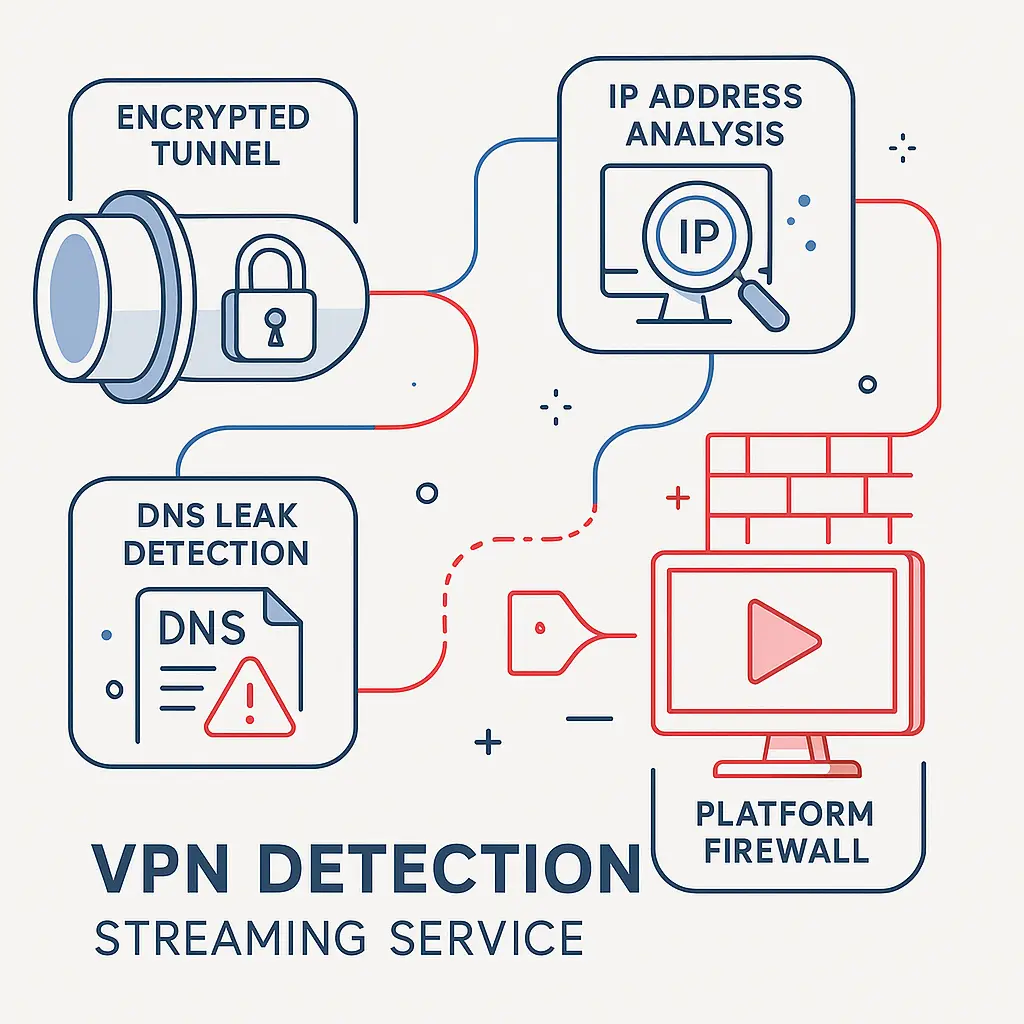
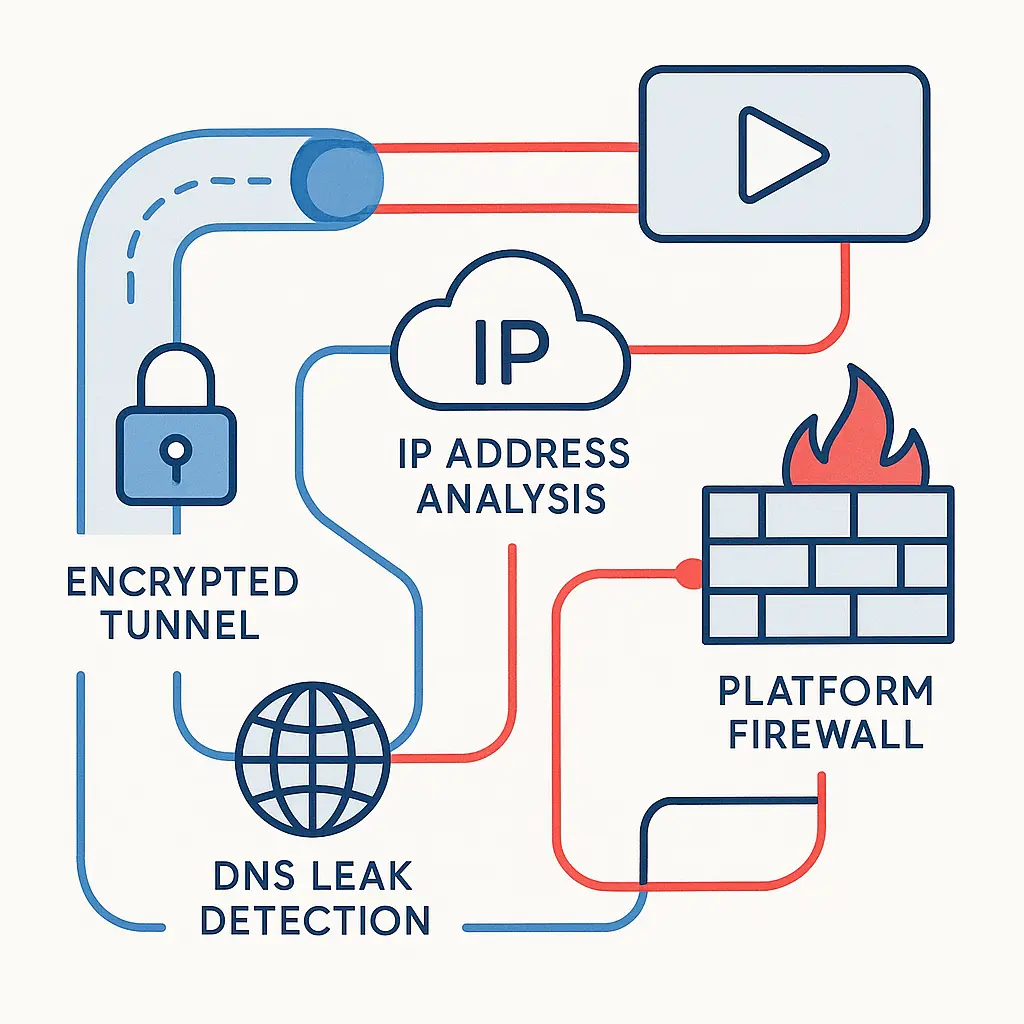
Detection happens through multiple overlapping methods. A VPN that defeats one detection layer often fails against another.
IP address analysis is the primary method. CISA guidance on network infrastructure security explains how organizations track and categorize IP addresses. Streaming platforms maintain databases of known VPN server IP addresses. They purchase these lists from commercial vendors, scrape them from VPN provider websites, and aggregate reports from users who admit to using VPNs.
When you connect through a VPN, your traffic comes from a shared server IP address. Hundreds or thousands of other users connect through the same IP. Streaming platforms see the same IP address making requests from multiple accounts in rapid succession, often with different user agents and browsing patterns. That clustering signals VPN use.
Premium VPNs rotate IP addresses to stay ahead of detection. They acquire new servers, cycle through address ranges, and retire burned IPs. The streaming platform updates its blocklist. The cycle continues. What works today fails tomorrow.
DNS leak detection catches VPNs that don't route all traffic through the tunnel. Your device sends DNS queries to resolve domain names into IP addresses. A properly configured VPN routes those queries through its own DNS servers. A misconfigured VPN leaks DNS requests to your ISP's servers.
Streaming platforms check whether your DNS resolver matches your apparent location. If your IP address appears in Germany but your DNS queries come from a U.S. ISP, the mismatch reveals the VPN. Some platforms go further and send test queries to specific domains, watching for responses that indicate split-tunnel configurations.
Connection pattern analysis looks at how you access the service. A VPN user typically connects from a data center IP address with high bandwidth, low latency variance, and consistent uptime. A residential user connects from an ISP IP address with variable bandwidth, occasional disconnections, and usage patterns that match a household.
Streaming platforms analyze connection stability, packet timing, and traffic volume. They compare your behavior to statistical models of residential and data center traffic. Outliers get flagged for additional scrutiny.
WebRTC leaks expose your real IP address even when the VPN is active. WebRTC is a browser technology that enables real-time communication for video calls and peer-to-peer connections. It can bypass the VPN tunnel and reveal your actual IP address to any website that queries it.
Streaming platforms embed WebRTC checks in their web players. If your WebRTC-exposed IP address differs from your VPN IP address, the platform knows you're masking your location. Browser extensions can block WebRTC, but many users don't configure them.
Behavioral signals track how you use the service. If you watch content in English, set your account language to English, and browse U.S.-centric categories, but your IP address places you in Japan, the pattern doesn't match. Streaming platforms use machine learning models to score the likelihood that a given session is VPN traffic based on dozens of behavioral inputs.
These signals aren't definitive on their own, but they contribute to an overall risk score. Cross enough thresholds and the platform blocks access.
What actually works in 2026
Some VPNs maintain working servers through aggressive IP rotation, residential IP proxies, and obfuscation techniques. Success is temporary, inconsistent, and expensive.
Residential IP VPNs route your traffic through real residential IP addresses instead of data center servers. The VPN provider partners with users who opt in to share their home internet connection in exchange for free VPN access or payment. Your traffic appears to come from a real household, defeating the clustering and behavioral analysis that catches data center IPs.
Residential IP VPNs work better against streaming platforms, but they're slower, more expensive, and raise different ethical questions. You're routing your traffic through someone else's home network. That person's ISP sees your traffic. If you do something illegal, their IP address gets flagged.
Residential IP services also tend to have smaller server networks and higher prices. Expect to pay around two to three times what a standard VPN costs, with more limited server selection.
Dedicated IP VPNs assign you a unique IP address that no other user shares. The address still comes from a data center, but the lack of clustering makes detection harder. Streaming platforms can't use "multiple accounts from the same IP" as a signal. They rely on other detection methods.
Dedicated IPs cost extra, typically around $3 to $5 per month on top of the base VPN subscription. They work until the streaming platform adds that specific IP to its blocklist, at which point you need a new one.
Smart DNS services don't encrypt your traffic or hide your IP address. They only reroute DNS queries to make it appear you're in a different region. Smart DNS is faster than a VPN because it doesn't add encryption overhead, but it offers zero privacy protection and fails against platforms that use IP-based geo-blocking.
Smart DNS works for some streaming services that rely primarily on DNS-based location detection. It fails against Netflix, which checks IP addresses. It's a niche tool, not a general solution.
Obfuscation protocols disguise VPN traffic to look like regular HTTPS traffic. Streaming platforms that use deep packet inspection to identify VPN protocols can be fooled by obfuscation. The VPN wraps its traffic in an extra layer that mimics normal web browsing.
Obfuscation helps in countries that actively block VPN protocols, but it's less effective against streaming platforms that focus on IP address analysis. The traffic might look like HTTPS, but it's still coming from a known VPN server IP.
When VPN detection doesn't matter
Some streaming services don't aggressively block VPNs. Smaller platforms, niche services, and platforms in regions with less stringent licensing enforcement often let VPN traffic through without interference.
YouTube doesn't block VPNs. The platform serves ads based on your location, but it doesn't restrict content access by region for most videos. Using a VPN with YouTube works consistently.
Twitch doesn't block VPNs. Live streaming platforms generally care less about geo-blocking because their content isn't subject to the same territorial licensing restrictions as on-demand video.
Spotify blocks VPNs inconsistently. The platform enforces regional restrictions on music licensing, but detection is less aggressive than Netflix. Some users report success with standard VPNs; others get blocked immediately.
If your primary use case is accessing content that isn't aggressively geo-blocked, a standard VPN works fine. The detection problem is specific to platforms with strict licensing enforcement.
The legal and terms-of-service reality
Using a VPN to bypass geo-restrictions violates the terms of service for most streaming platforms. You agreed not to do it when you signed up.
Violating terms of service isn't a crime. You won't face legal consequences for watching The Office through a VPN while traveling in Europe. The streaming platform can terminate your account, but in practice, they rarely do. The more common response is temporary blocking, you see an error message, disconnect the VPN, and regain access.
Account termination happens more often with repeat offenders who use VPNs to access content in regions where they don't have a valid payment method. If you create a U.S. Netflix account with a U.S. credit card, travel to another country, and use a VPN to maintain access, the platform is less likely to care. If you create a U.S. account with a foreign credit card and use a VPN to pretend you're in the U.S. permanently, the platform is more likely to act.
The risk isn't zero, but it's low. Most users who get caught simply lose access until they disconnect the VPN. Permanent bans are rare.
The privacy tradeoff you're actually making
When you use a VPN for streaming, you're not using it for privacy. You're using it to bypass geo-restrictions. Those are different goals with different tradeoffs.
A VPN encrypts your traffic between your device and the VPN server. Your ISP can't see what you're streaming. The streaming platform can. The VPN provider can. If law enforcement requests logs from the VPN provider, and the provider keeps logs, your activity is visible.
Some VPN providers claim they don't keep logs. Mozilla's documentation on VPN security explains how no-log policies work and what they actually protect. A true no-log VPN doesn't record which websites you visit, what content you access, or when you connect. But enforcement of those policies is inconsistent. Some providers have been caught lying. Others operate in jurisdictions with mandatory data retention laws.
If your goal is privacy, using a VPN for streaming is fine as long as you understand what you're protecting. Your ISP won't see your Netflix traffic. Your streaming platform will. Your VPN provider might.
If your goal is bypassing geo-restrictions, privacy is a secondary concern. The VPN needs to work against detection. Whether it keeps logs matters less.
When the workaround stops being worth it
You're paying around $5 to $15 per month for a VPN. If you add a dedicated IP, that's another $3 to $5. If you switch to a residential IP service, you're paying $15 to $30 per month. You're troubleshooting detection failures, switching servers, and dealing with slower speeds.
At some point, the cost and hassle exceed the value of the content you're trying to access.
If you're traveling short-term and want to finish a show you started at home, a VPN makes sense. The investment is temporary. The content matters to you. The effort is worth it.
If you're living abroad long-term and trying to maintain access to your home country's streaming library, the math gets harder. You're paying for the VPN indefinitely. Detection gets more aggressive over time. At some point, subscribing to the local version of the streaming service and accepting the regional content library becomes simpler.
If you're trying to access content that isn't available in any region you have legal access to, you're in a gray area where the VPN is competing with piracy. The VPN is more ethical, but it's also more expensive and less reliable. That's a personal decision.
The detection arms race isn't slowing down
Streaming platforms invest heavily in VPN detection. They hire engineers, buy commercial detection tools, and refine machine learning models. VPN providers invest in countermeasures. They rotate IPs, acquire residential proxies, and develop obfuscation protocols.
The platforms have more resources. They also have more to lose. Every user who bypasses geo-restrictions is a potential licensing violation. The studios pressure the platforms to enforce restrictions. The platforms respond by tightening detection.
In 2026, the VPNs that work are the ones that invest the most in staying ahead of detection. That means premium pricing, frequent server changes, and no guarantee of long-term reliability. The budget VPNs that worked in 2020 are mostly blocked now.
If you're choosing a VPN specifically for streaming, expect to pay more, switch providers occasionally, and accept that nothing works forever. The arms race continues.
The alternative nobody talks about
Wait.
Most geo-restricted content eventually becomes available in your region. Licensing agreements expire. Studios renegotiate. Shows move between platforms. The content you can't access today might be available in six months.
If you're traveling short-term, waiting isn't practical. If you're living abroad permanently, waiting is a viable strategy. The content will come to you eventually, or you'll find something else to watch.
The streaming library in your region isn't empty. It's different. Watching what's available locally instead of fighting to access content from home is the path of least resistance. It's also free.
That's not the answer anyone wants, but it's the one that avoids the detection arms race entirely.
The setup that actually works
If you decide a VPN for streaming is worth it, here's the practical setup:
-
Choose a VPN known for streaming support. NordVPN and ExpressVPN maintain dedicated streaming servers and update their infrastructure regularly to stay ahead of detection.
-
Enable the kill switch. If the VPN connection drops, the kill switch stops all internet traffic until the VPN reconnects. This prevents your real IP address from leaking to the streaming platform during disconnections.
-
Use the VPN's DNS servers. Don't rely on your ISP's DNS or public DNS like Google's 8.8.8.8. VPN providers configure their DNS servers to match the region you're connecting to, preventing DNS-based detection.
-
Disable WebRTC in your browser. Install an extension like WebRTC Leak Prevent (Chrome) or Disable WebRTC (Firefox). Test for leaks at a site like BrowserLeaks before streaming.
-
Clear cookies and cache before connecting. Streaming platforms store location data in cookies. If you accessed the service without a VPN earlier, those cookies reveal your real location even after you connect to the VPN.
-
Connect to a server in the region you want to access. If you're trying to watch U.S. Netflix, connect to a U.S. server. Don't connect to a random server and hope the platform doesn't notice.
-
Test with a less aggressive platform first. Try YouTube or Twitch to confirm the VPN is working before attempting Netflix. If those fail, your VPN setup has a problem.
-
Accept that detection happens. When the streaming platform blocks you, disconnect the VPN, switch servers, or wait a few hours and try again. Persistence sometimes works. Sometimes it doesn't.
This setup maximizes your chances, but it doesn't guarantee success. Detection is probabilistic, not binary. You might get through today and fail tomorrow using the same configuration.
The decision framework
Use a VPN for streaming when:
- You're traveling short-term and want to access content from home
- The content you need isn't available in your current region and waiting isn't practical
- You're willing to pay for a premium VPN and accept detection failures
- You understand the terms-of-service risk and accept it
Don't use a VPN for streaming when:
- You're living abroad long-term and can subscribe to local services
- The content is available in your region through a different platform
- You're not willing to troubleshoot detection issues
- You expect the VPN to work reliably and permanently
The decision depends on how much the content matters to you, how much time you're willing to spend fighting detection, and whether the cost justifies the access.
For most people, most of the time, the answer is no. The VPN works for privacy, security on public WiFi, and accessing region-free content. Streaming is the edge case where the technology fights the business model. The business model usually wins.