The Unsubscribe Link That Wasn't Really an Unsubscribe: Are They Safe?
You're clearing your inbox on a Tuesday morning when you spot another promotional email from a retailer you don't remember signing up for. The unsubscribe link sits at the bottom, small and gray, exactly where it's supposed to be. You move your cursor toward it, then pause. Is this safe? Could clicking this link confirm your email address to spammers? Could it install malware? Could it be a phishing trap?
The answer is more complicated than "yes, always safe" or "no, never click." Unsubscribe links occupy a strange position in email security advice. Some sources tell you to click them every time. Others warn that clicking anything in an unsolicited email is dangerous. Both positions contain truth, but neither tells the full story.
Here's what actually happens when you click an unsubscribe link, how attackers weaponize them, and how to tell the difference before you click.
How Legitimate Unsubscribe Links Work
A legitimate unsubscribe link does exactly what it says: it removes your email address from a mailing list. The mechanism is straightforward. The link contains a unique identifier tied to your email address in the sender's database. When you click it, your browser sends a request to the sender's server. The server processes that identifier, marks your email address as unsubscribed, and removes you from future mailings.
The FTC's CAN-SPAM Act requires commercial emails to include a working unsubscribe mechanism. Companies must honor unsubscribe requests within 10 business days. The law creates a baseline: if a company is operating legally in the United States, their unsubscribe link must function as advertised.
This doesn't mean every unsubscribe link is safe. It means legitimate companies have a legal obligation to make their unsubscribe links work. Scammers operating outside U.S. jurisdiction or willing to break the law face no such constraint.
The technical implementation varies. Some unsubscribe links work with a single click. Others take you to a preferences page where you confirm your choice or select which types of emails to stop receiving. Some require you to log in first. The variation is normal, but it also creates opportunities for attackers to hide malicious links among legitimate patterns.
How Attackers Weaponize Unsubscribe Links
Attackers use unsubscribe links in three specific ways. Each exploits a different aspect of how people interact with email.
Email validation. The first and most common use is confirming that your email address is active and monitored. When you click an unsubscribe link in a phishing email, the server logs that click. The attacker now knows your email address reaches a real person who opens messages and interacts with links. Your address becomes more valuable. It gets added to lists sold to other spammers or used in targeted phishing campaigns.
This is not theoretical. Researchers have found that clicking unsubscribe links in spam emails correlates with receiving more spam, not less. The mechanism is simple: you've identified yourself as someone who responds to unsolicited email.
Phishing page redirect. The second use is redirecting you to a fake login page. The unsubscribe link takes you to a site that looks like the company's preferences portal. It asks you to log in to confirm your unsubscribe request. You enter your credentials. The attacker captures them. This is a standard phishing technique dressed up as an unsubscribe workflow.
The fake page often mirrors the real company's branding closely enough that you don't notice the discrepancy. The URL might be slightly misspelled or use a different top-level domain. The attacker is betting that you're focused on the task, unsubscribing, and won't scrutinize the page carefully.
Malware delivery. The third use, less common but more dangerous, is delivering malware through the unsubscribe link itself. The link redirects to a site that attempts a drive-by download or exploits a browser vulnerability. Modern browsers and operating systems have made this harder to execute, but it remains possible, especially on unpatched systems.
I think this third category gets more attention in security advice than its actual prevalence warrants. Drive-by downloads are difficult to pull off in 2026. Most attackers find email validation and credential phishing more reliable. But the risk is not zero, and it's the one that justifies the blanket "never click anything in suspicious email" advice.
The Reality Check: When Unsubscribe Links Are Actually Safe
Here's where security advice often fails: it treats all unsubscribe links as equally risky, or it treats them all as safe. Neither is true. The safety of an unsubscribe link depends on the email it's attached to.
Unsubscribe links are safe when:
- The email comes from a company you've done business with or knowingly signed up for.
- The sender domain matches the company's official domain (not a lookalike).
- The email is personalized with your name or account details the company would have.
- The formatting and branding match previous emails from that company.
- Hovering over the unsubscribe link shows a URL that belongs to the company's domain or a known email service provider like SendGrid or Mailchimp.
When these conditions are met, clicking the unsubscribe link is the correct action. It removes you from the mailing list efficiently and stops future emails. Marking the email as spam instead creates a different problem: your email provider learns to filter messages from that sender, but the sender keeps sending them. You're treating a legitimate newsletter like a phishing attempt.
Unsubscribe links are risky when:
- The email comes from a sender you don't recognize.
- The sender domain doesn't match the company being impersonated.
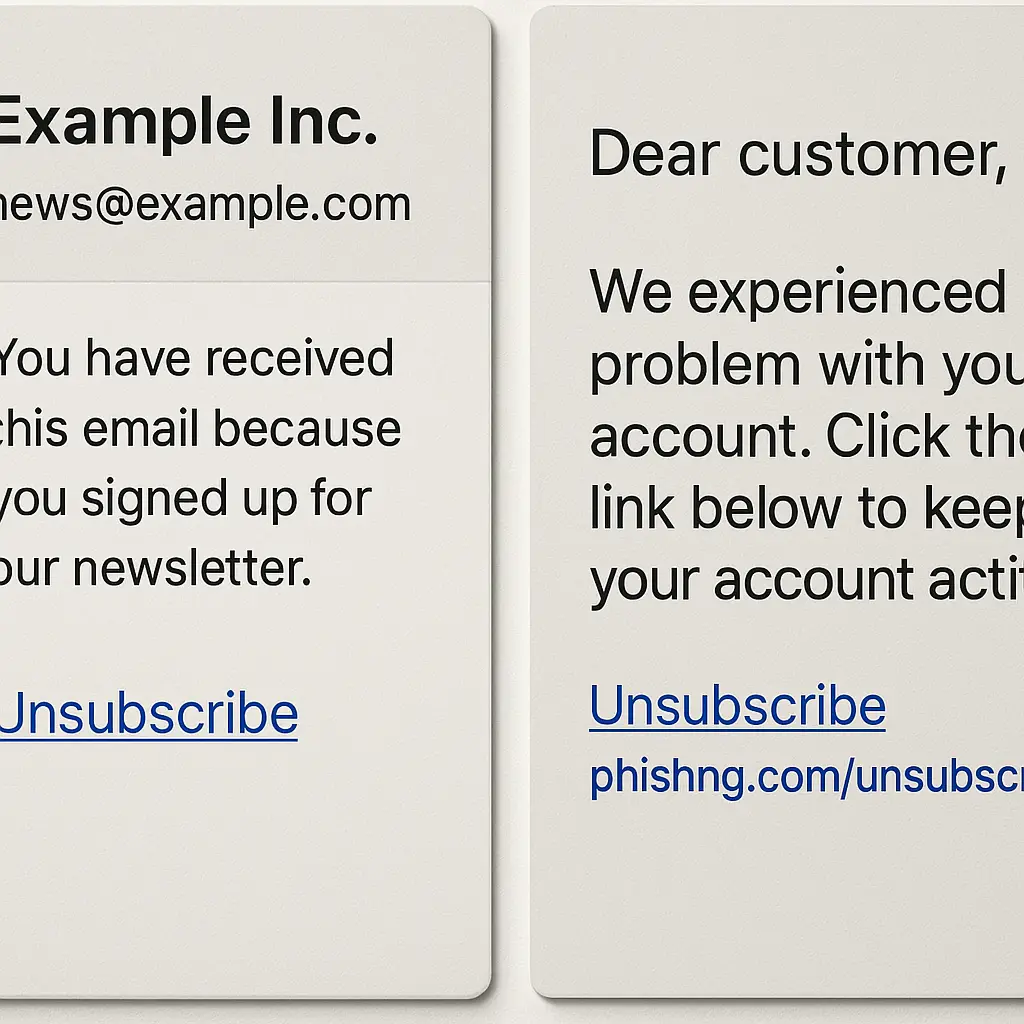
- The email uses generic greetings like "Dear Customer" instead of your name.
- The message creates urgency or threatens consequences if you don't unsubscribe.
- Hovering over the unsubscribe link shows a URL that doesn't match the sender or uses a suspicious domain.
- The email contains other phishing indicators, misspellings, poor grammar, requests for personal information.
When these conditions are present, clicking the unsubscribe link is a mistake. You're interacting with an attacker's infrastructure. The correct action is marking the email as spam or phishing, then deleting it.
The challenge is that attackers deliberately blur the line. They send emails that look legitimate enough to pass a quick glance but fall apart under scrutiny. Your job is to scrutinize before you click.
How to Verify an Unsubscribe Link Before Clicking
Verification takes around 30 seconds. It's faster than recovering from a compromised account.
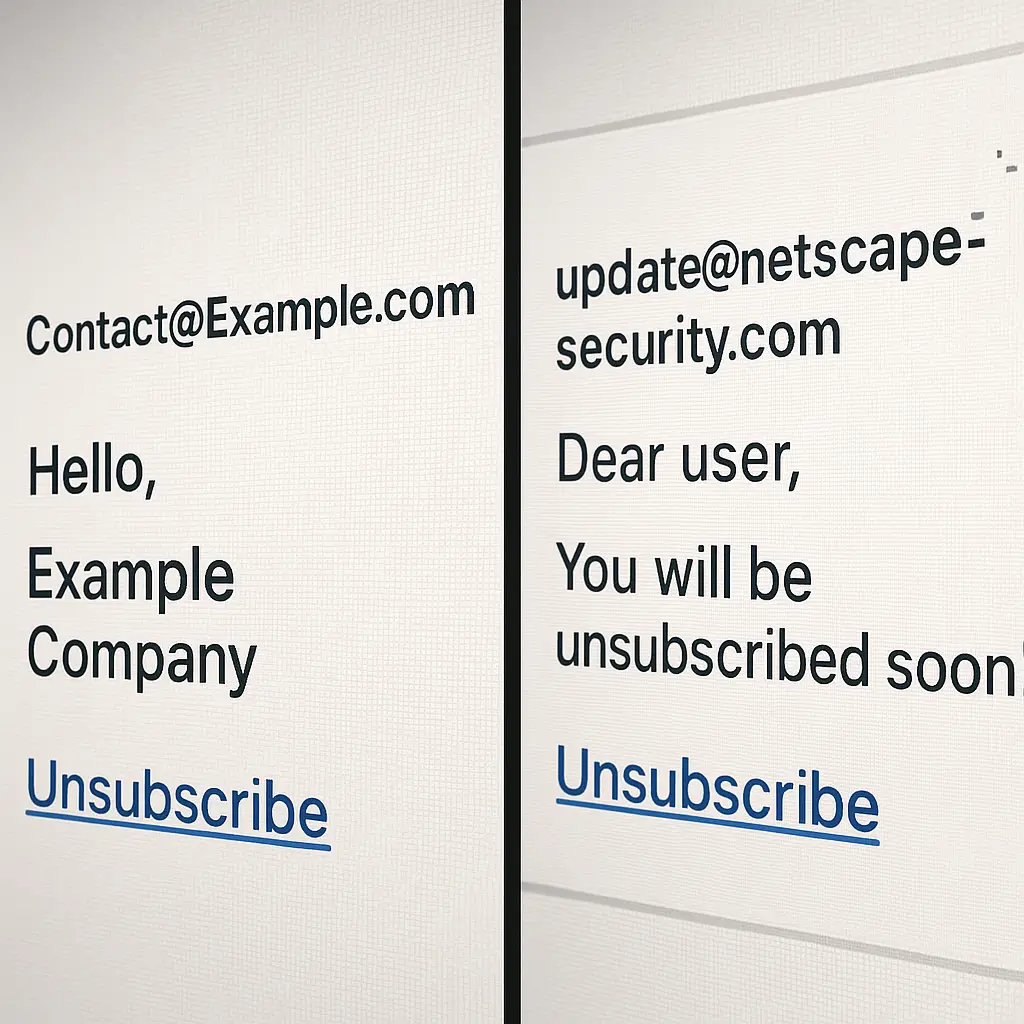
Step 1: Check the sender address. Click on the sender's name in your email client to see the full email address. Does the domain match the company? If the email claims to be from Amazon but the sender address ends in @amazon-notification.net, that's not Amazon. Legitimate companies send from domains they own.
Some phishing emails use display name spoofing. The sender name says "Amazon" but the actual address is something like noreply@random-domain.com. Your email client shows the display name prominently and hides the actual address until you click. This is why clicking to see the full address matters.
Step 2: Hover over the unsubscribe link. Don't click it yet. Just hover your cursor over it. Your browser or email client will show you the destination URL, usually in the bottom left corner of the window or in a tooltip. Does that URL belong to the company or a legitimate email service provider? If the email claims to be from Nike but the unsubscribe link points to http://random-string.tk/unsub, that's not Nike.
Legitimate unsubscribe links often go through email service providers like SendGrid, Mailchimp, or Constant Contact. URLs containing those names are normal. What's not normal is a completely unrelated domain or an IP address instead of a domain name.
Step 3: Look for personalization. Does the email address you by name? Does it reference a specific order, account, or interaction? Generic emails that could be sent to anyone are more likely to be phishing. Legitimate companies usually personalize their marketing emails because personalization increases engagement. Scammers often can't personalize because they're working from scraped email lists without associated names or account data.
Step 4: Compare to previous emails. If you've received emails from this company before, open one and compare. Does the formatting match? Is the unsubscribe link in the same location? Does the sender address use the same domain? Consistency suggests legitimacy. Inconsistency suggests someone is impersonating the company.
Step 5: When in doubt, go direct. If you're unsure about an unsubscribe link, don't use it. Instead, open your browser and go directly to the company's website. Log into your account and look for email preferences or notification settings. Unsubscribe there. This bypasses any risk from the email itself.
This method is slower, but it's bulletproof. You're interacting with the company's actual infrastructure, not with whatever the email is linking to.
The Mark-as-Spam Decision Tree
Knowing when to mark an email as spam instead of using the unsubscribe link is the other half of the decision. Marking as spam trains your email provider's filters to recognize similar messages in the future. It's the right choice when the email is unsolicited and you don't trust the sender.
Mark as spam when:
- You don't recognize the sender and never signed up for their emails.
- The email shows phishing indicators even if it includes an unsubscribe link.
- The sender domain is obviously fake or misspelled.
- The email threatens consequences for not unsubscribing (legitimate companies don't threaten).
- You've already unsubscribed but keep receiving emails from the same sender.
Don't mark as spam when:
- The email is from a company you've done business with, even if you don't want their emails anymore.
- The email is a transactional message (receipts, shipping notifications, password resets) rather than marketing.
- You signed up for the mailing list but forgot or changed your mind.
Marking legitimate commercial email as spam creates a problem for the sender. Their emails start landing in spam folders for other recipients, even people who want them. This is why the unsubscribe link exists: it's the clean exit that doesn't damage the sender's reputation.
But when the sender is a scammer, their reputation is not your concern. Mark as spam without hesitation.
What Happens After You Click a Malicious Unsubscribe Link
Let's say you clicked an unsubscribe link in a phishing email before you realized it was suspicious. What actually happens next?
In the email validation scenario, nothing visible happens. The attacker logs your click. Your email address gets flagged as active. You'll probably see an increase in spam volume over the following weeks as your address circulates through spammer networks. The fix is patience and aggressive spam filtering. Your email provider's spam filter will eventually catch up if you consistently mark unwanted messages as spam.
In the phishing page redirect scenario, you land on a fake login page. If you entered credentials, the attacker now has access to that account. The immediate action is changing your password on the real site, enabling two-factor authentication if you haven't already, and checking for unauthorized activity. If you used that password anywhere else, change it there too. This is why password reuse is dangerous: one compromised password becomes many compromised accounts.
In the malware delivery scenario, your browser or operating system might block the download automatically. Modern browsers warn you when a site attempts to download a file without your explicit permission. If the download succeeded and you opened the file, you're in incident response mode: disconnect from the internet, run a full antivirus scan, and consider whether you need to restore from a clean backup. Malware infections are serious, but they're also rarer than the other two scenarios.
The common thread is that clicking a malicious unsubscribe link rarely causes immediate catastrophic damage. The damage is usually delayed and indirect: more spam, a compromised account, or in the worst case a malware infection that takes time to detect. This is why verification before clicking matters. The 30 seconds you spend checking the sender and hovering over the link prevents problems that take hours or days to fix.
The CAN-SPAM Act and What It Actually Requires
Understanding the legal framework helps explain why legitimate unsubscribe links exist and why scammers ignore them. The CAN-SPAM Act sets rules for commercial email in the United States. It requires:
- A clear and conspicuous unsubscribe mechanism in every commercial email.
- Honoring unsubscribe requests within 10 business days.
- No charging a fee or requiring personal information beyond an email address to unsubscribe.
- Including the sender's physical postal address in the email.
These requirements apply to commercial email, not transactional email. A receipt from an online purchase doesn't need an unsubscribe link because it's not marketing. A promotional email from that same retailer does.
The law creates accountability for legitimate businesses. If a company violates CAN-SPAM, the FTC can fine them. This is why recognizable companies have working unsubscribe links: the legal risk of not having them outweighs any benefit from trapping people on their mailing lists.
Scammers don't care about CAN-SPAM. They're often operating outside U.S. jurisdiction or using infrastructure that's difficult to trace. The law doesn't stop them from sending phishing emails with fake unsubscribe links. It just means that legitimate companies have an incentive to make their unsubscribe links work correctly.
This is why the sender matters more than the presence of an unsubscribe link. A phishing email can include an unsubscribe link. It costs the attacker nothing to add one. The link's presence doesn't make the email legitimate. What makes the email legitimate is the sender's identity and your relationship with them.
When Email Preferences Pages Are Actually Phishing
Some phishing attacks don't just fake the unsubscribe link, they fake the entire preferences page. You click a legitimate-looking unsubscribe link and land on a page that mimics the company's email preferences portal. It asks you to log in to confirm your changes. This is where the attack happens.
The fake preferences page looks convincing. It uses the company's logo, color scheme, and layout. The URL might be close enough to the real domain that you don't notice the difference at a glance. The form asks for your email address and password. You enter them. The attacker captures them and redirects you to the real company's site or shows you a "preferences updated" message. You think you've unsubscribed. The attacker thinks they've compromised your account.
This attack works because logging in to manage email preferences is a reasonable request. Some companies do require authentication before letting you change settings. The behavior isn't inherently suspicious. The only tell is the URL, and most people don't check URLs carefully when they're focused on completing a task.
The defense is the same as for any phishing page: check the URL before entering credentials. The domain should match the company exactly. If you're unsure, close the page and go directly to the company's website instead. Log in there and navigate to email preferences manually. It takes longer, but it guarantees you're interacting with the real site.
Two-factor authentication limits the damage if you do enter credentials on a phishing page. The attacker gets your password, but they can't log in without the second factor. This is why CISA recommends multi-factor authentication for every account that supports it. It's not perfect protection, some phishing attacks can bypass 2FA, but it raises the difficulty significantly.
The Email Service Provider Complication
Many companies don't send marketing emails directly from their own servers. They use email service providers like SendGrid, Mailchimp, Constant Contact, or similar platforms. This creates a complication: the unsubscribe link points to the service provider's domain, not the company's domain.
A legitimate email from Nike might have an unsubscribe link that goes to sendgrid.net or mailchimp.com. This is normal. The service provider handles unsubscribe requests on Nike's behalf. When you click the link, SendGrid or Mailchimp processes the request and updates Nike's mailing list.
This is where verification gets harder. You can't just check that the unsubscribe URL matches the sender's domain, because it often won't. You need to recognize legitimate email service provider domains and distinguish them from fake ones.
Common legitimate email service provider domains include:
- sendgrid.net
- mailchimp.com
- constantcontact.com
- list-manage.com (Mailchimp)
- awsmail.com (Amazon SES)
- mcsv.net (Mailchimp)
Attackers sometimes register domains that look similar to these. They might use sendgrid.tk or mailchimp.net or constantcontact.co. The difference is subtle. This is why hovering over the link and reading the full URL matters. If the domain is sendgrid.net, that's SendGrid. If it's sendgrid-unsubscribe.net, that's not SendGrid.
When you're unsure whether an email service provider domain is legitimate, the safest approach is still going direct. Skip the unsubscribe link in the email, go to the company's website, log in, and change your email preferences there. You lose the convenience of one-click unsubscribe, but you eliminate the risk of clicking a malicious link.
Why "Just Mark Everything as Spam" Doesn't Work
Some security advice says to never use unsubscribe links and just mark unwanted emails as spam instead. This advice is well-intentioned but creates its own problems.
Marking legitimate commercial email as spam when you could unsubscribe properly has three consequences:
First, it trains your email provider's spam filter incorrectly. You're telling the filter that emails from this sender are spam when they're actually legitimate marketing. If enough people do this, the sender's emails start landing in spam folders for everyone, including people who want them. This is why companies care about unsubscribe rates: high unsubscribe rates are better than high spam complaint rates.
Second, it doesn't stop the emails. The sender keeps sending them because they don't know you want to stop receiving them. Their system still has you marked as subscribed. The emails keep coming; your spam filter just hides them. Using the unsubscribe link actually removes you from the list.
Third, it makes your spam folder harder to monitor. If you're marking dozens of legitimate marketing emails as spam every week, your spam folder fills with messages that aren't actually spam. This makes it harder to spot the real phishing attempts and scams mixed in. When everything is spam, nothing is spam.
The better approach is selective: use unsubscribe links for legitimate companies, mark actual spam and phishing attempts as spam. This trains your email provider's filter accurately and keeps your inbox manageable.
The Unsubscribe Link in Context: Email Security Basics
Unsubscribe link safety is one piece of a larger email security picture. The link itself is rarely the weakest point. The weakest point is usually your ability to distinguish legitimate email from phishing attempts before you interact with anything.
The core email security practices haven't changed in years:
- Verify the sender before clicking any link, not just unsubscribe links.
- Hover over links to see their destination before clicking.
- Don't enter credentials on a page you reached by clicking an email link.
- Enable two-factor authentication on accounts that support it.
- Use a password manager so you're not reusing passwords across sites.
- Keep your browser and operating system updated to patch security vulnerabilities.
These practices protect you from phishing attempts whether they come through unsubscribe links, password reset links, invoice links, or any other vector. The unsubscribe link is just one of many places where attackers try to trick you into clicking.
Understanding how unsubscribe links work, both legitimate and malicious, fits into this broader framework. You're not just learning whether it's safe to click. You're learning how to evaluate email before you click anything.
When You Should Actually Use the Unsubscribe Link
After all this, here's the practical guidance: use the unsubscribe link when you trust the sender and want to stop receiving their emails. Trust comes from recognizing the sender, verifying the domain, and seeing personalization that indicates the sender actually knows who you are.
Use the unsubscribe link for:
- Retailers you've purchased from but don't want promotional emails from anymore.
- Newsletters you signed up for but no longer read.
- Service providers whose marketing emails you don't want but whose transactional emails you need.
- Any legitimate company where you can verify the sender domain matches their official domain.
Don't use the unsubscribe link for:
- Emails from senders you don't recognize.
- Emails with obvious phishing indicators.
- Emails where the sender domain doesn't match the claimed company.
- Emails that threaten consequences if you don't unsubscribe.
- Emails where hovering over the unsubscribe link shows a suspicious URL.
When you're unsure, go direct. Visit the company's website, log in, and change your email preferences there. It's slower but eliminates all risk.
The unsubscribe link exists because legitimate companies need a way to let people opt out of marketing emails. When it's attached to a legitimate email from a company you recognize, it's the right tool for the job. When it's attached to a phishing email from an attacker you don't know, it's a trap. Your job is telling the difference.