How Spammers Got Your Email Address: The Collection Methods Behind the Flood
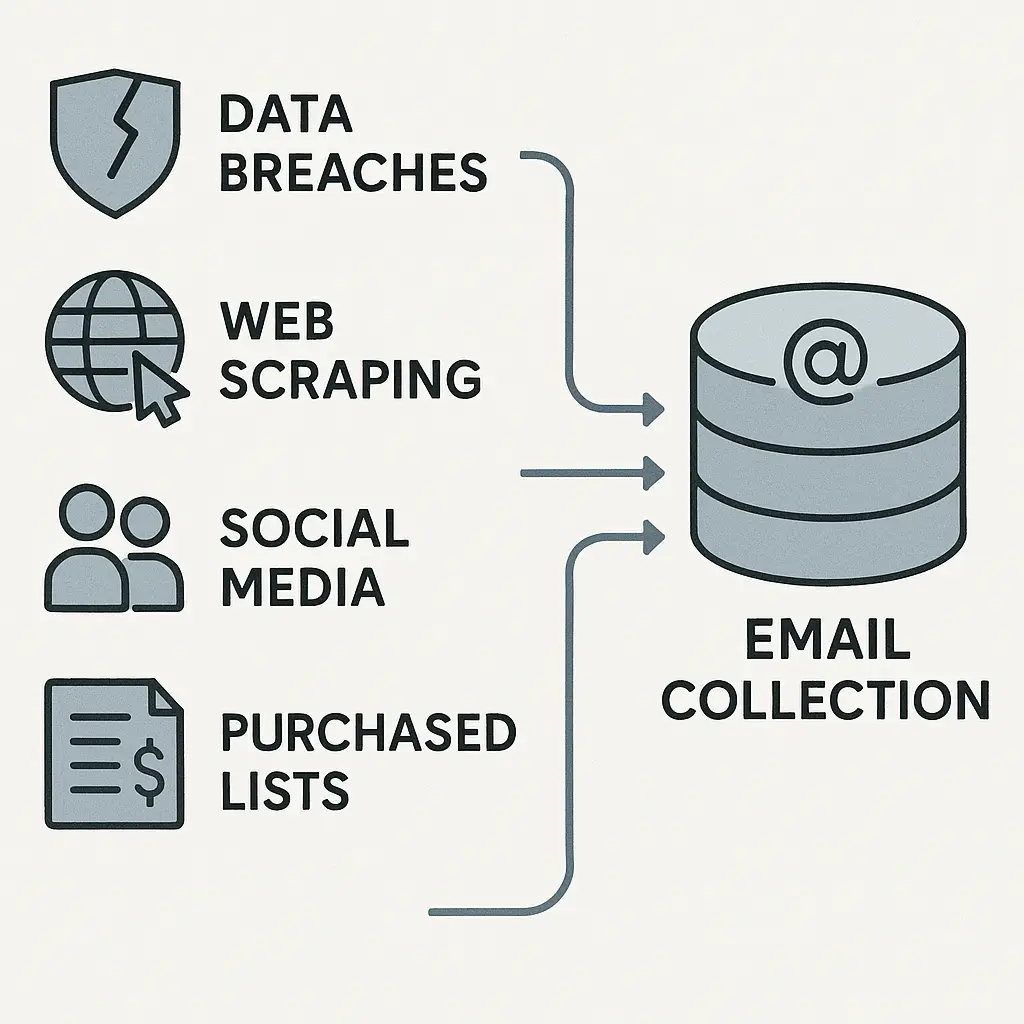
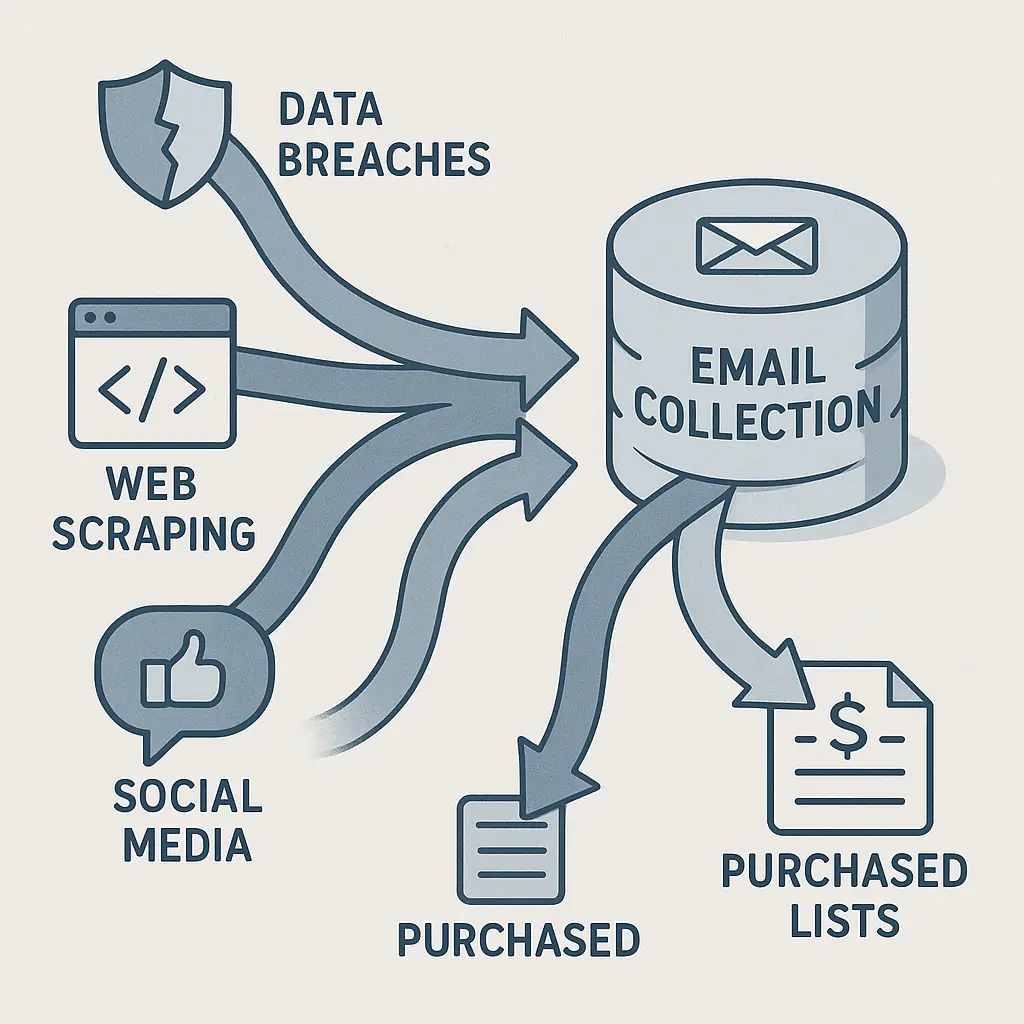
Your inbox fills with spam. Crypto investment opportunities. Pharmacy deals. Fake package delivery notices. Phishing attempts dressed as urgent account warnings. The volume feels random, but the mechanism behind it is systematic and predictable.
Spammers didn't guess your email address. They collected it through specific methods that harvest millions of addresses daily. Understanding how that collection works doesn't stop all spam, nothing does, but it shows you where exposure happens and what you can actually control.
The Breach Pipeline: When Companies Leak Your Data
Data breaches are the most efficient email harvesting method spammers have. When a company's database gets compromised, attackers extract everything: usernames, email addresses, passwords, and sometimes payment information. Those email addresses immediately enter the spam economy.
The 2021 T-Mobile breach exposed Social Security numbers and dates of birth for 40 million people, but it also leaked email addresses attached to those accounts. Every address in that database became a verified target, spammers know these addresses belong to real people who use real services.
Breached data moves through criminal markets in stages. Fresh breaches sell at premium prices to sophisticated attackers. Older data gets bundled and sold in bulk to spammers who use it for mass campaigns. Your email from a 2019 breach might still be generating spam in 2026 because those lists get resold repeatedly.
You can check if your email appeared in known breaches at Have I Been Pwned. The site indexes billions of compromised accounts from documented breaches. Finding your address there doesn't mean you're currently at risk, it means your email entered the spam ecosystem at some point and you should assume it's circulating.
The breach pipeline explains why spam volume sometimes spikes after major incidents. When millions of fresh addresses hit the market simultaneously, spammers launch coordinated campaigns to capitalize on the new data before people change their passwords and tighten security.
Web Scraping: Bots That Harvest Visible Addresses
Automated bots scan the internet looking for email addresses posted publicly. They crawl websites, forums, comment sections, social media profiles, and any other text-based content that might contain an address. The pattern is simple: anything that looks like text@domain.com gets collected.
This method is old, it predates modern spam filters by decades, but it still works because people still post email addresses publicly. A contact form on your business website might hide your address behind a submission system, but if you've ever posted yourname@gmail.com in a forum signature, blog comment, or social media bio, scrapers found it.
The technical mechanism is straightforward. Scrapers use regular expressions to match email patterns in HTML and text. They don't need to understand context or content, they just need to identify strings that follow email formatting rules. A bot can scan thousands of pages per minute, extracting every visible address it finds.
Some websites try to obfuscate email addresses by replacing @ with [at] or breaking the address across multiple lines. These tricks slow down basic scrapers but don't stop sophisticated ones. Modern scraping tools use natural language processing to reconstruct obfuscated addresses, and they can solve simple CAPTCHAs designed to block bots.
The EFF's Surveillance Self-Defense guide recommends never posting your primary email address publicly. If you need to share an address on a website or forum, use a disposable one created specifically for that purpose. Once an address gets scraped, you can't unscramble it, the only fix is to stop using that address or accept the spam volume that follows.
Social Media Collection: Mining Profiles and Connections
Social media platforms are email harvesting goldmines. Your profile might not display your email publicly, but platforms use it internally for notifications, password resets, and account recovery. When those platforms get breached or when their APIs get exploited, email addresses leak.
LinkedIn is particularly valuable to spammers because it connects email addresses to professional information. A scraper that extracts your LinkedIn profile gets your name, job title, employer, and often enough information to guess or construct your work email address. Even if your actual address isn't visible, the pattern firstname.lastname@company.com is predictable enough that spammers can generate it with high accuracy.
Facebook's 2019 incident exposed phone numbers and email addresses for over 500 million users. That data didn't come from a traditional breach, it came from scraping public profiles using the platform's search and contact import features before Facebook locked them down. The addresses were technically public, but most users didn't realize how easily they could be collected at scale.
Third-party apps connected to your social media accounts also harvest email addresses. When you authorize an app to access your Facebook or Google account, you often grant permission to read your email address. Some apps use that data legitimately. Others sell it to data brokers who package it with demographic information and resell it to marketers and spammers.
The privacy settings on social platforms matter, but they're not foolproof. Even locked-down profiles leak information through mutual connections, tagged photos, and group memberships. If your email appears anywhere in a friend's contact list and that friend uses an app that scrapes contacts, your address enters the collection pool.
Purchased Lists: The Data Broker Economy
Data brokers compile email addresses from public records, consumer surveys, warranty registrations, loyalty programs, and online purchases. They build profiles that include your name, address, age, income estimate, purchasing behavior, and email address. Those profiles get sold to marketers, who use them for targeted advertising and email campaigns.
The line between legitimate marketing and spam is blurry. A company that bought your email from a data broker might send you promotional emails you never asked for. Technically, those emails aren't spam if the sender complies with CAN-SPAM Act requirements, they need to identify themselves, include an unsubscribe link, and honor opt-out requests. But the experience feels like spam because you never gave that company permission to contact you.
Some data brokers sell to anyone who pays. That includes spammers who don't care about CAN-SPAM compliance or any other regulation. Your email gets bundled into lists sold under categories like "active online shoppers" or "tech-savvy consumers," and those lists circulate through marketing networks until they eventually reach operators who use them for phishing, scams, and bulk spam campaigns.
You can opt out of data broker collection, but the process is manual and incomplete. Services like Incogni automate removal requests to dozens of brokers, but new brokers appear constantly and removed data often gets re-added from other sources. The FTC's guidance on protecting your personal information recommends limiting what you share with companies and reading privacy policies before submitting your email to any service.
Dictionary Attacks: Generating Addresses That Might Exist
Spammers don't always need to harvest real addresses, they can generate millions of plausible ones and send emails to all of them. This method is called a dictionary attack because it uses lists of common names, words, and number patterns combined with popular email domains.
The math is simple. Take the 100 most common first names, combine them with the 100 most common last names, add @gmail.com, and you've generated 10,000 email addresses. Many of those addresses exist. Spammers don't care about the ones that bounce, they only need a small percentage to reach real inboxes to make the campaign profitable.
Modern spam filters catch most dictionary-generated emails because the patterns are obvious and the sender reputation is usually terrible. But some get through, especially when spammers rotate through different domains and use tactics that mimic legitimate bulk email services.
Dictionary attacks explain why you might receive spam at an address you've never used publicly. If your email follows a common pattern, firstname.lastname@gmail.com or firstinitiallastname@yahoo.com, spammers generated it without ever seeing it in a breach or scraping it from a website.
The defense is to use email addresses that don't follow predictable patterns. Adding numbers, middle initials, or random characters makes your address harder to guess. But once you use that address anywhere online, it becomes harvestable through the other methods described here.
Email Append Services: Matching Names to Addresses
Email append services take a database of names and physical addresses and match them to email addresses using data from brokers, public records, and proprietary databases. Companies use these services to build email lists from customer records that only contain offline contact information.
The technical mechanism relies on fuzzy matching algorithms that compare your name, address, age, and other identifiers against databases that include email addresses. When the service finds a likely match, it appends the email to your record. Accuracy varies, some matches are correct, others are guesses based on household data or outdated information.
Legitimate businesses use email append services to reach customers who provided physical addresses but not email. But the same services sell to anyone, including spammers who use appended data to build bulk email lists. The FTC has issued warnings about data security practices in email append services, particularly when companies fail to verify that appended addresses actually belong to the person in their records.
If you receive emails from companies you've never interacted with online, email appending might be the source. The sender got your name and address from a purchase, warranty registration, or public record, then used an append service to find an email that might be yours.
Form Submissions and Contests: Voluntary Disclosure
You hand over your email address voluntarily more often than you realize. Every online purchase, account registration, newsletter signup, contest entry, and contact form submission adds your address to a database. What happens to that data depends entirely on the company's privacy policy and data handling practices.
Some companies protect your email and use it only for the purpose you agreed to. Others sell it to third parties, share it with marketing partners, or include it in data licensing agreements that let dozens of other companies access it. The privacy policy tells you which category the company falls into, but reading those policies is time-consuming and most people don't do it.
Contests and giveaways are particularly risky. The entry form asks for your email, and buried in the terms is language that grants permission to share your information with sponsors, partners, and affiliates. You entered to win a prize; you also opted into email lists for multiple companies you've never heard of.
Free trials and downloadable content operate the same way. You provide your email to access a white paper, ebook, or software trial, and the company adds you to their marketing list. If they're ethical, they include an unsubscribe option. If they're not, your email gets sold to brokers who package it with demographic data and resell it to anyone who pays.
The CISA guidance on protecting sensitive information recommends using unique email addresses for different services. That way, when spam arrives at the address you used for a specific contest or signup, you know exactly where the leak originated.
Malware and Phishing: Stealing Contact Lists
Malware that infects a computer can harvest email addresses from contact lists, sent mail folders, and browser autofill data. Once extracted, those addresses get uploaded to command-and-control servers and distributed to spammers. This method is particularly effective because it captures addresses from trusted contacts, people you've actually emailed, which means they're active and likely to engage.
Phishing emails sometimes include malicious attachments or links that install malware when opened. The malware scans your system for email clients, web browsers, and any files that might contain addresses. It doesn't need to understand context, it just looks for strings that match email patterns and extracts everything it finds.
Contact list theft explains why you sometimes receive spam that appears to come from someone you know. The spammer didn't compromise your friend's email account, they stole their contact list and used it to send emails that spoof the sender address. The emails look like they came from a trusted source, which increases the chance you'll open them.
The EFF's guidance on keeping your data safe recommends keeping your operating system and software updated, using antivirus protection, and being cautious about email attachments even from known senders. Malware that steals contact lists spreads through social engineering as much as technical exploits, it relies on you opening something you shouldn't.
Third-Party Tracking and Ad Networks
Advertising networks track you across websites using cookies, pixels, and device fingerprinting. Those tracking systems don't directly capture your email address from browsing behavior, but they link your browsing profile to your email when you log into a service that shares data with ad networks.
The mechanism works like this: you browse a website that uses Google Analytics or Facebook Pixel. Those tools assign you a unique identifier and track which pages you visit. Later, you log into Gmail or Facebook using the same browser. The ad network now knows that the browsing profile they've been tracking belongs to the email address you just used to log in.
That linkage gets packaged and sold. Your email becomes associated with behavioral data, sites you visited, products you viewed, time spent on different pages. Marketers use that data for targeted advertising, but it also flows through data broker networks where it can be purchased by anyone, including spammers.
Third-party tracking is why you might receive spam about products you recently searched for but never bought. The ad network tracked your interest, linked it to your email, and that data got sold to a sender who used it for bulk email campaigns. The FTC's Tech at FTC blog has written about data security principles that address how companies should handle tracking data, but enforcement is inconsistent and many companies operate in gray areas where the rules are unclear.
Public Records and Government Databases
Your email address might appear in public records if you included it on voter registration forms, business filings, professional licenses, or property records. Some jurisdictions publish that information online, making it scrapable by anyone with the right tools.
Real estate transactions often require email addresses for document delivery and communication between parties. Those addresses sometimes appear in recorded deeds and mortgage documents that become part of public records. Business registrations for LLCs and corporations often require a contact email, and many states publish that information in searchable databases.
The Consumer Reports security planner recommends using a dedicated email address for any public-facing records or official documents. That way, if spam volume increases at that address, you know it came from public record scraping rather than a breach or purchased list.
The Alien Franchise and Email Harvesting
In Alien, the Nostromo's crew investigates a distress signal that turns out to be a warning. They assume it's a call for help, but the signal's purpose is to lure ships into range of the xenomorph eggs. The mechanism is efficient: broadcast a message that looks like it needs a response, wait for someone to arrive, and harvest what you need.
Email harvesting works the same way. Spammers broadcast collection methods, scrapers, breaches, purchased lists, that look like normal internet activity. You sign up for a service, post in a forum, enter a contest, and your email gets collected. The signal looks harmless. The collection is systematic.
The crew could have ignored the signal. You can reduce how many signals you respond to by limiting where you share your email, using unique addresses for different services, and understanding that every form submission is a potential collection point. But you can't eliminate exposure entirely, the harvesting infrastructure is too large and too distributed.
The xenomorph doesn't care which crew member triggers the egg. Spammers don't care which specific method harvests your email. They use all of them simultaneously because each method captures a different segment of addresses. Your email enters the system through whichever door you leave open first.
What You Can Actually Control
You can't prevent all email harvesting, but you can reduce exposure and limit damage when collection happens. Use unique email addresses for different services so you can identify which one leaked or sold your data. Email aliases and forwarding services make this practical, you don't need dozens of separate accounts, just a system that routes different addresses to your primary inbox.
Avoid posting your email publicly on websites, forums, and social media. If you need to share an address for professional purposes, use one that's separate from your personal email and expect it to accumulate spam over time.
Read privacy policies before submitting your email to any service. Look for language about data sharing, third-party access, and marketing partnerships. If the policy says they share data with affiliates or partners, assume your email will be sold or distributed.
Check if your email appeared in breaches using Have I Been Pwned and enable notifications for future breaches. If your address shows up, change passwords on any accounts that used it and consider whether that address is still worth using.
Use spam filters aggressively. Gmail, Outlook, and other major providers have strong filtering systems that catch most bulk spam. Report spam when it gets through, those reports train the filters and improve detection for everyone.
Consider using a password manager that generates unique passwords for every account. When a breach happens, you'll know exactly which account was compromised and you won't have to change passwords across multiple services because none of them match.
The harvesting infrastructure isn't going away. Spammers have too many collection methods, the data broker economy is too profitable, and enforcement is too inconsistent. What you can control is how much data you expose, how you segment your email addresses, and how quickly you respond when a collection method succeeds.
Spam volume is a symptom of systematic data collection. The emails filling your inbox came from somewhere specific, breaches, scrapers, purchased lists, or voluntary submissions. Understanding the mechanism doesn't stop the flood, but it shows you where the leaks are and what you can patch.