What modern antivirus actually does, and what it misses
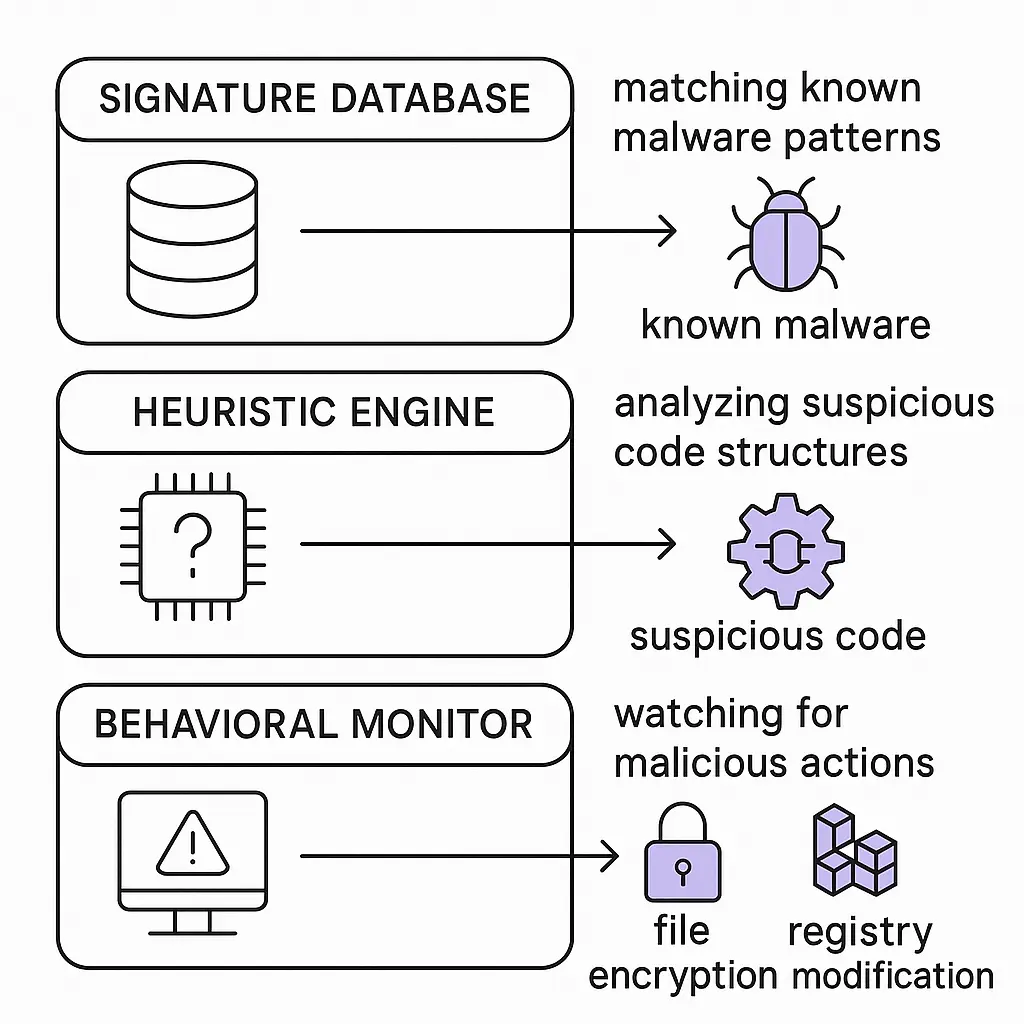
Antivirus software scans your files, watches what programs do, and blocks threats it recognizes. That's the summary version. The mechanism underneath is more interesting, and understanding it helps you know what antivirus actually protects you from and what it doesn't.
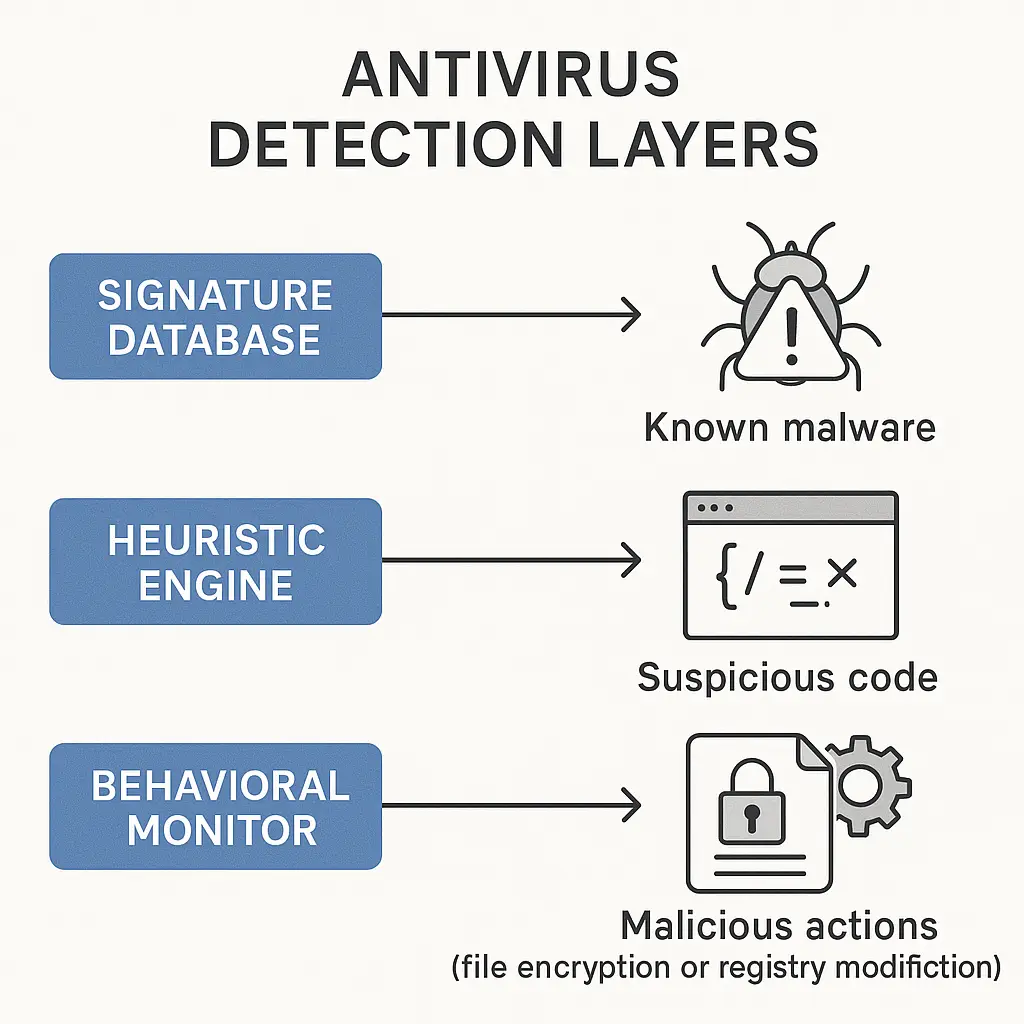
Modern antivirus uses three primary detection methods working together. Signature-based detection matches files against a database of known malware. Heuristic analysis examines code structure for suspicious patterns. Behavioral monitoring watches programs in real time for actions that look like attacks. Each method catches threats the others miss. Each method also has gaps.
This article explains how antivirus works in 2026, what changed from the signature-only tools of the 1990s, and where the technology still fails. You'll understand what you're actually getting when you run antivirus, what threats slip through, and what other defenses you need alongside it.
Signature-based detection: matching files against known threats
Signature detection is the oldest antivirus method and still the foundation. The antivirus vendor maintains a database of malware signatures. A signature is a unique pattern extracted from a known malicious file. When you scan a file, the antivirus checks whether any part of it matches a signature in the database.
The signature might be a hash of the entire file, a snippet of code, or a sequence of bytes that appears in multiple variants of the same malware family. The database updates constantly. Vendors collect malware samples from honeypots, customer submissions, security researchers, and automated crawlers. When a new threat appears, analysts extract a signature and push it to the database. Your antivirus downloads the update.
Signature detection is fast and produces few false positives. If a file matches a known signature, it's malware. The certainty is high. But the method only works for threats already in the database. Brand-new malware, custom-written for a specific target, or slightly modified variants of existing threats won't match. Attackers know this. They test their malware against popular antivirus products before deployment, tweaking the code until scans come back clean.
CISA's malware analysis reports document this dynamic. Threat actors iterate on known malware families, changing just enough to evade signature detection while keeping the core functionality intact. The gap between a new threat appearing in the wild and a signature landing in vendor databases creates a window where signature detection fails.
Heuristic analysis: looking for suspicious code patterns
Heuristic analysis tries to catch malware that doesn't have a signature yet. Instead of matching exact patterns, heuristics examine code structure and behavior for characteristics common to malware. Does the program try to hide itself? Does it obfuscate its code? Does it attempt to disable security tools? Does it contain functions typically used for keylogging or data exfiltration?
The antivirus runs the file in a sandbox, a controlled environment isolated from your actual system. It watches what the program tries to do. If the behavior matches heuristic rules, the antivirus flags it as suspicious. Some products assign a threat score. Low scores might trigger a warning. High scores trigger a block.
Heuristics catch some zero-day threats, malware variants, and polymorphic code that changes its signature with each infection. But heuristic rules generate false positives. Legitimate software sometimes exhibits behavior that looks suspicious. A developer tool might modify system files. A backup program might access large numbers of files quickly. An updater might download and execute code. The antivirus can't always distinguish intent.
Security researchers have found that around 10 to 30 percent of heuristic detections are false positives, depending on how aggressively the vendor tunes the rules. Vendors balance sensitivity and accuracy. Too sensitive, and users get flooded with false alarms. Too conservative, and real threats slip through.
Behavioral monitoring: watching programs in real time
Behavioral monitoring is the third layer. Instead of scanning files at rest, behavioral engines watch programs while they run. They track system calls, file operations, network connections, registry modifications, and process creation. When a program does something that matches a behavioral rule for malware, the antivirus intervenes.
Behavioral monitoring catches ransomware that signature and heuristic analysis miss. Ransomware typically encrypts files rapidly. The behavioral engine sees a program touching hundreds or thousands of files in quick succession, modifying them without user interaction, and flags it. The antivirus can stop the process before all your files are encrypted.
But behavioral detection has timing problems. If the malware moves slowly, encrypting a few files per hour instead of hundreds per minute, it might stay under the threshold that triggers a block. If it uses legitimate system tools to perform malicious actions, the behavioral engine might not distinguish the activity from normal system behavior. MITRE ATT&CK's technique catalog documents how attackers use living-off-the-land binaries, built-in Windows tools that behavioral monitoring trusts by default, to avoid detection.
Behavioral monitoring also creates performance overhead. Watching every file operation and system call in real time requires processing power. Vendors optimize to minimize impact, but you'll notice the difference on older hardware or during intensive tasks like video rendering or large file transfers.
Cloud-based analysis and threat intelligence
Modern antivirus doesn't work in isolation. Most products now send file hashes, behavioral data, and metadata to cloud-based analysis engines. The vendor aggregates telemetry from millions of endpoints. If a file appears on one machine and gets flagged as suspicious, that information propagates to other users before the file spreads widely.
Cloud analysis enables faster response to emerging threats. A new ransomware variant hits a corporate network. Behavioral monitoring on one machine catches it. The vendor extracts a signature, updates the cloud database, and pushes the signature to all users within minutes. The delay between first detection and broad protection shrinks from hours to seconds.
But cloud-based detection requires sending data to the vendor. File hashes are relatively low-risk. Behavioral telemetry can include information about what programs you run, what files you access, and what network connections you make. Privacy-conscious users disable cloud features. That choice reduces detection effectiveness.
Some vendors anonymize telemetry. Others don't. Microsoft's documentation on Defender telemetry explains what data gets collected and how it's used. Read the privacy policy. Understand the tradeoff between detection speed and data sharing.
Machine learning models: pattern recognition at scale
Machine learning entered antivirus around 2015 and became standard by 2020. ML models analyze file characteristics, code structures, and behavioral patterns to classify files as malicious or benign. The models train on millions of samples. They learn to recognize features correlated with malware that human analysts might miss.
ML detection catches polymorphic malware, code that changes its signature with each infection. Traditional signatures fail because the file looks different every time. But the underlying behavior and structural patterns remain consistent. The ML model recognizes those patterns even when the exact code differs.
ML also reduces false positives compared to heuristics. The model learns from feedback. When users report false positives, the vendor retrains the model to avoid similar mistakes. Over time, accuracy improves.
But ML models aren't magic. They depend on training data. If the model hasn't seen examples of a particular attack technique, it won't recognize it. Attackers test their malware against commercial antivirus products, including ML-based detection, before deployment. They iterate until the malware passes. The arms race continues.
What antivirus misses: the gaps in detection
Antivirus catches a lot. It stops known malware reliably. It catches some unknown malware through heuristics and behavioral monitoring. But specific threat categories consistently evade detection.
Targeted attacks designed for a single victim often succeed. The attacker writes custom code, tests it against the victim's antivirus product, and deploys only when scans come back clean. No signature exists. Heuristics might not trigger if the code is clean enough. Behavioral monitoring might not catch slow, deliberate actions.
Fileless malware operates in memory without writing to disk. Traditional antivirus scans files. If there's no file, there's nothing to scan. Behavioral monitoring can catch fileless attacks, but only if the behavior is aggressive enough to trigger rules. Subtle persistence mechanisms slip through.
Exploits that leverage legitimate software vulnerabilities bypass antivirus entirely. The malicious code runs inside a trusted process. Behavioral monitoring sees a known program doing something unusual, but distinguishing a zero-day exploit from a legitimate edge case is hard. Patching software closes these gaps. Antivirus doesn't.
Social engineering attacks don't involve malware at all. A phishing email tricks you into entering credentials on a fake login page. Antivirus scans the email, finds no malicious attachment, and lets it through. You click the link. You type your password. Antivirus can't stop that. The threat isn't code. It's persuasion.
Independent testing: how products actually perform
You don't have to take vendor marketing claims at face value. Independent testing labs evaluate antivirus products using real-world malware samples and simulated attacks. The tests measure detection rates, false positive rates, performance impact, and usability.
AV-Comparatives, AV-TEST, and SE Labs publish results regularly. The top products typically detect 95 to 99 percent of known threats. Detection rates for zero-day threats drop to around 60 to 80 percent, depending on the test methodology and the sophistication of the samples.
Windows Defender, the antivirus built into Windows, performs competitively with paid products in these tests. In 2026, Defender's detection rates match or exceed many commercial options. The performance gap between free and paid antivirus has narrowed significantly. The question is no longer whether free antivirus works. It's whether the additional features in paid products justify the cost.
Paid antivirus often bundles VPN services, password managers, parental controls, and identity theft monitoring. Evaluate those features separately. A standalone password manager is usually better than the one bundled with antivirus. A standalone VPN gives you more control over server selection and logging policies. Bundling creates convenience, not necessarily better security.
The cultural reference: The Fellowship of the Ring and the limits of vigilance
In The Fellowship of the Ring, the Elves of Lothlórien maintain constant watch over their borders. Sentries patrol. Scouts report. The Lady Galadriel's mirror reveals distant threats. But vigilance has limits. Galadriel sees much, but not everything. The mirror shows possible futures, not certainties. The Elves can't stop every threat, only the ones they detect in time.
Antivirus works the same way. It watches. It scans. It catches threats it recognizes and some it doesn't. But perfect detection is impossible. New threats appear. Attackers adapt. The mirror doesn't show everything, and neither does your antivirus. You still need other defenses. You still need to think before you click.
Performance impact: what antivirus costs in system resources
Antivirus uses CPU cycles, memory, and disk I/O. Real-time scanning checks every file you open. Behavioral monitoring tracks every process. Cloud lookups query remote servers. The overhead is measurable.
Independent tests measure performance impact by running standardized tasks with and without antivirus enabled. Launching applications, copying files, browsing websites, and downloading files all take longer with antivirus active. The difference ranges from negligible to noticeable depending on the product and your hardware.
On modern systems with SSDs and multi-core processors, most users won't notice the impact during normal use. On older hardware or during intensive tasks, the slowdown becomes apparent. Some products let you configure scan schedules and exclusions to reduce impact. Exclude folders you trust, like development environments or media libraries. Schedule full scans for times when you're not using the machine.
But exclusions create risk. If you exclude a folder and malware lands there, antivirus won't catch it. Balance performance and protection. Exclude only what you understand and monitor.
Antivirus on mobile: different threats, different mechanisms
Mobile antivirus exists, but the threat landscape differs from desktop. iOS sandboxes apps aggressively. Apps can't access each other's data or modify system files. Traditional malware struggles to gain a foothold. The bigger risks on iOS are phishing, credential theft, and malicious apps that slip through App Store review.
Android allows more flexibility, which creates more risk. Apps can request broad permissions. Sideloading apps from outside the Play Store bypasses Google's vetting. Mobile antivirus on Android scans installed apps, checks permissions, and blocks known malicious packages.
But mobile antivirus can't do much that the operating system doesn't already handle. Google Play Protect scans apps automatically. iOS rejects apps that violate sandboxing rules. The value of third-party mobile antivirus is debatable. Some security researchers recommend it. Others call it unnecessary overhead.
If you install mobile antivirus, understand what it actually does. Most mobile antivirus products focus on anti-theft features, privacy audits, and VPN services rather than traditional malware scanning. Evaluate those features on their own merits.
What you still need to do yourself
Antivirus is one layer. It doesn't replace other defenses. You still need to keep software updated. Unpatched vulnerabilities let attackers bypass antivirus entirely. Enable automatic updates for your operating system, browser, and critical applications.
You still need backups. Ransomware might encrypt files before antivirus stops it. Backups let you recover without paying. Store backups offline or in a separate account the ransomware can't access. Test restoration periodically.
You still need to recognize phishing. Antivirus scans attachments and links, but it can't evaluate whether an email's story makes sense. If your bank emails you asking to verify your account by clicking a link, that's suspicious regardless of whether antivirus flags it. Go directly to the bank's website instead of clicking.
You still need strong, unique passwords. Antivirus doesn't protect credentials stored in your browser or typed into fake login pages. Use a password manager. Enable two-factor authentication on important accounts.
Antivirus handles threats that arrive as files or processes. It doesn't handle threats that exploit human psychology or attack through other vectors. Treat it as a backstop, not a primary defense.
Choosing antivirus: what actually matters
If you're running Windows, you already have Defender. It works. Independent tests confirm it. Unless you need specific features Defender doesn't offer, there's no compelling reason to replace it.
If you want a paid product, focus on detection rates in independent tests, not marketing claims. Check recent test results from AV-Comparatives or AV-TEST. Look at both known-threat detection and zero-day detection. Check false positive rates. A product that blocks legitimate software creates more problems than it solves.
Evaluate bundled features separately. If you need a VPN, compare the bundled VPN to standalone options. If you need a password manager, compare the bundled manager to dedicated products like Bitwarden or 1Password. Bundles create convenience, but standalone tools often perform better.
Avoid products that nag constantly. Some antivirus products generate frequent alerts, popups, and upgrade prompts. That's not security. That's marketing. Security software should run quietly in the background and only notify you when there's an actual threat.
The endpoint security stack in 2026
Antivirus is part of a broader endpoint security stack. Firewalls control network traffic. Intrusion detection systems monitor for suspicious network activity. Application whitelisting restricts which programs can run. Endpoint detection and response (EDR) tools provide deeper visibility and faster incident response than traditional antivirus.
For most home users, the full stack is overkill. Antivirus, a firewall, and basic security hygiene cover the majority of threats. For businesses, the calculus changes. EDR tools catch threats that antivirus misses and provide forensic data for incident response. The cost and complexity are justified.
Understand where you sit on that spectrum. Home users don't need enterprise EDR. Small businesses might. Large organizations definitely do. Match your defenses to your actual risk.
What's changing: the shift toward behavioral and cloud-based detection
Signature-based detection is declining in importance. Attackers iterate too fast. By the time a signature lands in the database, the malware has already spread or evolved. Vendors are investing more in behavioral monitoring, ML models, and cloud-based threat intelligence.
The shift creates privacy tradeoffs. Cloud-based detection requires sending telemetry to vendors. Behavioral monitoring requires deep visibility into what you do on your machine. Some users accept that tradeoff. Others don't.
Privacy-focused users can disable cloud features and telemetry, but detection effectiveness drops. There's no way around it. Better detection requires more data. You choose where to draw the line.
The bottom line: antivirus works, but it's not enough
Antivirus catches known malware reliably and some unknown malware through heuristics, behavioral monitoring, and ML models. It's faster and more accurate than it was a decade ago. Cloud-based threat intelligence closes the gap between new threats and detection.
But antivirus doesn't stop targeted attacks, fileless malware, exploits, or social engineering. It doesn't patch software, create backups, or recognize phishing. It's one layer in a defense that requires multiple layers.
Run antivirus. Keep it updated. But don't assume it's handling everything. The threats it misses are the ones you need to handle yourself.