Man-in-the-Middle Attacks Explained: How Attackers Hijack Your Connection
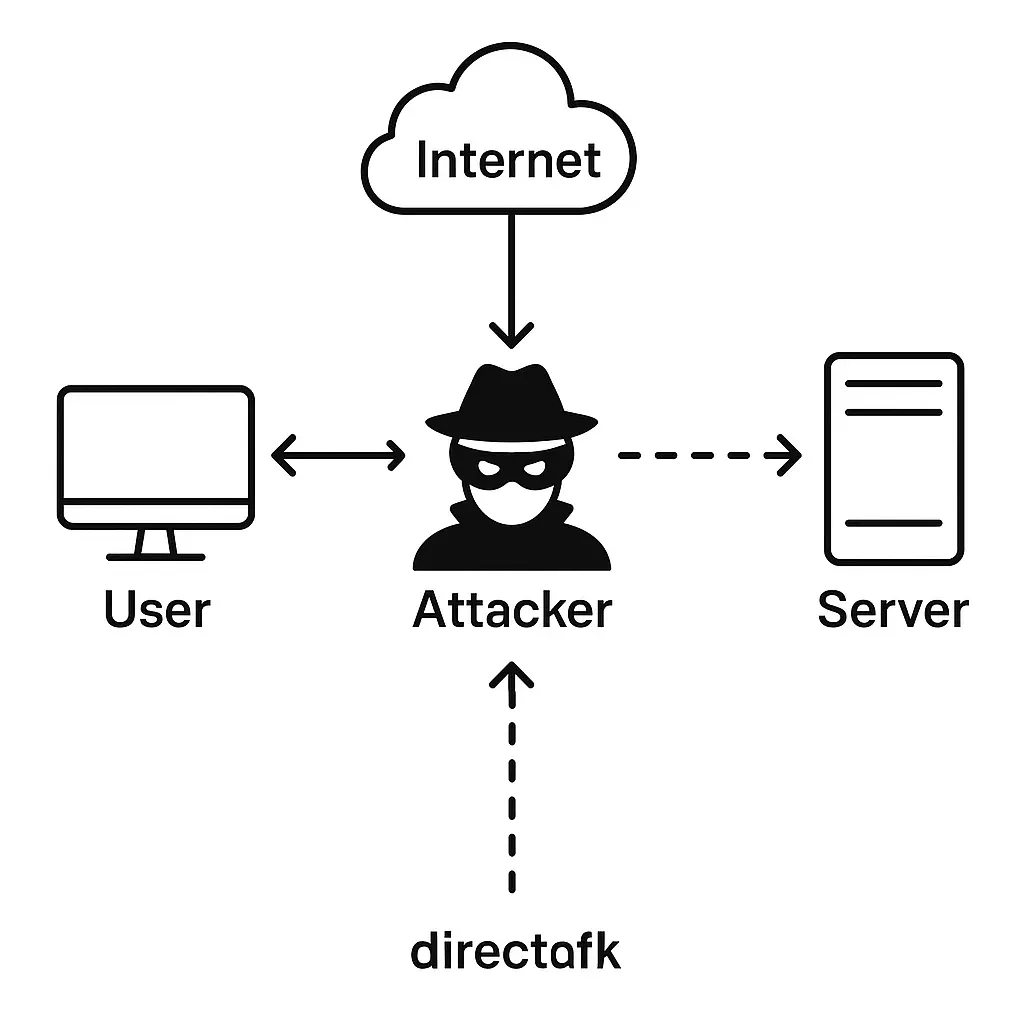
A man-in-the-middle attack happens when an attacker inserts themselves between you and your intended destination. You think you're talking directly to your bank. The bank thinks it's talking directly to you. But every packet flows through the attacker's system first.
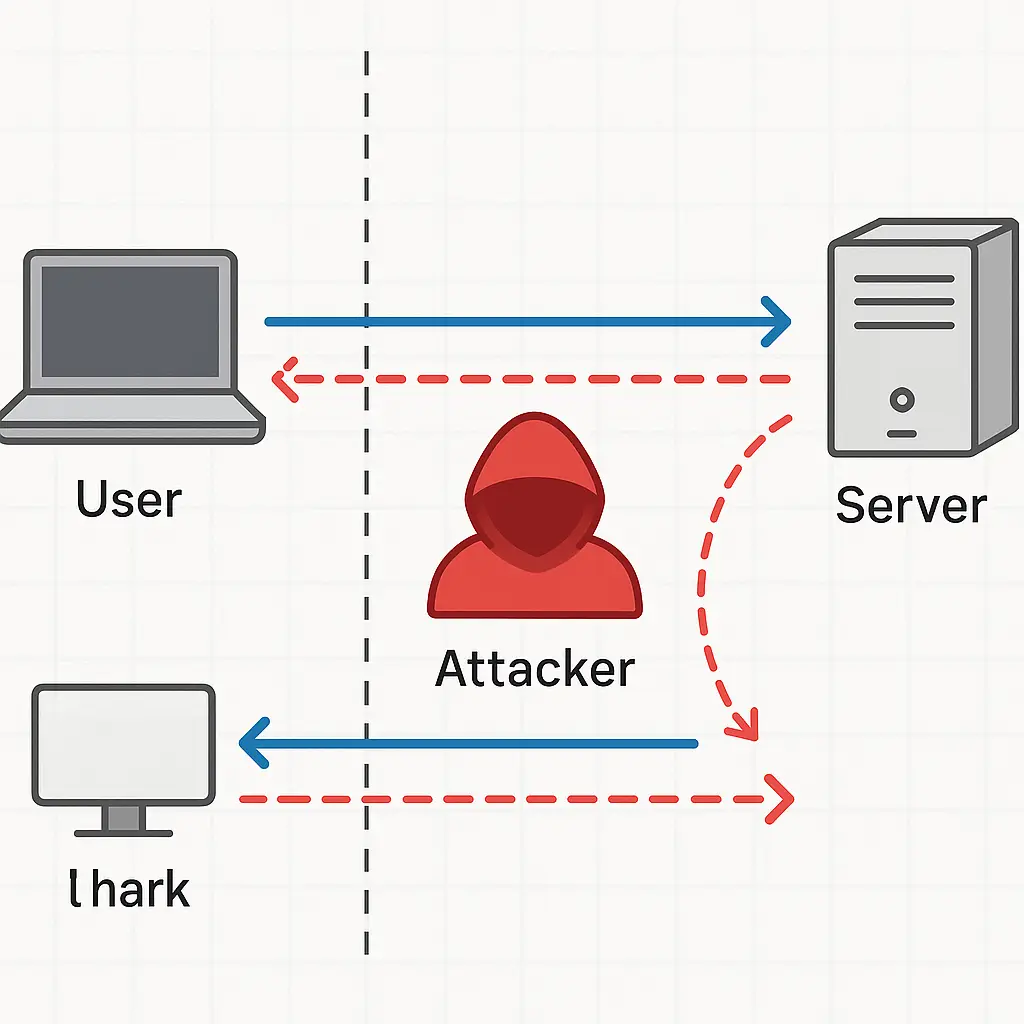
The attacker becomes an invisible relay. They can read your traffic, modify it in transit, or impersonate either endpoint. You never see them. The destination never sees them. The connection feels normal until something goes wrong.
This isn't theoretical. MITM attacks happen on coffee shop WiFi, compromised routers, and malicious browser extensions. They steal credentials, inject malware, and intercept financial transactions. The mechanism is simple. The consequences are serious.
Here's how the attack actually works, what makes it succeed, and what you can do about it.
The Core Mechanism: Becoming the Relay
Every network connection involves two endpoints: your device and the destination server. Traffic flows directly between them, routed through intermediate infrastructure but never inspected or modified by those intermediaries.
A MITM attack breaks that direct connection. The attacker positions themselves as a relay point. Your device sends traffic to the attacker, thinking it's the destination. The attacker forwards that traffic to the real destination, which thinks it's talking directly to you. Responses flow back through the same relay.
From your perspective, nothing looks wrong. The connection works. Pages load. Forms submit. The browser shows a lock icon. But the attacker sees everything.
The technical challenge for the attacker is positioning. They need to trick your device into routing traffic through their system instead of directly to the destination. Different attack methods accomplish this in different ways.
ARP Spoofing on Local Networks
Address Resolution Protocol maps IP addresses to physical hardware addresses on local networks. When your laptop wants to send traffic to the router, it broadcasts an ARP request: "Who has IP address 192.168.1.1?" The router responds with its hardware address, and your laptop caches that mapping.
ARP spoofing exploits the fact that devices trust ARP responses without verification. An attacker on the same local network can send fake ARP responses claiming to own the router's IP address. Your laptop updates its cache with the attacker's hardware address. Now when you send traffic to the router, it goes to the attacker instead.
The attacker forwards your traffic to the real router, maintaining the connection. You don't notice the relay. The router doesn't notice the relay. But the attacker sees everything you send.
This works on any local network where the attacker has access: coffee shops, airports, hotels, coworking spaces. It doesn't work across the internet because ARP only operates on local networks. Once your traffic leaves the local network, the attacker loses visibility.
Defense against ARP spoofing requires network-level protections that most public WiFi doesn't implement. Your device can't detect the attack on its own. The protection comes from encrypting your traffic so the attacker can't read it even when they intercept it.
DNS Hijacking: Redirecting Before You Connect
Domain Name System translates domain names like "bank.example.com" into IP addresses. Your device asks a DNS server for the IP address, then connects to that address. If an attacker controls the DNS response, they can redirect you to their own server instead of the legitimate destination.
DNS hijacking happens at different layers. An attacker on your local network can intercept DNS queries and respond with fake answers before the real DNS server responds. A compromised router can modify DNS settings to point all queries to an attacker-controlled DNS server. Malware on your device can change your DNS settings directly.
Once DNS is hijacked, you type "bank.example.com" in your browser, but you connect to the attacker's server at a different IP address. If that server presents a fake login page that looks legitimate, you might enter credentials without realizing you're on the wrong site.
HTTPS provides partial protection here. Even if DNS redirects you to the wrong IP address, the destination's SSL certificate won't match the domain name. Your browser should display a certificate warning. But many users click through warnings without reading them, and some attacks compromise certificate authorities to obtain valid certificates for fraudulent sites.
DNS hijacking is harder to execute than ARP spoofing but potentially more effective because it works even when you're not on the same local network. If an attacker compromises your home router or your ISP's DNS infrastructure, they can hijack your DNS queries regardless of where you connect.
Rogue Access Points: The Evil Twin
A rogue access point is a WiFi network controlled by an attacker that impersonates a legitimate network. You see "Starbucks WiFi" in your network list. You connect. But it's not actually Starbucks WiFi, it's an attacker's laptop broadcasting the same network name.
Your device can't distinguish between the legitimate network and the rogue one based on the name alone. Both appear identical in your WiFi settings. You connect to whichever has a stronger signal or appears first in the list.
Once connected to the rogue access point, all your traffic flows through the attacker's device before reaching the internet. The attacker can inspect unencrypted traffic, attempt to downgrade encrypted connections, and serve fake pages for sites you visit.
This attack requires physical proximity. The attacker needs to be close enough for their WiFi signal to reach you. Coffee shops, airports, and conference venues are common locations because they have high concentrations of people connecting to known network names.
The defense is the same as for other MITM attacks: encrypt your traffic with HTTPS and VPNs. Even if you connect to a rogue access point, encrypted traffic remains unreadable. But the attack succeeds if you visit sites without HTTPS or if the attacker can trick you into accepting invalid certificates.
SSL Stripping: Downgrading to Plaintext
Many sites support both HTTP and HTTPS, with the HTTPS version as the secure default. SSL stripping is a MITM technique that intercepts your initial HTTP request and prevents the upgrade to HTTPS.
Here's the sequence: You type "bank.example.com" without specifying a protocol. Your browser sends an HTTP request first, which the site typically redirects to HTTPS. But if an attacker is relaying your traffic, they can intercept that redirect and maintain an HTTP connection with you while using HTTPS for their connection to the real site.
You see "http://bank.example.com" in your address bar instead of "https://bank.example.com". No lock icon. But the site loads normally, and many users don't notice the missing HTTPS indicator.
The attacker maintains two connections: an unencrypted HTTP connection with you and an encrypted HTTPS connection with the real site. They decrypt traffic from the site, read or modify it, then send it to you over the unencrypted connection. Your credentials and data travel in plaintext across the attacker's relay.
Modern browsers implement HTTP Strict Transport Security (HSTS), which prevents SSL stripping for sites that use it. Once you've visited a site over HTTPS, your browser remembers that the site requires HTTPS and refuses to connect over HTTP in the future. But HSTS only works after your first successful HTTPS connection, and not all sites implement it.
Certificate Warnings: The Last Line of Defense
When you connect to a site over HTTPS, your browser validates the site's SSL certificate. The certificate proves the site's identity and establishes the encryption keys for the session. If the certificate is invalid, expired, self-signed, issued to the wrong domain, or signed by an untrusted authority, your browser displays a warning.
Certificate warnings are the primary defense against MITM attacks on HTTPS connections. If an attacker tries to relay your traffic and present their own certificate, your browser detects the mismatch and warns you.
In The X-Files, Mulder investigates conspiracy after conspiracy, but the real threat often comes from trusting the wrong source at the wrong time. Certificate warnings are your browser's way of saying "something doesn't match the official record." Clicking through is like ignoring evidence that the person you're talking to isn't who they claim to be.
The problem is that many users click through certificate warnings without reading them. The warnings use technical language. They interrupt workflows. And legitimate certificate problems do occur, expired certificates, misconfigured servers, corporate proxies that intercept HTTPS for inspection.
But clicking through a certificate warning on a sensitive site like banking or email is dangerous. If an attacker is conducting a MITM attack, that warning is the only indication you'll get. Once you accept the invalid certificate, the attack succeeds. Your traffic flows through the attacker's relay, and they can read everything.
The rule is simple: never click through certificate warnings on sites where you enter credentials, financial information, or personal data. If a site's certificate is invalid, leave and report the problem. The inconvenience is worth avoiding credential theft.
VPNs: Encrypted Tunnels Through Untrusted Networks
A VPN creates an encrypted tunnel between your device and the VPN server. All your traffic flows through that tunnel before reaching the internet. Even if an attacker intercepts your traffic on the local network, they can't read it because it's encrypted within the VPN tunnel.
VPNs protect against local network attacks like ARP spoofing and rogue access points. The attacker can see that you're connected to a VPN, and they can see the volume of traffic, but they can't see the contents or the destination. Your traffic emerges from the VPN server, not from your local network.
This doesn't eliminate MITM risk entirely. If an attacker compromises the VPN server itself or controls the network between the VPN server and your destination, they can still intercept traffic. But VPNs significantly reduce risk on untrusted local networks, which is where most MITM attacks occur.
NordVPN provides strong encryption and a large server network, with features like auto-connect on untrusted networks. The protection comes from encrypting your traffic before it leaves your device, which makes local network interception useless.
The tradeoff is that you're trusting the VPN provider with visibility into your traffic. Choose a provider with a clear logging policy and a business model that doesn't depend on selling your data. Free VPNs often monetize through data collection, which defeats the privacy purpose.
What HTTPS Actually Protects
HTTPS encrypts traffic between your browser and the destination server. Even if an attacker intercepts that traffic, they can't read it without the encryption keys. This is the primary defense against MITM attacks in 2026.
But HTTPS only protects the content of your traffic, not the fact that you're connecting or the destination you're connecting to. An attacker can see that you're visiting "bank.example.com" even if they can't read what you're sending. They can see the timing and volume of your traffic. They can correlate your activity across different sites if you're not using additional privacy tools.
HTTPS also depends on correct implementation. Sites need to use strong cipher suites, keep certificates valid, and implement HSTS. Browsers need to validate certificates properly and reject invalid ones. Users need to pay attention to certificate warnings and not click through them carelessly.
When all those pieces work correctly, HTTPS provides strong protection against MITM attacks. The EFF has documented the importance of HTTPS for web security and privacy, and the organization's HTTPS Everywhere initiative helped drive adoption across the web.
But HTTPS isn't magic. It's a protocol that requires correct implementation and user vigilance. Certificate warnings exist because HTTPS can break down, and ignoring those warnings removes the protection.
Where MITM Attacks Succeed in 2026
MITM attacks succeed when users ignore security indicators, when sites fail to implement HTTPS correctly, or when attackers compromise infrastructure that users trust.
Public WiFi remains a common attack vector, not because the networks themselves are malicious but because they create opportunities for rogue access points and local network attacks. Corporate networks with HTTPS inspection proxies create similar opportunities, though those are typically documented in employment policies.
Compromised home routers allow persistent MITM attacks. If malware changes your router's DNS settings to point to an attacker-controlled server, every device on your network becomes vulnerable to DNS hijacking. Router security is often overlooked, many people never change default passwords or update firmware, which makes routers attractive targets.
Browser extensions and malware on your device can intercept traffic before it's encrypted or after it's decrypted. These attacks bypass HTTPS entirely because they operate at the application layer, inside the browser where traffic is plaintext. Installing extensions from untrusted sources or clicking through malware warnings creates this risk.
Mobile apps that don't implement certificate pinning are vulnerable to MITM attacks even when they use HTTPS. Certificate pinning means the app only trusts specific certificates, not any certificate signed by a trusted authority. Without pinning, an attacker who compromises a certificate authority can issue valid certificates for any domain and intercept app traffic.
Practical Defense: Layers That Work
Defense against MITM attacks requires multiple layers. No single protection is sufficient on its own.
Use HTTPS for all sensitive connections. Check for the lock icon in your address bar. If a site doesn't offer HTTPS in 2026, question whether you should use it for anything sensitive. Most major sites implemented HTTPS years ago, and browsers now mark HTTP sites as "Not Secure."
Never click through certificate warnings on sites where you enter credentials or personal information. If your browser warns you about an invalid certificate, leave the site. Report the problem to the site operator if it appears legitimate. The warning exists to protect you from exactly this attack.
Use a VPN on untrusted networks. Coffee shops, airports, hotels, and any network you don't control personally qualify as untrusted. The VPN encrypts your traffic before it reaches the local network, which protects against ARP spoofing, rogue access points, and compromised routers.
Keep your devices updated. Operating system updates include fixes for vulnerabilities that attackers exploit to position themselves for MITM attacks. Browser updates improve certificate validation and HTTPS enforcement. Router firmware updates patch vulnerabilities that allow remote compromise.
Verify network names before connecting. "Starbucks WiFi" and "Starbucks Free WiFi" might both appear in your network list, but only one is legitimate. Ask staff for the correct network name if you're unsure. Rogue access points rely on users connecting to whatever network has a plausible name.
Use a password manager that validates site URLs before filling credentials. Password managers check that the domain matches before autofilling passwords, which protects against phishing sites and MITM attacks that redirect you to fake login pages. If your password manager doesn't autofill, that's a warning sign.
The Limits of User Control
You can't prevent all MITM attacks through individual action. Some attacks require infrastructure-level defenses that you don't control.
ARP spoofing requires network-level protections like dynamic ARP inspection, which most public WiFi networks don't implement. You can't configure your device to detect ARP spoofing attacks on its own. The protection comes from encrypting your traffic so interception doesn't matter.
DNS hijacking at the ISP level or through compromised infrastructure is outside your control. You can use encrypted DNS protocols like DNS-over-HTTPS or DNS-over-TLS, which prevent local network interception of DNS queries. But if your ISP or a nation-state actor controls the DNS infrastructure, encrypted DNS queries still go to compromised servers.
Certificate authority compromise allows attackers to issue valid certificates for any domain. Your browser trusts hundreds of certificate authorities, and if any one of them is compromised or coerced, an attacker can obtain certificates that your browser accepts. Certificate Transparency helps detect fraudulent certificates after issuance, but it doesn't prevent the initial attack.
State-level actors can conduct MITM attacks through control of internet infrastructure. CISA has documented the importance of securing network infrastructure against these threats, but individual users have limited ability to verify that infrastructure is secure.
The realistic goal is to make MITM attacks difficult enough that most attackers target easier victims. Use the protections available to you. Accept that some threats require systemic solutions beyond individual control.
What to Do If You Suspect a MITM Attack
If you notice certificate warnings on sites that normally work, connection issues that resolve when you switch networks, or unexpected behavior in applications, you might be experiencing a MITM attack.
Disconnect from the network immediately. Switch to cellular data if you're on mobile, or move to a different network if you're on a laptop. Don't continue using a connection that's showing signs of interception.
Change passwords for any accounts you accessed on the compromised network, starting with email and financial accounts. Use a device on a trusted network for the password changes. If an attacker intercepted your credentials, changing passwords limits the damage.
Run malware scans on any device that was connected to the suspicious network. Some MITM attacks serve malware through compromised connections. Even if you didn't download anything intentionally, drive-by downloads can install malware without user interaction.
Check your router's DNS settings if the problem occurred on your home network. Compare the DNS server addresses to your ISP's official settings. If they don't match, your router might be compromised. Reset the router to factory defaults and reconfigure it with a strong password.
Monitor your accounts for unauthorized activity. MITM attacks often lead to account takeovers or financial fraud. Check transaction histories, login locations, and connected devices for anything you don't recognize.
Report the incident if it occurred on a corporate or institutional network. Network administrators need to know about potential MITM attacks so they can investigate and protect other users.
The Ongoing Evolution of MITM Techniques
MITM attacks evolve as defenses improve. HTTPS adoption made simple traffic interception harder, so attackers shifted to SSL stripping and certificate compromise. Certificate Transparency made fraudulent certificates easier to detect, so attackers focused on compromising endpoints rather than intercepting traffic in transit.
The fundamental mechanism remains the same: position yourself between the endpoints and relay traffic while reading or modifying it. But the techniques for achieving that positioning change as the infrastructure changes.
Mobile apps create new MITM opportunities because they don't always implement certificate validation correctly. Some apps trust any certificate signed by a trusted authority, which allows attackers who compromise certificate authorities to intercept app traffic. Certificate pinning solves this, but many apps don't implement it.
IoT devices often lack proper certificate validation or use hardcoded credentials that attackers can exploit. A compromised smart home device can serve as a relay point for MITM attacks against other devices on the network. The proliferation of connected devices expands the attack surface.
Encrypted DNS protocols like DNS-over-HTTPS protect against DNS hijacking on local networks, but they shift trust to the DNS provider. If you use Cloudflare's DNS-over-HTTPS service, Cloudflare can see all your DNS queries even if your ISP can't. The protection against local attacks comes with a privacy tradeoff.
The trend is toward more encryption, better certificate validation, and infrastructure-level protections. But each improvement creates new complexity, and complexity creates new opportunities for attacks. MITM techniques will continue evolving alongside defenses.
What Actually Matters for Most People
For most people, the practical defense against MITM attacks is simpler than the technical details suggest. Use HTTPS. Don't click through certificate warnings. Use a VPN on public WiFi. Keep devices updated. Those four actions prevent the vast majority of MITM attacks you're likely to encounter.
The sophisticated attacks, compromised certificate authorities, state-level infrastructure control, targeted malware, require resources and motivation that most attackers don't have. If you're not a high-value target, attackers are more likely to move on to easier victims than to invest in advanced techniques.
But the basics matter. Clicking through one certificate warning can compromise your credentials. Connecting to one rogue access point without a VPN can expose your traffic. Using one site without HTTPS can leak your data. The attacks succeed when users ignore the protections that already exist.
MITM attacks aren't theoretical. They happen. They're relatively easy to execute on local networks. And they succeed when users don't understand what the security indicators mean or why they matter. Understanding the mechanism doesn't require a technical background. It requires paying attention to what your browser is telling you.