Find My Phone: How the Tech Works and Where It Fails
Your phone goes missing. You open Find My on another device, and a blue dot appears on a map showing your phone's location. That dot feels authoritative. It's either there or it's not. The interface doesn't convey uncertainty.
But the mechanism behind that dot is a stack of technologies with different accuracy levels, different failure modes, and different privacy implications. When Find My works, it works well. When it fails, understanding why it failed matters more than the failure itself.
Here's how the system actually locates your device, what determines accuracy, where the technology breaks down, and what you can do when the blue dot isn't where your phone is.
The Three Location Methods: GPS, WiFi, and Bluetooth
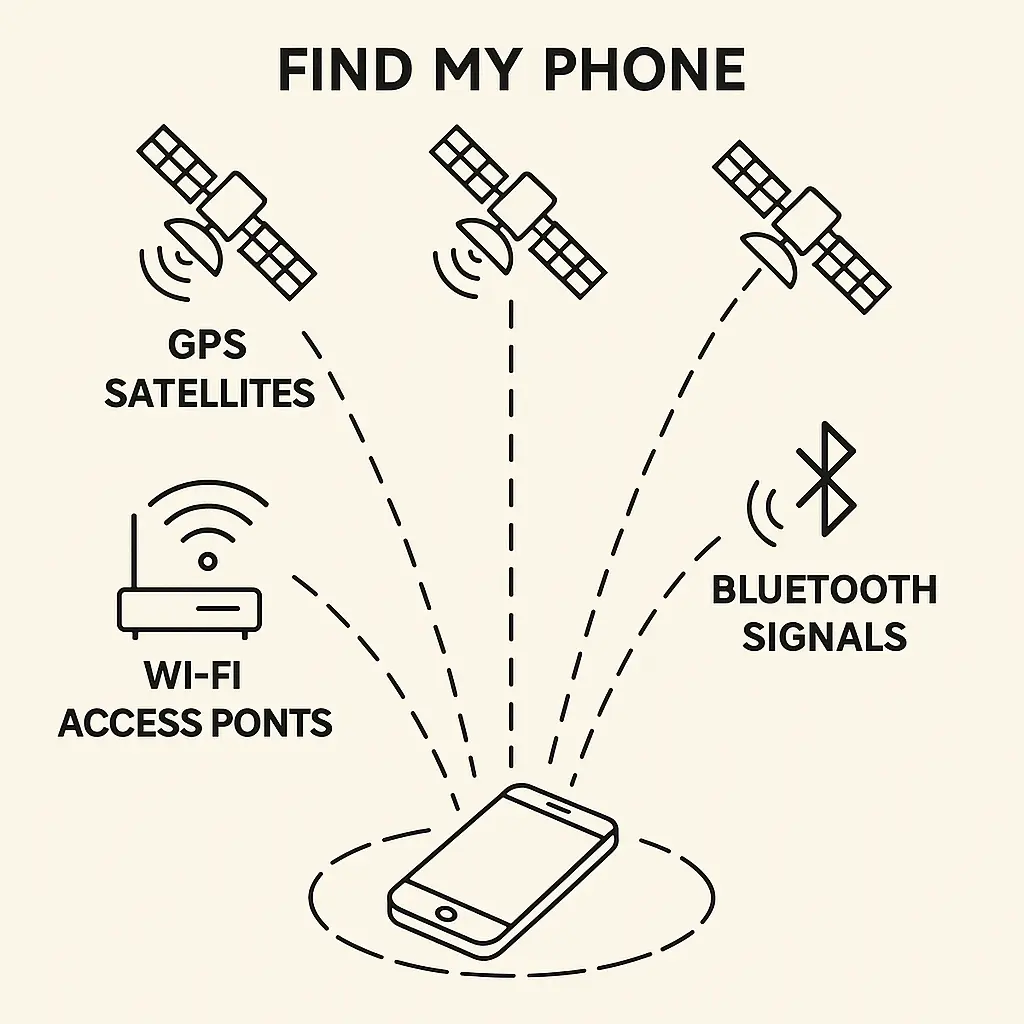
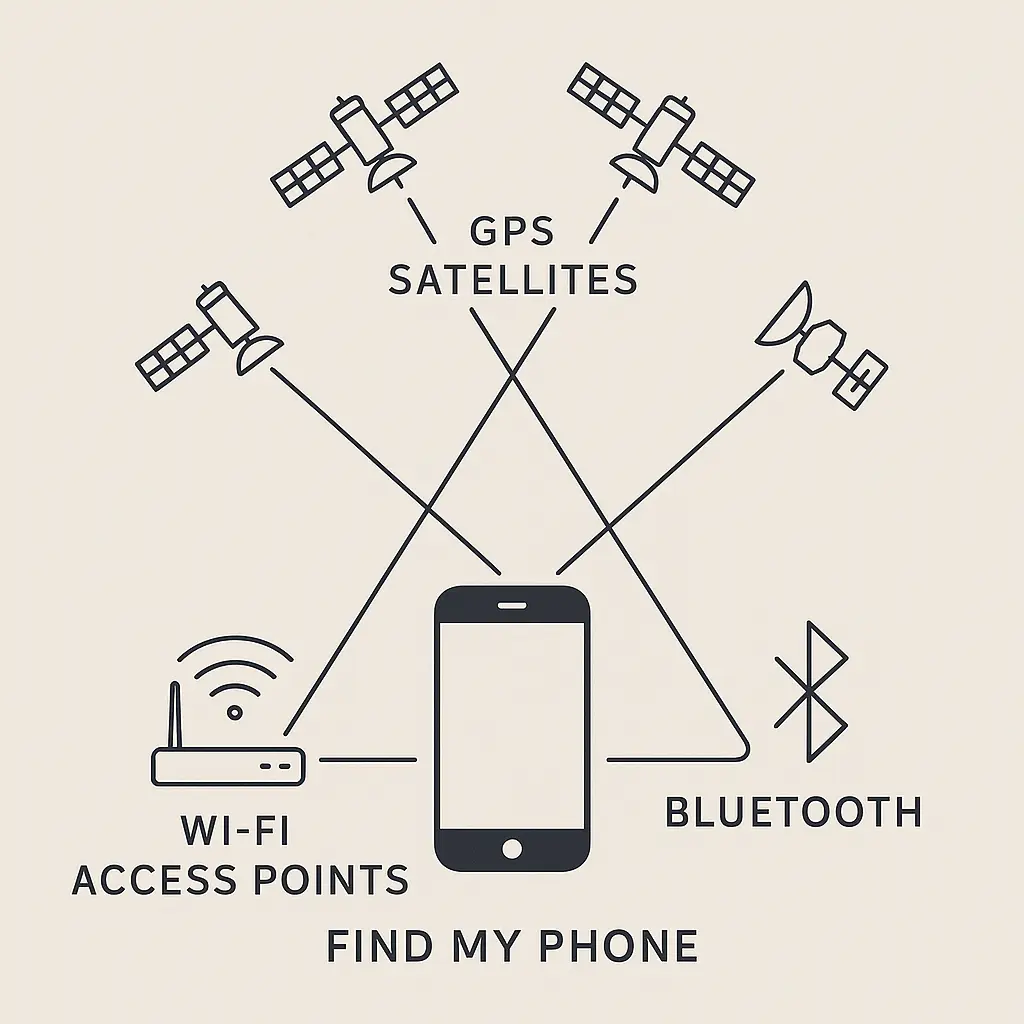
Find My Phone doesn't use one location technology. It uses three, layered on top of each other, and the system selects whichever method provides the best signal at that moment.
GPS is the baseline. Your phone receives signals from multiple satellites orbiting Earth. Each satellite broadcasts its position and the exact time the signal was sent. Your phone calculates how long each signal took to arrive, which tells it the distance to each satellite. With signals from at least four satellites, the phone triangulates its position.
Outdoors with clear sky, GPS accuracy is around 5-10 meters. That's the blue dot landing on the correct side of the street. Indoors, GPS degrades fast. Satellite signals don't penetrate buildings well. The phone might still get a fix, but accuracy drops to 50 meters or more, which puts the dot somewhere in your building but not necessarily on the right floor.
WiFi triangulation fills the indoor gap. Your phone scans for nearby WiFi networks and records their MAC addresses (unique hardware identifiers). It sends that list to Apple or Google's location services, which maintain databases mapping WiFi access points to physical locations.
Those databases were built by vehicles driving streets with WiFi scanners, by phones reporting their GPS location alongside visible WiFi networks, and by users manually geotagging networks. The database knows that if your phone sees a specific set of WiFi networks, it's probably within 10-50 meters of a known location.
WiFi triangulation works indoors where GPS fails, but accuracy depends on how many networks your phone can see and how recently those networks were mapped. In dense urban areas with many access points, accuracy improves. In rural areas or new buildings, it degrades.
Bluetooth is the fallback when your phone goes offline. This is the mechanism most people don't realize exists. When your phone loses internet connectivity, it starts broadcasting a Bluetooth signal that nearby devices can detect.
If another iPhone (for Apple's Find My network) or Android device (for Google's Find My Device network) comes within Bluetooth range of your offline phone, that nearby device detects the signal, records the location, and uploads it to the network. Your phone's location updates without your phone ever connecting to the internet.
The nearby device doesn't know it detected your phone. The process is anonymous and encrypted. Your phone broadcasts a rotating identifier that only you can decrypt using your Apple ID or Google account. The strangers walking past your lost phone are participating in the network without knowing it.
Bluetooth range is around 10-30 meters in open space, less through walls. If your phone is sitting in a backpack in a coffee shop, every iPhone or Android device that walks by becomes a potential relay point. In dense areas, this works surprisingly well. In remote areas with low foot traffic, it doesn't.
How the System Chooses Which Method to Use
Your phone doesn't pick one method and stick with it. It runs all three simultaneously and reports whichever provides the most accurate fix.
GPS runs continuously when location services are enabled, but the phone only uses GPS data when the signal quality is good. If you're indoors and GPS accuracy drops below 50 meters, the system switches to WiFi triangulation.
If WiFi triangulation provides a more accurate fix than GPS (which happens indoors), the phone reports the WiFi position instead. If both GPS and WiFi are unavailable (your phone is in airplane mode or powered off), Bluetooth takes over.
The blue dot you see on the map is the output of this decision tree. The interface doesn't tell you which method produced that dot. It doesn't show a confidence interval. It just shows a dot.
That's fine when the dot is accurate. It's misleading when it's not.
Where Accuracy Breaks Down
Indoors, GPS fails predictably. You're in a multi-story building, your phone is on the third floor, but the blue dot shows ground level or one floor off. That's GPS struggling to get a satellite fix through the roof and walls. WiFi triangulation should compensate, but if the building's WiFi networks aren't in the database or if the phone can't see enough networks, accuracy drops to 50-100 meters.
At that accuracy level, the dot tells you the building but not the floor or room. If you're searching for your phone in a large office or apartment complex, that's not enough.
Bluetooth relay depends on device density. Your phone is offline in a rural area. No one walks past it for hours. The last known location was wherever your phone lost connectivity, which might be miles from where it actually is now. The blue dot shows the old location until someone with an iPhone or Android device comes within Bluetooth range.
In urban areas, Bluetooth relay updates location within minutes. In remote areas, it might take hours or never happen at all.
Powered-off phones still broadcast Bluetooth, but not forever. Apple introduced this feature in iOS 15. Even when you power down an iPhone, it reserves enough battery to broadcast a Bluetooth signal for up to 24 hours. Android added similar functionality in recent versions.
This works until the battery drains completely. Once the phone is fully dead, it stops broadcasting. At that point, the last known location is all you have.
Thieves know how to interfere. A stolen phone gets wrapped in aluminum foil or placed in a Faraday bag. That blocks all wireless signals: GPS, WiFi, Bluetooth, cellular. The phone can't update its location, and the blue dot freezes at the last known position.
Professional thieves do this immediately. Opportunistic thieves might not, which gives you a brief window to track the device before they figure it out.
What You Can Actually Do When Your Phone Goes Missing
Check the map first, but don't trust the dot blindly. The location you see might be current, or it might be the last known position from hours ago. Find My shows a timestamp under the location. If it says "now" or "1 minute ago," the location is current. If it says "2 hours ago," you're looking at stale data.
If the timestamp is old and the phone is offline, you're waiting for Bluetooth relay to update the position. That might happen in five minutes or five hours, depending on foot traffic near the phone.
Play a sound if the phone is nearby. Find My lets you trigger a loud alert on the device, even if it's set to silent mode. This works when the phone is online or within Bluetooth range of your other devices. It doesn't work if the phone is powered off or in a Faraday bag.
The sound plays at maximum volume for two minutes. If you're in the same building, this usually works. If the phone is in a bag or under a couch, the sound might be muffled but still audible.
Enable Lost Mode to lock the device and display a message. Lost Mode disables all notifications, prevents anyone from using the phone without your passcode, and displays a custom message on the lock screen. You can include a phone number where someone can reach you if they find the device.
Lost Mode also continues tracking location and sends you a notification when the phone moves or comes online. This is the setting to enable immediately if you think the phone is lost rather than stolen.
Remote wipe is the last resort, not the first. Erasing your phone deletes all data and returns it to factory settings. This protects your information, but it also removes your ability to track the device. Once you wipe the phone, the blue dot disappears.
Use remote wipe only when you're certain the phone won't be recovered and data protection is the priority. If there's any chance of getting the phone back, leave it trackable.
Report the theft to your carrier and local police. Your carrier can blacklist the phone's IMEI number, which prevents it from connecting to cellular networks. This doesn't help you recover the device, but it makes the phone less valuable to a thief.
Filing a police report creates a record. In some jurisdictions, police will use Find My location data to attempt recovery. In most jurisdictions, they won't. The report matters more for insurance claims than for actual recovery.
The Privacy Layer: Who Sees Your Location Data
Find My uses end-to-end encryption for location data. When your phone reports its position, the data is encrypted before it leaves the device. Apple or Google can see that a location update happened, but they can't decrypt the coordinates. Only your Apple ID or Google account can decrypt that data.
When Bluetooth relay updates your phone's location through a stranger's device, that stranger's phone doesn't know it detected your device. The Bluetooth identifier your phone broadcasts rotates frequently and is encrypted. The nearby device reports the encrypted identifier and its own location to Apple or Google's servers. Your account decrypts the identifier and matches it to your phone.
This design prevents Apple, Google, and the relay device owner from tracking your phone. The system works through cryptographic anonymity rather than trust.
But there's a gap. Law enforcement can request location data from Apple or Google with a warrant. The companies can't decrypt the location coordinates, but they can provide metadata: timestamps, the fact that a location update occurred, and potentially the IP address of the device that uploaded the relay data.
That metadata doesn't tell law enforcement where your phone is, but it confirms that the phone is powered on and moving. In some investigations, that's enough.
The Comparison: Apple Find My vs. Google Find My Device
Apple's Find My network is larger because it includes every iPhone, iPad, and Mac. In areas with high iPhone density (urban areas in the US, Western Europe, parts of Asia), Bluetooth relay updates happen fast. In areas with lower iPhone density, updates slow down.
Google's Find My Device network includes Android phones, but participation is opt-in. Many Android users don't enable the feature, which reduces relay density. In regions where Android dominates market share, Google's network performs better. In regions where iPhone dominates, Apple's network performs better.
Both systems use the same underlying technologies: GPS, WiFi triangulation, Bluetooth relay. The difference is network density and default settings. Apple enables Find My by default. Google requires users to opt in.
Accuracy is comparable when both systems have good signal. The blue dot lands in the same place whether you're using Find My on an iPhone or Find My Device on an Android phone. The difference shows up in offline tracking, where network density determines how quickly Bluetooth relay updates location.
What Find My Phone Doesn't Do
It doesn't prevent theft. A locked phone with Find My enabled is harder to use, but thieves don't always care. Some steal phones to sell for parts. The screen, battery, and camera modules have value even if the phone is activation-locked.
It doesn't guarantee recovery. Most stolen phones are never recovered. Find My improves your odds, but the odds are still low. If the thief knows what they're doing, they'll disable tracking before you realize the phone is gone.
It doesn't work across borders reliably. If your phone is stolen in one country and taken to another, Bluetooth relay depends on device density in the destination country. In regions with low iPhone or Android penetration, offline tracking stops working.
It doesn't protect your data if the phone is unlocked. If you don't use a passcode or biometric lock, Find My can locate the phone but can't prevent someone from accessing your data. The tracking feature and the lock screen are separate layers. Both need to be enabled.
The Cultural Reference: Sherlock Holmes and the Limits of Deduction
In Arthur Conan Doyle's Sherlock Holmes stories, Holmes solves cases by observing details others miss and deducing conclusions from incomplete evidence. He sees a speck of mud on a shoe and deduces the neighborhood where the suspect walked. He smells a particular tobacco and identifies the shop where it was purchased.
But Holmes also knows when he doesn't have enough information. In several stories, he admits that the evidence points to multiple possible conclusions, and he can't determine which is correct without more data. The method works, but only when the inputs are sufficient.
Find My Phone is the same. The system deduces your phone's location from GPS signals, WiFi networks, and Bluetooth relays. When the inputs are strong (clear sky for GPS, many WiFi networks, dense Bluetooth relay coverage), the deduction is accurate. When the inputs are weak (indoors, rural area, phone powered off), the deduction becomes a guess.
The blue dot on the map looks authoritative, but it's a conclusion drawn from incomplete evidence. Sometimes the conclusion is right. Sometimes it's wrong. Knowing which scenario you're in requires looking at the timestamp, understanding which location method is active, and recognizing the limits of each.
What to Configure Before You Lose Your Phone
Enable Find My (or Find My Device) now. On iPhone, go to Settings > [Your Name] > Find My > Find My iPhone and turn on all three options: Find My iPhone, Find My network (for Bluetooth relay), and Send Last Location (which uploads location when the battery is critically low). On Android, go to Settings > Security > Find My Device and enable it.
Set a strong passcode or biometric lock. A six-digit passcode is the minimum. Longer is better. Face ID or fingerprint unlock adds convenience without reducing security. The lock screen is the first barrier between a thief and your data.
Add a recovery contact in your Apple ID or Google account. If you lose access to your account (forgotten password, lost second factor), a recovery contact can help you regain access. Without account access, you can't use Find My, even if the feature is enabled on your phone.
Write down your phone's IMEI number. This is the unique hardware identifier your carrier uses to blacklist stolen devices. On iPhone, go to Settings > General > About and scroll to IMEI. On Android, dial *#06# to display it. Store the number somewhere other than your phone.
Test Find My before you need it. Open the app, locate your phone, play a sound, enable Lost Mode. Make sure the feature works and you know how to use it. The middle of a crisis is not the time to figure out the interface.
The Reality Check: Recovery Rates Are Low
Industry data suggests that around 10-20 percent of stolen phones are recovered. Find My improves those odds, but not dramatically. Most thieves disable tracking quickly, and most police departments don't prioritize phone theft cases.
If your phone is stolen, the best outcome is often not recovery but data protection. Remote wipe, strong passcode, and encrypted backups mean the thief gets a locked brick and you get a new phone with your data intact.
Find My Phone is a tool, not a guarantee. It works best when the phone is lost rather than stolen, when the thief is opportunistic rather than professional, and when you act quickly. The rest of the time, it provides a last known location and a slim hope that someone will find the device and return it.
That's still better than nothing. But it's not what the blue dot implies.