Evil twin WiFi networks: spotting fake hotspots before you connect
You sit down at a coffee shop, open your laptop, and see "CoffeeShop_Guest" in the WiFi list. You've connected to this network before. You click it. You're online.
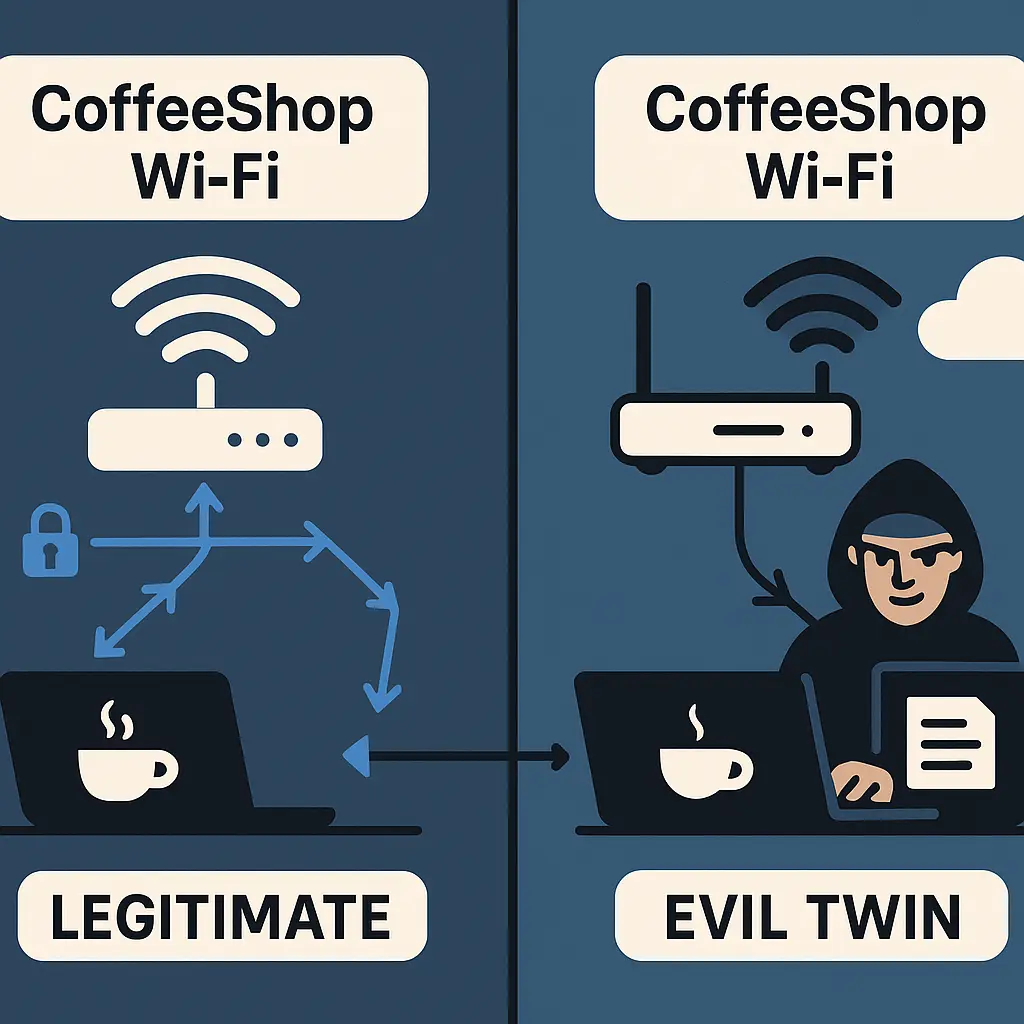
But what if that network isn't the coffee shop's access point? What if someone in the corner is running a router with the same name, waiting for you to connect?
That's an evil twin network. It impersonates a legitimate hotspot to intercept your traffic. The attack works because WiFi network names are not authenticated. Anyone can broadcast any SSID. Your device sees the name, assumes it's legitimate, and connects.
Here's how the mechanism works, what makes evil twin attacks succeed in 2026, and how to recognize them before you hand over your traffic.
The underlying mechanism of an evil twin attack
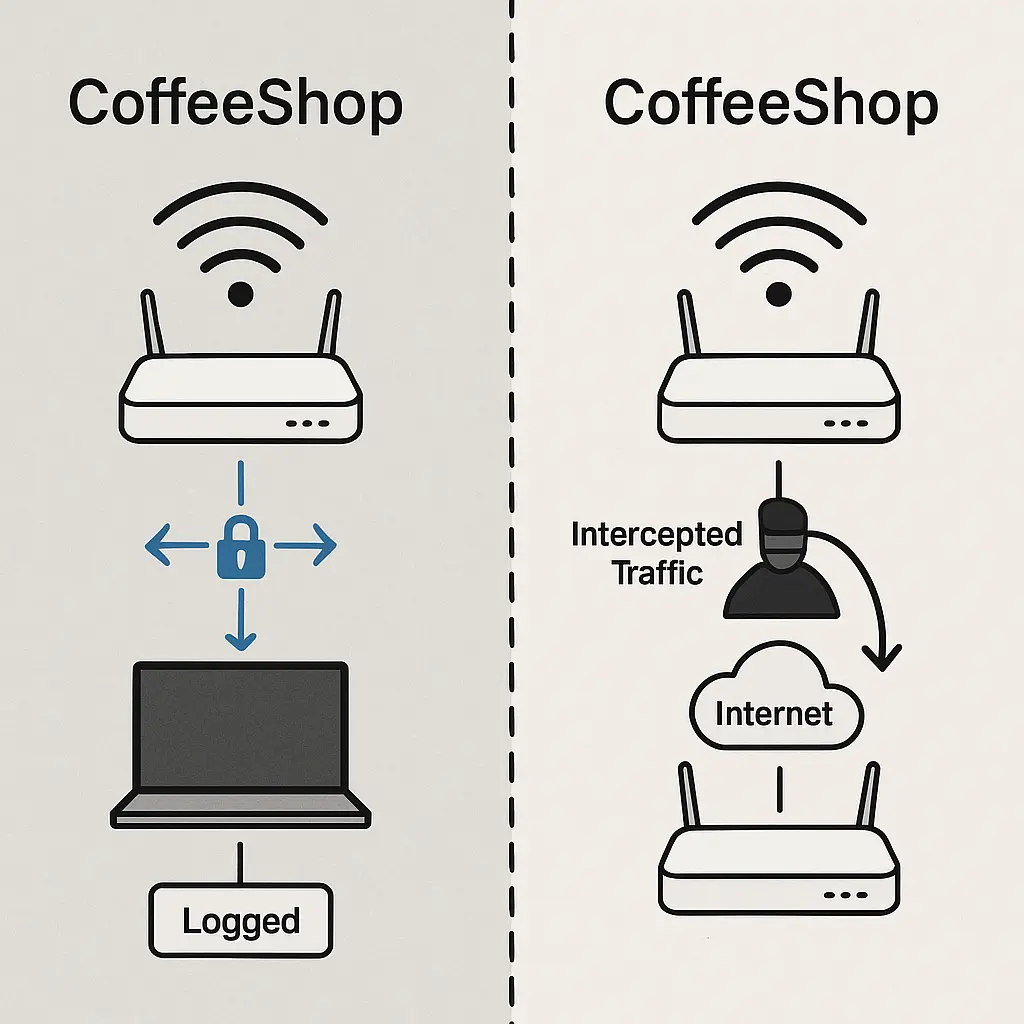
An evil twin attack is a specific type of man-in-the-middle attack. The attacker sets up a wireless access point that broadcasts the same SSID (network name) as a legitimate network. When your device connects, the attacker's router becomes the middleman between you and the internet.
Your device sends traffic to the evil twin. The evil twin forwards that traffic to the real internet, receives the response, and forwards it back to you. From your perspective, everything works. Websites load. Apps connect. You have no idea someone is sitting between you and the destination, logging every unencrypted request.
The attack requires three components. First, the attacker needs a wireless access point. This can be a laptop running hotspot software, a cheap router, or a Raspberry Pi with a WiFi adapter. Second, the attacker needs to broadcast an SSID that matches a network people will trust. Third, the attacker needs software to intercept and log traffic. Tools like Wireshark, mitmproxy, and Ettercap handle this trivially.
The attacker doesn't need to crack encryption or exploit a vulnerability. They just need you to connect to their network instead of the legitimate one. Once you do, they control the path your traffic takes.
Why evil twin attacks succeed
Evil twin attacks succeed because WiFi network names are not authenticated. When you see "Airport_Free_WiFi" in your network list, you have no cryptographic proof that the access point broadcasting that name is actually operated by the airport. You're trusting the name.
Most people connect to WiFi based on familiarity. You've used "Starbucks" before, so when you see "Starbucks" again, you assume it's the same network. But SSIDs are just labels. They don't verify identity. An attacker can broadcast "Starbucks" from a laptop in the parking lot, and your phone won't know the difference.
The attack becomes more effective when the attacker positions their access point closer to you than the legitimate one. WiFi signal strength determines which access point your device prefers. If the evil twin has a stronger signal, your device will choose it automatically, especially if you've connected to a network with that SSID before.
Some attackers take this a step further with a technique called de-authentication. They send spoofed de-authentication frames to devices connected to the legitimate access point, forcing them to disconnect. When those devices try to reconnect, they see the evil twin's stronger signal and connect to it instead. This technique is forbidden in many jurisdictions and detectable by network monitoring tools, but it's still used in targeted attacks.
The attack works because the user experience is seamless. You connect, you browse, nothing feels wrong. The attacker isn't blocking your traffic or redirecting you to fake login pages. They're just watching.
What an evil twin can actually intercept
An evil twin intercepts traffic at the network layer. The attacker sees every packet your device sends and receives. What they can do with that traffic depends on whether it's encrypted.
HTTPS protects the content of web traffic. When you visit a site using HTTPS, your browser negotiates an encrypted connection with the destination server. The evil twin sees that you're connecting to a specific domain, but it can't read the content of the requests or responses. Your login credentials, credit card numbers, and private messages stay encrypted.
But HTTPS doesn't protect everything. The evil twin can see which domains you're visiting. It can see the timing and size of your requests. It can see DNS queries, which reveal every domain you look up before your browser connects. And if you visit a site that still uses HTTP (no "s"), the evil twin sees everything in cleartext.
Session cookies are another risk. Some websites send session cookies over HTTPS but don't mark them as secure-only. If your browser makes any HTTP request to that domain, the evil twin can intercept the cookie and use it to hijack your session. This is less common in 2026 than it was a decade ago, but it still happens.
The evil twin can also perform more active attacks. It can inject content into unencrypted HTTP responses. It can redirect DNS queries to malicious servers. It can serve fake captive portal pages that look like legitimate login screens. These techniques require more sophistication, but they're within reach of anyone who's read a tutorial.
How to recognize an evil twin network
You usually can't recognize an evil twin from the network name alone. That's the entire point of the attack. But there are patterns that should make you suspicious.
Duplicate SSIDs are the clearest warning sign. If you see two networks with the same name in your WiFi list, one of them is probably illegitimate. The legitimate access point and the evil twin are both broadcasting, and your device is showing you both. This happens more often in crowded spaces like airports and conference centers, where multiple attackers might be running the same playbook.
Check the security type. If a network you've used before suddenly appears as open (no password required) when it was previously encrypted, that's a red flag. Some attackers run open evil twins to make connection easier. Others broadcast a password-protected network but use a weak or commonly known password to give the appearance of security.
Look for unusual behavior after you connect. If websites that normally load instantly are taking longer, the evil twin might be forwarding your traffic through a slow connection or performing active interception. If you're being redirected to unfamiliar login pages or seeing certificate warnings, disconnect immediately.
Verify the network with staff. Ask the barista, the hotel front desk, or the airport information booth what the correct WiFi network name is. This sounds obvious, but most people don't do it. They assume the network name they remember is correct. Attackers count on that assumption.
Use your phone's hotspot instead of public WiFi when you're handling sensitive tasks. Your phone's cellular connection is harder to intercept than WiFi, and you control the access point. This isn't practical for long work sessions, but it's a good fallback when you're checking your bank account or logging into work email.
What HTTPS actually protects on an evil twin
HTTPS is your primary defense against evil twin interception. When you visit a site using HTTPS, your browser establishes an encrypted tunnel directly to the destination server. The evil twin can see that you're connected to that server, but it can't read the content of your communication.
The protection comes from Transport Layer Security (TLS), the protocol that powers HTTPS. Your browser and the server negotiate a shared encryption key that only they know. The evil twin sitting in the middle doesn't have that key. It can forward encrypted packets back and forth, but it can't decrypt them.
This is why HTTPS adoption matters so much. In 2010, most websites used HTTP. An evil twin could intercept login credentials, read emails, and capture credit card numbers. In 2026, HTTPS is the default for the vast majority of websites. The attack surface has shrunk dramatically.
But HTTPS doesn't protect metadata. The evil twin still sees which domains you visit, when you visit them, and how much data you transfer. It sees your DNS queries, which reveal every domain lookup your device makes. It sees the size and timing of encrypted packets, which can reveal information about your behavior even without reading the content.
HTTPS also doesn't protect you from a fake certificate attack. If the attacker can trick your browser into accepting a fraudulent certificate for a site, they can decrypt your HTTPS traffic. This requires installing a malicious root certificate on your device, which is hard to do without physical access or malware. But it's not impossible, especially on managed devices or in environments where users are tricked into installing certificates themselves.
The role of VPNs in defending against evil twins
A VPN encrypts all traffic between your device and the VPN server, regardless of the network you're connected to. This renders the evil twin's interception capability useless. The attacker sees encrypted data flowing to the VPN server, but they can't read it.
The mechanism is straightforward. When you enable a VPN, your device establishes an encrypted tunnel to the VPN server. All traffic routes through that tunnel before reaching the internet. The evil twin sees packets going to the VPN server's IP address, but it can't see what's inside those packets. Your DNS queries, HTTP requests, and HTTPS traffic all travel through the tunnel.
This is why VPNs matter for public WiFi. Not because public WiFi is universally dangerous in 2026, but because a VPN eliminates the need to trust the access point. You don't need to verify that "Airport_Free_WiFi" is legitimate. You don't need to check for duplicate SSIDs. You connect, enable the VPN, and your traffic is protected.
The VPN doesn't prevent the evil twin from existing. It just makes the evil twin irrelevant. The attacker can still see that you're connected, but they can't intercept anything useful.
VPNs have limitations. They don't protect you from malware on your device. They don't stop you from entering credentials into a fake login page. They don't prevent DNS leaks if the VPN is misconfigured. But for the specific threat of evil twin interception, a VPN is the most reliable defense.
I use NordVPN when I'm traveling. It auto-connects when I join an untrusted network, which removes the decision point. I don't have to remember to enable it. It just happens.
The evolution of the evil twin threat
Evil twin attacks are less effective in 2026 than they were in 2010, but they haven't disappeared. The widespread adoption of HTTPS has closed the biggest vulnerability. Most of the traffic an evil twin intercepts today is encrypted and useless to the attacker.
But attackers have adapted. Modern evil twin attacks focus on metadata collection, DNS manipulation, and social engineering. The attacker might not be able to read your email, but they can see which email provider you use, when you check it, and how long you spend reading messages. They can redirect DNS queries to serve fake login pages. They can inject content into the small percentage of HTTP traffic that still exists.
The attack also works in specific contexts where users are less cautious. Airports, hotels, and conference centers are high-value targets because people expect to see generic WiFi network names. "Airport_Free_WiFi" and "Conference_Guest" are plausible. Users connect without thinking.
Some attackers combine evil twins with other techniques. They run a fake captive portal that looks like a legitimate login page. They use the evil twin to deliver malware through fake software update prompts. They harvest email addresses and phone numbers from captive portal forms. The evil twin becomes the delivery mechanism for a broader attack.
The threat is real, but it's also manageable. HTTPS, VPNs, and basic verification habits reduce the risk to near zero for most users. The people most vulnerable to evil twin attacks in 2026 are those who ignore certificate warnings, disable VPNs for convenience, or trust network names without verification.
Practical steps to protect yourself
Start with HTTPS. Check that websites show the padlock icon in your browser's address bar. If you see a certificate warning, don't proceed. Certificate warnings on public WiFi are a red flag. The evil twin might be attempting a man-in-the-middle attack on your encrypted connection.
Use a VPN on public WiFi. Configure it to auto-connect when you join untrusted networks. This removes the decision point and ensures your traffic is encrypted regardless of the access point.
Verify network names with staff. Ask the hotel front desk, the coffee shop barista, or the airport information booth what the correct WiFi network name is. This takes ten seconds and eliminates the risk of connecting to an evil twin.
Disable auto-connect for public networks. Your phone and laptop can be configured to automatically connect to networks you've used before. This is convenient at home, but it's a liability in public. An attacker can broadcast a network name you've used previously, and your device will connect without asking.
Check for duplicate SSIDs. If you see two networks with the same name, one is probably an evil twin. Don't connect to either until you've verified the correct one with staff.
Use your phone's hotspot for sensitive tasks. If you're logging into your bank, filing taxes, or accessing work email, use your phone's cellular connection instead of public WiFi. The cellular network is harder to intercept, and you control the access point.
Keep your devices updated. Operating system updates often include patches for WiFi vulnerabilities. Attackers exploit outdated devices because they know the vulnerabilities are public and the patches are available.
Turn off file sharing and AirDrop when you're on public WiFi. These features can expose your device to other users on the same network. An evil twin gives the attacker direct access to everyone connected. Don't make it easier.
What to do if you think you connected to an evil twin
Disconnect immediately. Don't try to verify whether it's an evil twin while you're still connected. Just disconnect.
Change passwords for any accounts you accessed while connected. Start with email, banking, and work accounts. Use a trusted network or your phone's cellular connection to change them.
Enable two-factor authentication on any account that doesn't already have it. If the evil twin intercepted your password, 2FA makes it harder for the attacker to use it.
Check your account activity. Look for unfamiliar logins, unexpected transactions, or changes to your settings. Most services let you review recent activity and active sessions.
Run a malware scan on your device. If the evil twin was part of a broader attack, the attacker might have delivered malware through a fake software update or injected content. A full scan checks for this.
Monitor your accounts for the next few weeks. Evil twin attacks don't always result in immediate fraud. The attacker might sell your credentials on a criminal marketplace, and someone else might use them later.
Report the incident to the venue. If you connected to an evil twin at a hotel, airport, or coffee shop, tell the staff. They might not be able to do anything about it immediately, but they should know that someone is running a fake access point on their property.
The Schitt's Creek problem
In Schitt's Creek, the Rose family moves from wealth to a small town where everyone knows everyone. The town's simplicity is both charming and dangerous. You trust people because you recognize them. You assume the motel WiFi is safe because you've used it before. You don't verify because verification feels unnecessary.
Evil twin networks exploit the same dynamic. You see "Starbucks" and you connect because you've connected to "Starbucks" before. The name is familiar. The trust is automatic. But familiarity isn't authentication. The network name you recognize might be broadcast by someone sitting three tables away with a laptop and a plan.
The defense is the same as it is in a small town where not everyone is who they seem. Verify. Ask. Don't assume that the familiar is safe just because it's familiar. The network name is a label, not a guarantee.
Final thoughts
Evil twin networks work because WiFi network names are not authenticated. Anyone can broadcast any SSID. Your device sees the name, assumes it's legitimate, and connects.
The threat is real, but it's manageable. HTTPS protects the content of your traffic. VPNs encrypt everything before it reaches the access point. Basic verification habits eliminate the risk of connecting to an evil twin in the first place.
The people most vulnerable to evil twin attacks in 2026 are those who ignore warnings, disable protections for convenience, or trust network names without verification. Don't be one of them.
Check for duplicate SSIDs. Verify the network with staff. Use a VPN. Keep HTTPS enabled. These steps take seconds and eliminate the risk.
The evil twin is sitting in the corner, broadcasting a network name you recognize. Whether you connect to it is up to you.