Calendar Invite Phishing: The Inbox Threat Hiding in Plain Sight
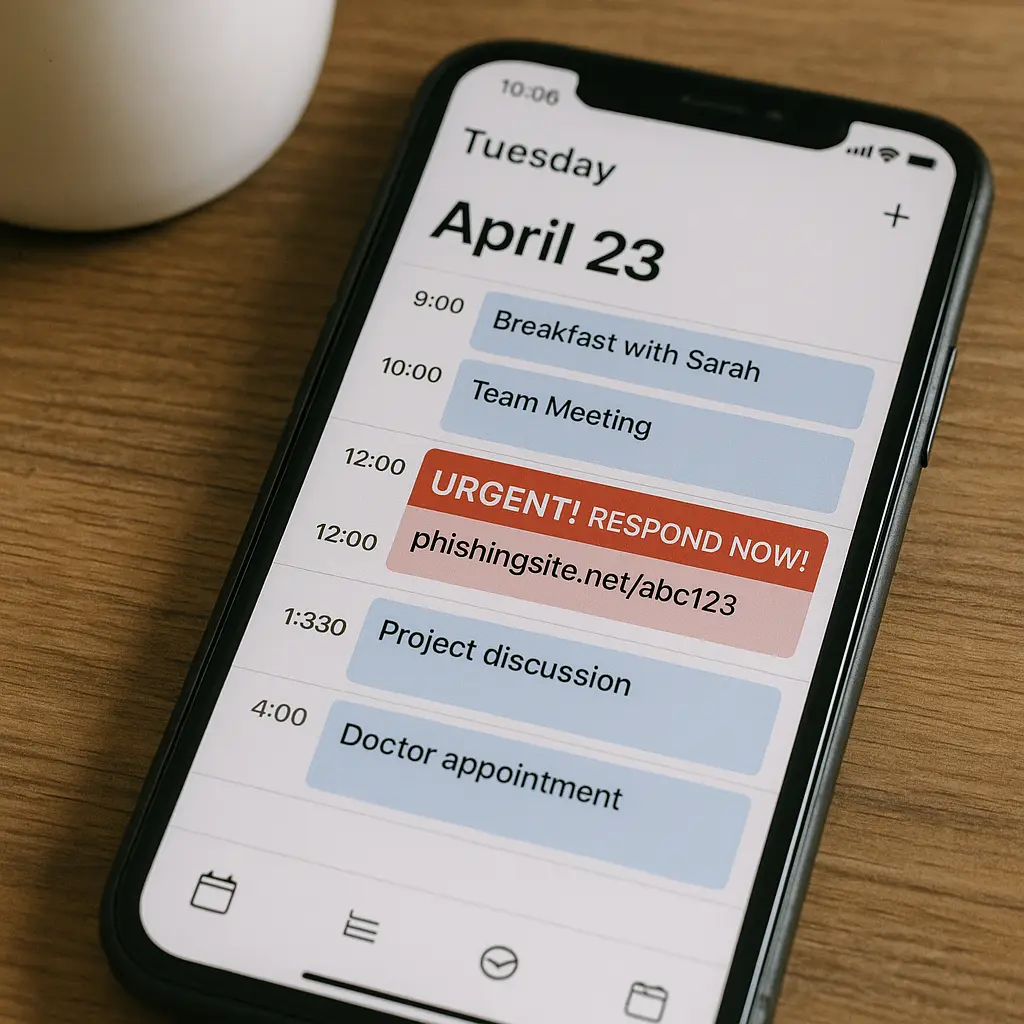
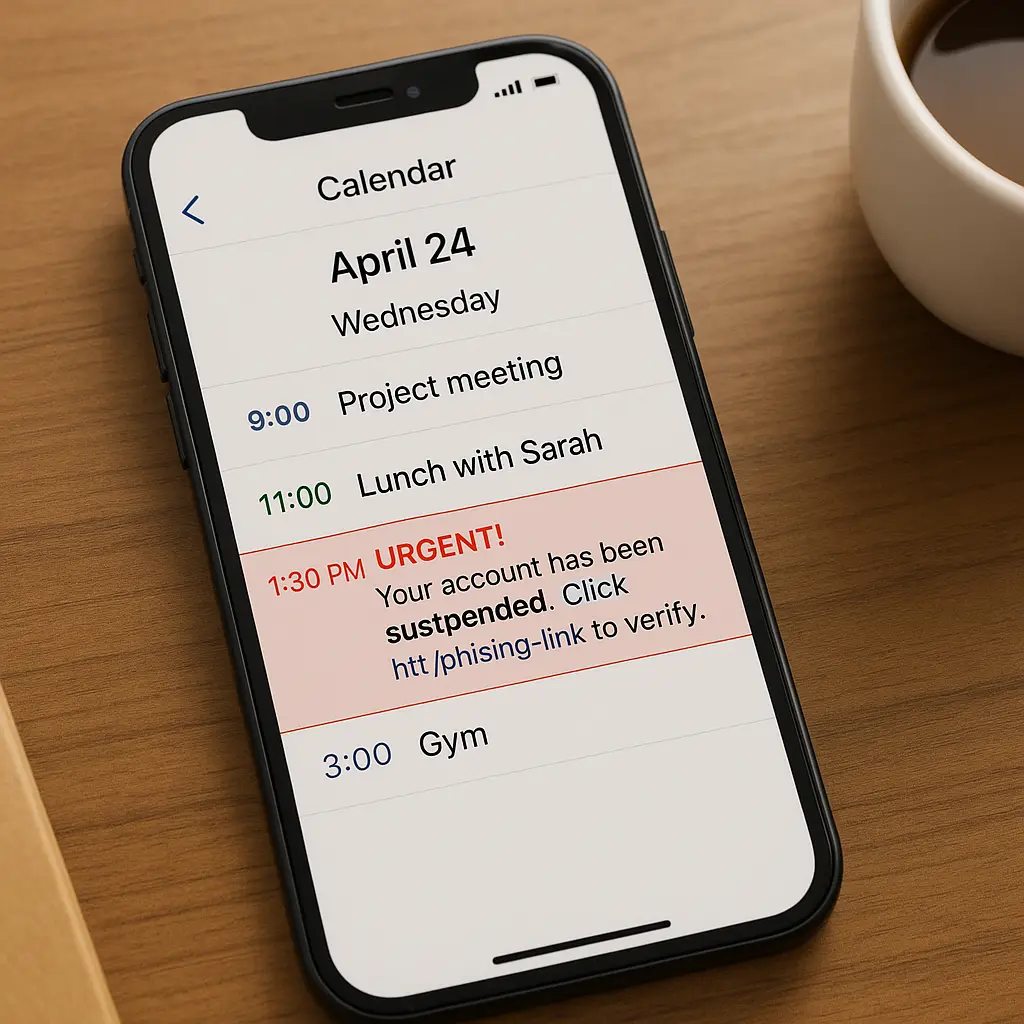
You check your phone. A calendar notification appears: "Urgent: Account Security Review Required." The meeting is scheduled for 2 PM today. There's a link to join. The sender's name looks like your bank.
You didn't schedule this meeting. You don't recognize the email address when you look closer. But it's in your calendar, so it must be legitimate, right?
That's the mechanism behind calendar invite phishing, and it's working because most people don't expect their calendar to lie to them.
The Protocol That Became a Weapon
Calendar phishing exploits the iCalendar protocol, the standard format for sharing meeting invitations across platforms. When someone sends you a calendar invite, your email client receives an .ics file containing the meeting details: time, location, description, and any embedded links.
The problem is that email providers treat calendar invites differently from regular messages. Spam filters analyze message content, subject lines, and sender reputation to catch phishing attempts. But calendar invites bypass these checks because they're processed as calendar data, not email content.
Your calendar app automatically adds the event. No spam folder. No warning. The invite appears alongside your legitimate meetings, borrowing credibility from its context.
This is the underlying mechanism: attackers use a trusted protocol to deliver malicious content directly to your calendar, where it sits waiting for you to click.
Why Your Calendar Became a Target
The shift to calendar-based attacks makes sense from an attacker's perspective. Email phishing faces increasingly sophisticated filters. Security awareness training teaches people to scrutinize unexpected emails. Two-factor authentication blocks many credential-stealing attempts.
But calendars? Most people trust their calendar implicitly. It's where work meetings live, where personal appointments get tracked, where reminders keep life organized. When an event appears in that trusted space, the psychological barrier drops.
The attack works because it exploits the gap between how we think about email security and how we think about calendar security. We've been trained to question emails. We haven't been trained to question calendar invites.
Consider the typical phishing email: it lands in your inbox, competes with dozens of other messages, and triggers your skepticism if the sender or subject line looks suspicious. A calendar invite skips that competition. It appears as a scheduled event, complete with time slot and notification. The visual presentation suggests legitimacy.
Attackers also exploit calendar notification systems. When the meeting time approaches, your phone buzzes. You see the reminder. The urgency feels real because your calendar says it's time to act. That's the social engineering component, using the calendar's own notification system to create pressure.
The Anatomy of a Calendar Phishing Attack
Let me walk through how these attacks actually unfold.
The attacker sends a calendar invite to your email address. The invite uses a sender name that mimics a legitimate organization: "PayPal Security Team," "Microsoft Account Protection," "Your Bank Fraud Department." The actual email address might be completely unrelated, but most calendar apps display the sender name more prominently than the address.
The meeting title creates urgency: "Immediate Action Required," "Account Suspended," "Security Alert," "Unusual Activity Detected." These phrases trigger the same psychological responses that make traditional phishing effective, fear of loss, authority, and time pressure.
The description field contains the malicious payload. This might be a link to a credential-stealing site, instructions to call a phone number for "support," or a request to download an attachment. The text often includes official-looking language, case numbers, and warnings about account closure or legal consequences.
Some attackers schedule the meeting for the current day, sometimes within the next hour. This compressed timeline amplifies urgency and reduces the window for rational evaluation. Others schedule recurring events, ensuring the victim sees repeated reminders over weeks or months.
When you click the link in the invite description, you land on a page that mimics a legitimate login screen. The URL might use typosquatting, a domain that looks almost right but contains a subtle misspelling. The page design copies the real service's branding, color scheme, and layout.
You enter your credentials. The fake page captures them. The attacker now has access to your account. Depending on what you've just compromised, they might drain your bank account, hijack your email, or use your identity to attack others.
The Mobile Vulnerability
Calendar phishing hits mobile devices particularly hard. Phone screens display less information than desktop monitors, making it harder to inspect sender addresses, hover over links to preview URLs, or notice subtle design inconsistencies.
Mobile calendar apps often truncate meeting descriptions, showing only the first few lines. The full malicious content might not be visible until you tap to expand, and by then, you might have already clicked a link.
Notifications compound the problem. When your phone buzzes with a meeting reminder, you're likely in the middle of something else. You glance at the notification, see an urgent message from what looks like your bank, and tap the link without the careful evaluation you'd give a suspicious email at your desk.
The mobile context also reduces your ability to verify. Switching between apps to check the sender's email address, opening a browser to manually navigate to the real service, or contacting the supposed sender through a separate channel, all of these protective behaviors become more friction-filled on a small screen when you're on the go.
What Actually Protects You
The defense starts with understanding what calendar invites can and cannot do. A legitimate meeting invitation from a colleague or a service you use will come from a recognizable email address. If you don't recognize the sender, that's your first signal to pause.
Check the full email address, not just the display name. Calendar apps often show "PayPal Security" in large text with the actual address in smaller text below. Tap or click to reveal the full sender information. If the address is something like "security.paypal-alert@suspicious-domain.net," that's not PayPal.
Examine the meeting description before clicking anything. Legitimate organizations don't send urgent account security warnings through calendar invites. They don't threaten account closure or demand immediate action via a calendar event. These tactics are social engineering, not standard business practice.
Hover over links before clicking them (on desktop), or long-press links (on mobile) to preview the URL. Does the domain match the organization supposedly sending the invite? If the link goes to a shortened URL (bit.ly, tinyurl, etc.), that's another red flag, legitimate services use their own domains for important account communications.
If an invite seems suspicious but claims to be from a service you actually use, don't click the link. Instead, open your browser, navigate to the service directly by typing the URL yourself, and log in. Check your account for any actual security alerts or required actions. If nothing appears on the legitimate site, the calendar invite was a scam.
For unexpected invites that claim to be from someone you know, verify through a separate channel. Send them a text, call them, or message them through a different platform. "Did you just send me a calendar invite about X?" takes thirty seconds and prevents credential theft.
The Office 365 and Google Calendar Variants
Calendar phishing adapts to the platforms people actually use. Office 365 and Google Calendar dominate workplace and personal scheduling, so attackers have developed platform-specific techniques.
In Office 365 environments, attackers exploit the fact that external calendar invites can appear in your calendar without explicit acceptance. The invite arrives, Outlook adds it to your schedule, and you see it alongside legitimate work meetings. Some organizations configure Outlook to auto-accept meeting requests, which eliminates even the minimal friction of clicking "Accept."
Google Calendar has a similar vulnerability. By default, Gmail automatically adds events from messages it detects as invitations. This feature is designed for convenience, you book a flight, Gmail adds it to your calendar, but attackers exploit it by crafting emails that trigger the automatic event creation.
Both platforms allow you to adjust these settings. In Google Calendar, you can disable automatic event creation from Gmail. In Outlook, you can configure how external meeting requests are handled. These changes add a small amount of friction to legitimate scheduling, but they prevent malicious invites from appearing automatically.
The corporate environment creates additional risk because calendar phishing can impersonate internal senders. An attacker who has already compromised one employee's account can send calendar invites that appear to come from within the organization. When you see a meeting request from your CFO's name, you're less likely to scrutinize the actual email address.
The Callback Variant
Some calendar phishing attacks skip the malicious link entirely and use a different tactic: phone numbers.
The invite appears in your calendar with urgent language about account security, fraudulent charges, or suspended access. Instead of a link, the description contains a phone number to call "immediately" to resolve the issue.
You call the number. Someone answers, claiming to represent your bank, a tech company, or a government agency. They already have some of your information, your name, maybe your email address, which makes them sound legitimate. They ask you to "verify your identity" by providing additional details: your full Social Security number, your account password, or a code sent to your phone.
This is vishing, voice phishing, delivered through a calendar invite. The mechanism combines the trusted context of your calendar with the real-time social engineering of a phone conversation. The person on the other end can adapt their approach based on your responses, building trust and extracting information that a static phishing page cannot.
The defense is the same: legitimate organizations don't schedule urgent security calls through calendar invites. If you're concerned about your account, hang up, find the real customer service number through the company's official website, and call that number yourself.
The Meeting Platform Impersonation
Another variant impersonates video conferencing platforms. The invite claims to be a Zoom meeting, Microsoft Teams call, or Google Meet session. The description contains a link to "join the meeting."
The link doesn't go to Zoom, Teams, or Meet. It goes to a credential-stealing page that mimics the platform's login screen. When you try to "join the meeting," you're asked to enter your email and password. The fake page captures your credentials and might redirect you to a real error page or a message saying the meeting has ended.
This attack works because we're conditioned to click links in calendar invites to join virtual meetings. It's a daily behavior for remote workers, normalized to the point where clicking feels automatic. The attacker exploits that automation.
The tell is in the URL. Legitimate Zoom meetings use zoom.us domains. Teams meetings use teams.microsoft.com. Meet uses meet.google.com. If the link in your calendar invite goes anywhere else, it's not a real meeting.
Before clicking, inspect the URL. If you're not sure, open the platform directly in your browser and check your scheduled meetings there. If the meeting doesn't appear in your Zoom account when you log in through the official site, the calendar invite was fake.
What to Do When You've Already Clicked
You clicked the link. You entered your credentials. You realize, too late, that the page wasn't legitimate. Now what?
Change your password immediately. Go to the real service, not through any link in the suspicious invite, and reset your password. Use a strong, unique password that you haven't used anywhere else.
If the compromised account has two-factor authentication, verify that it's still enabled and that no new recovery methods have been added. Attackers often add their own phone number or email address to maintain access even after you change the password.
Check your account activity. Look for logins from unfamiliar locations, devices you don't recognize, or actions you didn't take. Many services provide activity logs that show recent access.
If the compromised account is your email, the situation is more serious. Email unlocks password resets for other accounts. Review your sent folder for messages you didn't send. Check your email forwarding rules to ensure your messages aren't being copied to an attacker's address. Look at your email filters to see if anything has been configured to hide messages from you.
For financial accounts, contact your bank or credit card company immediately. Explain what happened. They can monitor for fraudulent transactions and, if necessary, issue new account numbers or cards.
Report the phishing attempt. The FTC's phishing reporting page accepts reports of scams and shares information with law enforcement. Your report helps build cases against the people running these operations.
If this happened on a work account, tell your IT department immediately. They need to know that your credentials may have been compromised so they can take steps to protect company systems and data.
The Broader Pattern
Calendar phishing is part of a larger trend: attackers moving to less-defended channels as traditional email security improves. Phishing guidance from CISA focuses heavily on email-based attacks, but the threat has diversified.
We've seen SMS phishing (smishing) exploit the trusted context of text messages. We've seen attackers use collaboration platforms like Slack and Teams to send malicious links that bypass email filters entirely. Calendar phishing follows the same logic: find a communication channel where users' defenses are down, and exploit it.
The technical controls that protect email, spam filters, link scanning, attachment sandboxing, don't fully extend to calendar protocols. Organizations that have invested heavily in email security might have minimal calendar security. The gap creates opportunity for attackers.
This doesn't mean calendar protocols are fundamentally broken. The iCalendar standard serves a legitimate purpose, and most calendar invites are exactly what they claim to be. But the trust we place in our calendars, combined with the protocol's ability to deliver content directly to a visible, notification-generating space, makes it an attractive vector for social engineering.
What Actually Changes
The practical takeaway is this: treat calendar invites with the same skepticism you've learned to apply to unexpected emails.
Don't click links in calendar invites from senders you don't recognize. Don't call phone numbers provided in unsolicited meeting requests. Don't download attachments from calendar events you didn't schedule.
When an invite looks suspicious, verify it through a separate channel before taking any action. Delete malicious invites immediately, and configure your calendar settings to prevent automatic acceptance of external meeting requests.
The underlying vulnerability isn't technical, it's psychological. We trust our calendars because we need them to function. Attackers exploit that trust. The defense is awareness: knowing that calendar phishing exists, understanding how it works, and maintaining the same cautious evaluation you'd apply to any other unexpected communication.
Your calendar is not a secure channel. Treat it accordingly.