Bluetooth beacons: the tracking you can't see
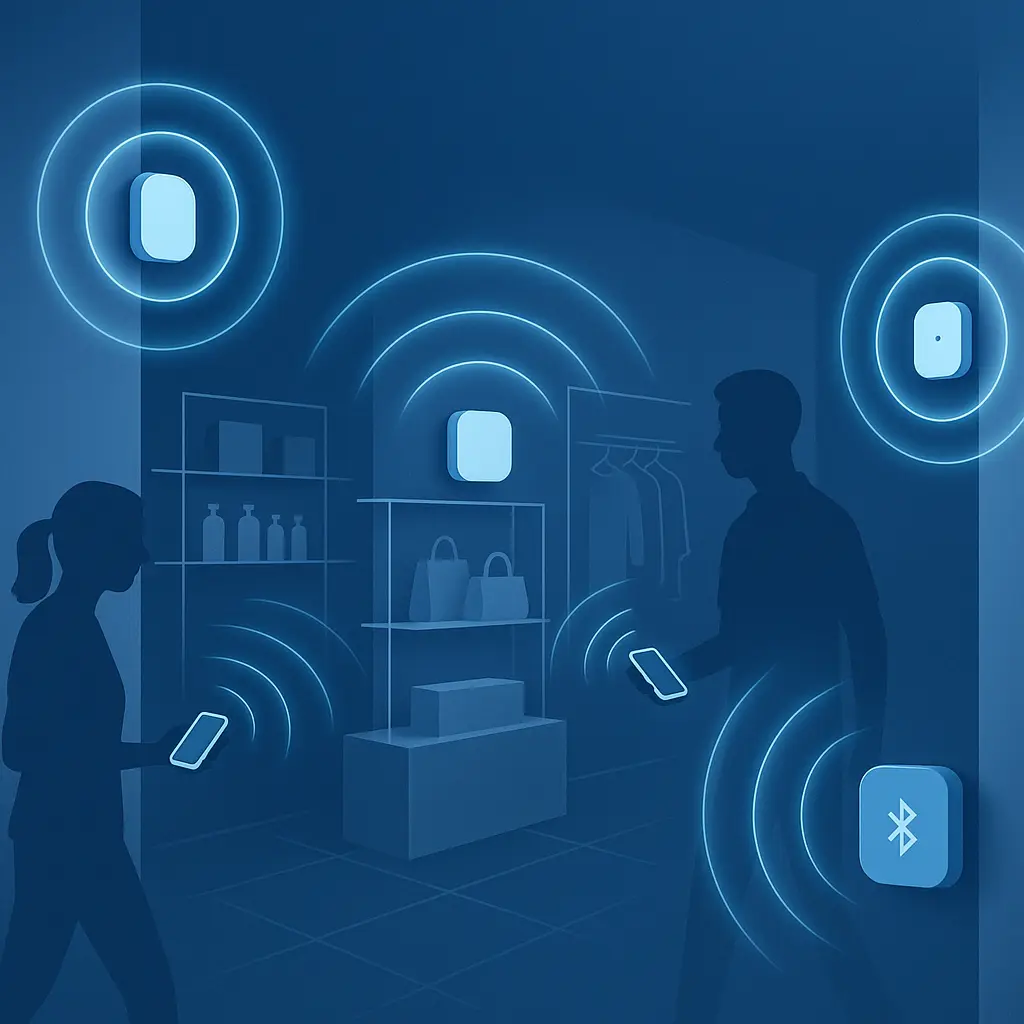
You walk into a store. Your phone is in your pocket. Bluetooth is on because you use wireless earbuds. You browse, you leave. You didn't open an app. You didn't scan anything. You didn't check in.
The store knows you were there. It knows how long you stayed. It knows which sections you visited. It knows if you've been there before. It might know your name.
This is Bluetooth beacon tracking. It's invisible, it's widespread, and most people have no idea it's happening.
What Bluetooth beacons are
A Bluetooth beacon is a small device that broadcasts a signal. The device itself is about the size of a coin or a USB drive. It runs on a battery that lasts months or years. It costs around $20 to $50 per unit.
The beacon doesn't collect data. It doesn't connect to your phone. It doesn't pair with anything. All it does is broadcast a unique identifier on repeat, roughly once per second. That identifier is a string of characters that looks meaningless to you but means everything to the system tracking you.
The broadcast uses Bluetooth Low Energy, a protocol designed for devices that need to run on tiny batteries for long periods. BLE signals travel around 100 feet in open space, less through walls and obstacles. The range is enough to cover a store aisle, a museum gallery, or a subway platform.
Your phone listens for these broadcasts if Bluetooth is enabled. Apps on your phone can request permission to access Bluetooth, and once granted, they can detect any beacon in range. The app logs the beacon's unique ID, timestamps the detection, and sends that data to a server. The server maps the beacon ID to a physical location. Now the system knows your phone was near that beacon at that time.
You didn't do anything. You didn't open the app. You didn't interact with the beacon. The tracking happened in the background.
How the tracking mechanism works
Beacons broadcast using a standard called iBeacon (Apple's implementation) or Eddystone (Google's, now deprecated but still in use). Both standards follow the same basic pattern: broadcast a unique ID, let apps on nearby phones detect it, and let those apps decide what to do with the information.
The ID contains three parts in iBeacon's format: a UUID (universally unique identifier), a major value, and a minor value. The UUID identifies the organization or campaign. The major value typically identifies a location, like a specific store. The minor value identifies a specific beacon within that location, like the one mounted near the shoe section.
An app detects the broadcast, reads the ID, and sends it to a server along with metadata: timestamp, signal strength (which estimates distance), and often your device's advertising identifier or account ID. The server logs the visit. If the app has permission to access your location via GPS, it might send precise coordinates too, but the beacon alone provides enough granularity to know which part of the store you're in.
This happens constantly. If you walk through a store with 50 beacons, your phone might detect dozens of them during a 10-minute visit. Each detection is a data point. String them together and you have a path: entry, browsing pattern, dwell time, exit.
The system doesn't need to know your name to be useful. Retailers care about aggregate behavior. How many people enter? How long do they stay? Which sections get the most traffic? Which displays get ignored? Beacons answer these questions at scale.
But the system can know your name. If the app you're using requires an account, the server links your beacon detections to your profile. If you've made a purchase with a loyalty card, the system can connect your in-store behavior to your transaction history. If the app shares data with advertising networks, your beacon trail can feed into the same profile that targets you with ads across the web.
Where beacons are deployed
Retailers were the early adopters. Macy's, Target, and similar chains deployed thousands of beacons in the mid-2010s. The pitch was personalized marketing: send a push notification when a customer walks past a product they've browsed online, or offer a discount when they linger near a display. Some of that happened. Most of it didn't, because people found the notifications intrusive and disabled them. But the tracking infrastructure stayed in place.
Airports use beacons to monitor passenger flow, estimate wait times, and send gate change notifications. Museums use them to deliver audio tours triggered by your location. Sports stadiums use them to guide fans to their seats and offer concession discounts. Cities embed them in bus stops and street furniture to study pedestrian traffic patterns.
Shopping malls combine beacons with WiFi tracking to build detailed maps of foot traffic. Conference centers use them to track attendee movement and measure which booths attract the most visitors. Hospitals use them for wayfinding and asset tracking. Hotels use them to unlock room doors and deliver location-based services.
The devices are small, cheap, and easy to deploy. You stick them to a wall, a shelf, or a ceiling. You configure the broadcast ID. You walk away. They run for years.
Some beacons are visible if you know what to look for. They're often white or black plastic discs mounted near entryways or on walls. Many are hidden inside fixtures, behind signage, or above drop ceilings. You won't see them unless you're looking.
What apps use beacon data
Retailer apps are the obvious ones. If you install the Target app, it requests Bluetooth permissions. If you grant them, the app listens for Target's beacons. The company's privacy policy discloses this, usually in a section about "location-based services" or "in-store experiences." The disclosure is accurate but vague. Most people don't read it.
Third-party apps collect beacon data too. Some do it for legitimate reasons: a museum app that triggers audio content, a transit app that shows real-time bus locations, a conference app that helps you navigate a venue. Others do it for tracking and advertising.
Ad networks pay developers to include software development kits (SDKs) that listen for beacons and send data to the network's servers. The developer gets a small revenue stream. The ad network gets location data it can sell or use for targeting. The user has no direct relationship with the ad network and no way to opt out beyond revoking the app's Bluetooth permissions or deleting the app entirely.
Some apps listen for beacons even when they have no business doing so. A flashlight app doesn't need Bluetooth. A weather app doesn't need Bluetooth. A game doesn't need Bluetooth. But if the app requests the permission and you grant it, the app can track you through any beacon-equipped space.
Android and iOS both require apps to request Bluetooth permissions explicitly, and both operating systems let you review and revoke those permissions. But the permission model doesn't distinguish between "I want to connect to my wireless earbuds" and "I want to track your location via beacons." Once you grant Bluetooth access, the app can do both.
The privacy gap beacons exploit
Bluetooth feels harmless. You use it for earbuds, speakers, car audio, fitness trackers. It's a convenience feature, not a tracking mechanism. That perception is what makes beacon tracking effective.
When you think about location privacy, you think about GPS. You know that GPS is precise. You know that apps request location permissions. You know you can deny those permissions or revoke them later. GPS tracking feels explicit.
Beacon tracking feels invisible. You granted Bluetooth permissions to connect your earbuds. You didn't think about beacons. The app didn't explain that Bluetooth permissions also allow location tracking. The operating system's permission dialog doesn't make the distinction clear.
The result is that people who are careful about location permissions often leave Bluetooth enabled and grant Bluetooth permissions to apps that don't need them. The tracking happens anyway.
EPIC, a nonprofit focused on consumer privacy, has documented how companies use Bluetooth tracking to build detailed profiles without clear consent. The FTC has issued guidance on mobile tracking, but enforcement is limited and many companies operate in the gap between legal requirements and user expectations.
Beacons don't require GPS. They don't require WiFi. They don't require cellular data. They work indoors where GPS fails. They work in airplane mode if Bluetooth is still enabled. They work when you think you're offline.
What beacon tracking reveals
The data from a single beacon detection is limited: a device was near this location at this time. The data from hundreds of detections over weeks or months is a behavioral profile.
Retailers use beacon data to measure store performance. Which locations get the most foot traffic? Which products get the most attention? How long do customers spend in each section? Do people who browse shoes also browse accessories? Do weekend visitors behave differently than weekday visitors?
Advertisers use beacon data to measure campaign effectiveness. Did the person who saw this ad visit the store? How long after seeing the ad did they visit? Did they make a purchase? Beacon data provides attribution that online tracking can't deliver: proof that an ad led to a physical store visit.
Researchers use beacon data to study urban behavior. How do people move through a city? Which routes are popular? Where do crowds form? When do people avoid certain areas? This data informs urban planning, public safety, and transportation policy.
Employers use beacon data to monitor workplace behavior. How much time do employees spend at their desks versus in meetings? Do people use the break room? Which conference rooms are underutilized? Some companies frame this as space optimization. Employees experience it as surveillance.
The data is rarely anonymous in practice. Even when companies claim they're tracking devices, not people, the device is a proxy for the person carrying it. If the app requires an account, the link is explicit. If the app shares data with third parties, the device ID becomes a persistent identifier that follows you across apps and services.
The Ents and Treebeard problem
In The Two Towers, Merry and Pippin spend time with the Ents, ancient tree-like beings who move and communicate so slowly that the hobbits barely notice the change at first. The Ents are always watching, always present, but their timescale is so different from the hobbits' that their surveillance feels ambient rather than active.
Beacon tracking works the same way. The beacons are always broadcasting. The apps are always listening. The data is always accumulating. But the tracking happens so slowly, so quietly, that you don't feel watched. You walk through a store. You go about your day. The surveillance is ambient.
The analogy isn't perfect. The Ents were benevolent. Beacon tracking is commercial. But the mechanism is similar: constant, passive observation that builds a picture over time. The hobbits didn't realize they were being watched until Treebeard explained it. You don't realize you're being tracked until you read the privacy policy or check your app permissions.
The difference is that the Ents were transparent once asked. Beacon tracking systems are not. The data flows to servers you can't see, controlled by companies you've never heard of, feeding systems you don't understand.
What you can control
Beacons require Bluetooth. If Bluetooth is off, beacons can't detect your phone. This is the simplest and most effective defense.
The tradeoff is that disabling Bluetooth breaks features you might use: wireless earbuds, car audio, fitness trackers, smart home devices. For many people, Bluetooth is always on because the convenience outweighs the privacy cost.
If you want Bluetooth enabled but want to limit beacon tracking, the next step is to review app permissions. On iPhone, go to Settings > Privacy & Security > Bluetooth. On Android, go to Settings > Apps > [App Name] > Permissions > Nearby devices (or Bluetooth, depending on your Android version). Revoke Bluetooth access for any app that doesn't need it.
Ask yourself: does this app need to connect to a device? If it's a music app, a fitness app, or a smart home app, the answer might be yes. If it's a retailer app, a news app, or a game, the answer is probably no. Revoke the permission. The app will still work. It just won't track you through beacons.
Some phones let you disable location-based Bluetooth scanning separately from Bluetooth itself. On iPhone, this is under Settings > Privacy & Security > Location Services > System Services > Bluetooth. On Android, it's under Settings > Location > Location services > Bluetooth scanning. Disabling this prevents apps from using Bluetooth to infer your location, but it doesn't stop apps from detecting beacons if they have Bluetooth permissions.
You can also delete apps that request Bluetooth permissions without a clear need. If a retailer app asks for Bluetooth and you don't want to be tracked, delete the app. Use the mobile website instead. You lose push notifications and app-specific features, but you keep your privacy.
Some apps let you opt out of location-based services in their settings. The option is usually buried under Privacy or Account settings. Enabling it might stop the app from sending beacon data to servers, but there's no way to verify this without inspecting the app's network traffic. The opt-out is a trust exercise.
What you can't control
You can't control the beacons themselves. They're on private property. They're broadcasting on a public frequency. There's no opt-out mechanism. You can't ask a store to turn off its beacons. You can't block the signal.
You can't control what data third parties collect if you've granted Bluetooth permissions to apps that include tracking SDKs. Revoking permissions stops future tracking, but the data already collected stays on servers you can't access.
You can't control how that data is used, shared, or sold. Privacy policies disclose some of this, but the language is vague and the practices change. Companies merge, sell assets, and update terms. The data you shared with one company might end up with another.
You can't audit which apps are actively listening for beacons at any given moment. Operating systems show which apps have Bluetooth permissions, but they don't show which apps are using those permissions in real time. An app might listen for beacons only when you're near a retail location, making the behavior hard to detect.
You can't control how long beacon data is retained. Some companies delete it after a few weeks. Others keep it indefinitely. Retention policies are disclosed in privacy policies, but enforcement is inconsistent and violations are hard to detect.
You can't control how beacon data is combined with other data sources. If a company has your email, purchase history, and beacon trail, it can build a detailed profile. If that company shares data with advertising networks, your beacon trail becomes part of the larger surveillance ecosystem that tracks you across the web.
What the future looks like
Beacon technology is mature. The infrastructure is deployed. The use cases are established. The privacy concerns are known but largely ignored.
The next phase is integration. Beacons are being combined with other tracking mechanisms: WiFi triangulation, device fingerprinting, ultrasonic signals, and computer vision. Retailers want a unified view of customer behavior across online and offline channels. Beacons are one piece of that puzzle.
Some companies are moving away from beacons toward other technologies. WiFi tracking doesn't require an app. Computer vision doesn't require a device. But beacons remain popular because they're cheap, reliable, and compatible with the app-based ecosystem that dominates retail and advertising.
Privacy regulations are starting to address location tracking, but enforcement is slow and the rules are inconsistent. The European Data Protection Board has issued guidelines on location data under GDPR, and the FTC has brought enforcement actions against companies that misuse location data. But beacon tracking often falls into a gray area where the legal requirements are unclear and the user's understanding is limited.
The technology isn't going away. The question is whether people will start paying attention. Bluetooth tracking is invisible until it's not. Once you know it's happening, every store visit feels different. You start noticing the small white discs on the walls. You start wondering what data is being collected. You start asking whether the convenience of wireless earbuds is worth the trade.